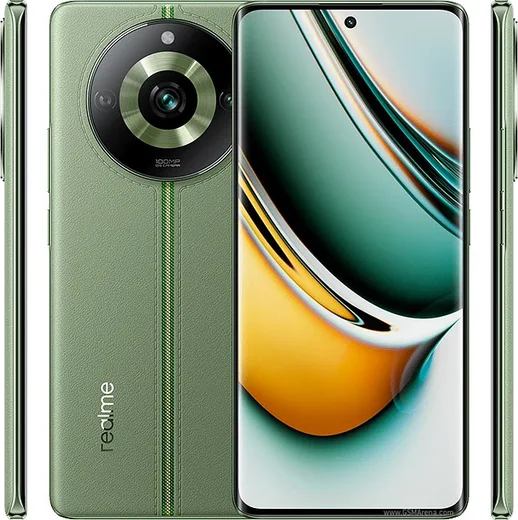
WhatsApp on Realme GT 5 Pro
Realme Android

WhatsApp for Realme GT 5 Pro

Snapdragon 8 Gen 3, 6.78-inch 144Hz LTPO AMOLED

WhatsApp Messenger 4.7 · 64.2M reviews Free · Android · ~40 MB · by WhatsApp LLC
Download WhatsApp

Ask a question / report a problem

You can ask any question about WhatsApp support on the Realme GT 5 Pro — leave it below and we'll help.

Ask a question

Can the Realme GT 5 Pro run WhatsApp?

Fully supported
  • Operating systemAndroid
  • ProcessorSnapdragon 8 Gen 3
  • WhatsApp versionLatest supported

Latest known WhatsApp problems on Realme GT 5 Pro

1

WhatsApp is draining the battery on my Realme GT 5 Pro after the realme UI 6 update

On realme UI 6 the most common cause of WhatsApp battery drain is the app being woken constantly by sync and background activity. Go to Settings > Battery > Power usage (or Settings > Apps > App management > WhatsApp > Battery usage) and check whether WhatsApp shows high background drain. Set WhatsApp's background activity to a controlled mode rather than fully Unrestricted: Settings > Apps > App management > WhatsApp > and turn on 'Allow background activity' but leave 'Allow auto-launch' enabled only if you need instant notifications. Also open Settings > Battery and turn OFF 'High background power consumption' alerts only after you've confirmed the drain. If drain persists, clear WhatsApp's cache (WhatsApp > Settings > Storage and data > Manage storage) and reboot, since a stuck media sync is a frequent cause. See how others solved this on Reddit
2

WhatsApp notifications are delayed or not showing on my Realme GT 5 Pro

Delayed WhatsApp notifications on realme UI almost always come from ColorOS background restrictions. Open Settings > Apps > App management > WhatsApp > Battery usage and enable 'Allow background activity' and 'Allow auto-launch'. Then go to Settings > Battery and make sure WhatsApp is excluded from any battery optimization or 'sleep' restriction. Finally, open Recent apps, swipe down on (or long-press) the WhatsApp card and tap the lock icon so the system won't clear it from memory. Also confirm notifications are allowed under Settings > Notifications and status bar > WhatsApp. See how others solved this on Reddit
3

I imported a Chinese (CN) Realme GT5 Pro and WhatsApp won't work with Google services

The China ROM ships without Google Play Services and the Play Store, so WhatsApp push notifications won't work normally even if the app installs. Install Google Play Services and the Google Play Store manually (sideload matching APK/components and reboot), then install WhatsApp from the Play Store rather than a random APK so it registers correctly. After that, go to Settings > Apps > App management > Google Play Services and allow background activity and auto-launch, since WhatsApp's push delivery depends on Play Services running in the background. See how others solved this on Reddit
4

WhatsApp consume mucha batería en mi Realme GT5 Pro con realme UI 6

En realme UI 6 el consumo alto de WhatsApp suele deberse a que la app se mantiene activa por la sincronización en segundo plano. Ve a Ajustes > Batería > Uso de energía (o Ajustes > Aplicaciones > Gestión de aplicaciones > WhatsApp > Uso de batería) para confirmar el consumo. Activa 'Permitir actividad en segundo plano' y 'Permitir inicio automático' solo si necesitas notificaciones instantáneas, ya que dejarlo totalmente sin restricciones aumenta el gasto. Después borra la caché de WhatsApp (WhatsApp > Ajustes > Almacenamiento y datos > Gestionar almacenamiento) y reinicia el teléfono, porque una sincronización de medios bloqueada es una causa frecuente del consumo. See how others solved this on Reddit

Ask a question / report a problem

You can ask any question about WhatsApp support on the Realme GT 5 Pro — leave it below and we'll help.

Ask a question

Watch: setting up WhatsApp

Prefer to watch? This short walkthrough shows the whole installation and number-verification flow.

How to install WhatsApp on Realme GT 5 Pro — video walkthrough

How to install WhatsApp on Realme GT 5 Pro

1

Choose how to download

On your Realme GT 5 Pro you can get the official app two ways: from the Google Play Store — the easiest option, since it keeps WhatsApp updated automatically — or directly from the official website. You can download an APK file, by clicking a link “Download WhatsApp directly”.

2

Open WhatsApp

Launch WhatsApp from your home screen or app drawer and accept the Terms of Service to start setup.

3

Verify your phone number

Enter your phone number. If your Realme GT 5 Pro uses dual SIM, pick the line you want WhatsApp tied to, then enter the 6-digit code it sends by SMS — it usually fills in automatically.

4

Restore chats and finish setup

Restore your chat history from Google Drive (use the same Google account), add your name and photo, and tap Allow for notifications so messages and calls arrive reliably.

Stay safe: only ever install WhatsApp from the official Android source. The Download button above already points there — modified copies (GB/Plus/Aero WhatsApp) can get your number banned.

Comments (15)

No registration needed. No email required.
M
marc_leoApr 5, 2026

pls help the download is very slow is that normal anyone

AppWhatsOfficialApr 11, 2026

Happy to help, speed comes down to your data or wifi. On a good connection it only takes a few seconds.

H
helpmeeeFeb 5, 2026

enfin a marché parfaitement, merci 👍

X
xX_noahDec 16, 2025

My new GT 5 Pro is all set up now

H
helpmeeeDec 12, 2025

wow no problems installing on my gt5pro

G
gabe2Nov 24, 2025

pls help is this gb whatsapp pls

AppWhatsOfficialNov 28, 2025

Good question, it is the official WhatsApp from the real app store. We do not recommend modded versions like GB or Plus, they can get your number banned. Reach out anytime.

C
chris.lNov 14, 2025

so it worked first try

X
xX_zoeJun 3, 2025

guys i NEED this app pleaseeee how do i do it

AppWhatsOfficialJun 4, 2025

Don't worry, you can do this! Use the Download button, install the app, and enter your number to verify. It is easier than it looks, promise.

S
sam80May 17, 2025

update installed whatsapp on my realme gt 5 pro with no issues

C
confuuusedJan 18, 2025

man i was scared it was a virus but its the real app ❤️

L
lucy12Jan 10, 2025

excelente guía, gracias 😍

A
ahmedDec 20, 2024

تم التثبيت بدون مشاكل

J
just_ashOct 18, 2024

omg simple and fast lol

T
tina42Sep 26, 2024

Finally the realme gt 5 pro guide was spot on

V
val_ytAug 14, 2024

finally had whatsapp on my realme gt 5 pro in no time

M
mobilegeekAug 6, 2024

so two thumbs up cheers