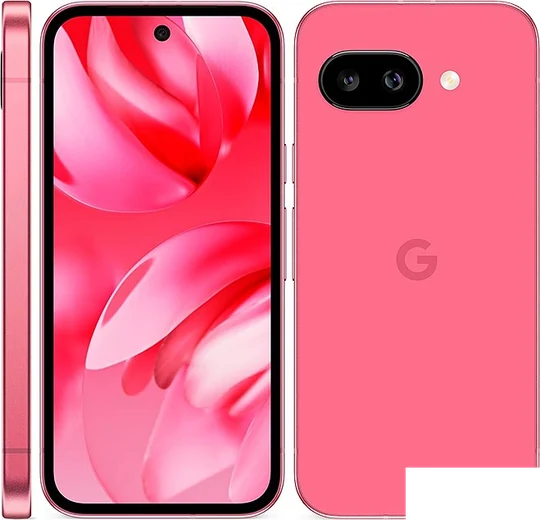
WhatsApp on Pixel 9a
Google Pixel Android

WhatsApp for Pixel 9a

Tensor G4, 6.3-inch 120Hz Actua, 7 years updates

WhatsApp Messenger 4.7 · 64.2M reviews Free · Android · ~40 MB · by WhatsApp LLC
Download WhatsApp

Ask a question / report a problem

You can ask any question about WhatsApp support on the Pixel 9a — leave it below and we'll help.

Ask a question

Can the Pixel 9a run WhatsApp?

Fully supported
  • Operating systemAndroid
  • ProcessorTensor G4
  • WhatsApp versionLatest supported

Latest known WhatsApp problems on Pixel 9a

1

WhatsApp notifications show in the shade but I get no pop-up or heads-up alert on my Pixel 9a

In WhatsApp, tap the three-dot menu > Settings > Notifications and make sure Message notifications are enabled. Then open Android Settings > Apps > WhatsApp > Notifications, tap the "Messages" category and set its importance to "High" (this is what enables "Pop on screen"/heads-up banners). Finally check Settings > Notifications > Do Not Disturb isn't blocking it, and set Settings > Apps > WhatsApp > App battery usage to "Unrestricted" so the system doesn't throttle alerts in the background. See how others solved this on Reddit
2

Why is my WhatsApp video call quality so poor and grainy on the Pixel 9a?

Video call quality drops when bandwidth is tight, so first test on a strong Wi-Fi connection. Then open WhatsApp Settings > Storage and data and turn off "Use less data for calls" so it stops capping the bitrate. If it persists, clear the app cache via Android Settings > Apps > WhatsApp > Storage & cache > Clear cache, confirm Camera permission is set to "Allow" under Settings > Apps > WhatsApp > Permissions, and make sure WhatsApp is updated from the Play Store. See how others solved this on Reddit
3

WhatsApp keeps crashing on my Pixel 9a, how do I fix it?

Start by updating WhatsApp from the Play Store, since crashes are usually fixed in a newer build, then go to Settings > Apps > WhatsApp > Storage & cache > Clear cache (not Clear storage, which logs you out). If it still crashes, check for a pending system update under Settings > System > Software updates, and as a last resort uninstall and reinstall WhatsApp after backing up your chats to Google Drive via WhatsApp Settings > Chats > Chat backup. See how others solved this on Reddit
4

WhatsApp voice notes won't play or record properly on my Pixel 9a

Confirm WhatsApp has microphone access under Settings > Apps > WhatsApp > Permissions > Microphone set to "Allow," and make sure no other app or a Bluetooth earbud is holding the audio channel. If recordings cut out or won't play, clear the cache under Settings > Apps > WhatsApp > Storage & cache > Clear cache and restart the phone, then update WhatsApp from the Play Store, as this was a known bug fixed in later versions. See how others solved this on Reddit
5

WhatsApp is lagging and feels sluggish on my Pixel 9a, what can I do?

Free up space by going to WhatsApp Settings > Storage and data > Manage storage and deleting large forwarded media, then clear the app cache via Android Settings > Apps > WhatsApp > Storage & cache > Clear cache. Set WhatsApp to "Unrestricted" under Settings > Apps > WhatsApp > App battery usage so it isn't throttled in the background, and restart the phone after updating to the latest WhatsApp build from the Play Store. See how others solved this on Reddit
6

WhatsApp started acting strange after the Android update on my Pixel 9a, is it the update?

New Android versions occasionally break WhatsApp until both are in sync, so first update WhatsApp from the Play Store, then clear its cache under Settings > Apps > WhatsApp > Storage & cache > Clear cache and reboot. If a feature like video or notifications still misbehaves, check Settings > System > Software updates for a patch and set WhatsApp's battery usage to "Unrestricted" so newer power management doesn't interfere. See how others solved this on Reddit

Ask a question / report a problem

You can ask any question about WhatsApp support on the Pixel 9a — leave it below and we'll help.

Ask a question

Watch: setting up WhatsApp

Prefer to watch? This short walkthrough shows the whole installation and number-verification flow.

How to install WhatsApp on Pixel 9a — video walkthrough

How to install WhatsApp on Pixel 9a

1

Choose how to download

On your Pixel 9a you can get the official app two ways: from the Google Play Store — the easiest option, since it keeps WhatsApp updated automatically — or directly from the official website. You can download an APK file, by clicking a link “Download WhatsApp directly”.

2

Open WhatsApp

Launch WhatsApp from your home screen or app drawer and accept the Terms of Service to start setup.

3

Verify your phone number

Enter your phone number. If your Pixel 9a uses dual SIM, pick the line you want WhatsApp tied to, then enter the 6-digit code it sends by SMS — it usually fills in automatically.

4

Restore chats and finish setup

Restore your chat history from Google Drive (use the same Google account), add your name and photo, and tap Allow for notifications so messages and calls arrive reliably.

Stay safe: only ever install WhatsApp from the official Android source. The Download button above already points there — modified copies (GB/Plus/Aero WhatsApp) can get your number banned.

Comments (13)

No registration needed. No email required.
J
just_louJun 11, 2026

ngl thank u so much 👍

T
the_real_amyApr 28, 2026

Ugh whyyy is this so hard pls help me get whatsapp 😭😭

AppWhatsOfficialApr 30, 2026

We are here to help. Hit Download, follow the steps on this page, and if the code is slow just request it again. It is easier than it looks, promise.

R
ray.hApr 17, 2026

pls help no contacts appear in the app anyone

AppWhatsOfficialApr 21, 2026

WhatsApp reads contacts from your phone book, so save the number there with the country code, then pull down to refresh your chat list. Feel free to ask if you get stuck.

P
phoneaddictDec 7, 2025

honestly best guide for the Pixel 9a by far

Y
yasinOct 25, 2025

والله اشتغل تمام شكراً 😍

L
luca.xOct 5, 2025

Trop facile, tout est prêt

M
maxx.cAug 6, 2025

did this on my Pixel 9a and it just worked

O
omar.yJun 18, 2025

did this on my pixel 9a and it just worked

M
marc_benMar 25, 2025

Tbh whatsapp finally on my pixel 9a :)

Z
zoe_rayJan 28, 2025

hey the app opens to a black screen anyone

AppWhatsOfficialJan 31, 2025

No worries, a black screen usually clears after a restart. If not, reinstall the newest version and it should open fine. Hope that helps!

T
tan_realDec 20, 2024

my 9a has whatsapp now thanks to this

I
im_andyDec 19, 2024

semplicissimo, tutto pronto

N
noobmasterDec 1, 2024

finally it worked first try