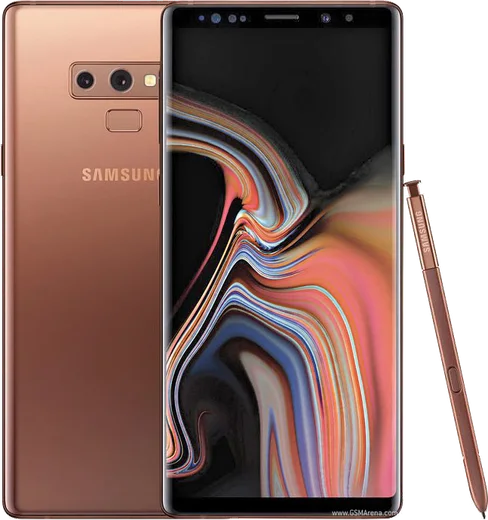
WhatsApp on Samsung Galaxy Note 9
Samsung Android

WhatsApp for Samsung Galaxy Note 9

Snapdragon 845, 6.4-inch QHD+ Super AMOLED, S Pen

WhatsApp Messenger 4.7 · 64.2M reviews Free · Android · ~40 MB · by WhatsApp LLC
Download WhatsApp

Ask a question / report a problem

You can ask any question about WhatsApp support on the Samsung Galaxy Note 9 — leave it below and we'll help.

Ask a question

Can the Samsung Galaxy Note 9 run WhatsApp?

Fully supported
  • Operating systemAndroid
  • ProcessorSnapdragon 845
  • WhatsApp versionLatest supported

Latest known WhatsApp problems on Samsung Galaxy Note 9

1

Why does my Galaxy Note 9 keep randomly powering off after a few minutes?

On a phone this old, random shutdowns are almost always the aging battery losing its ability to hold voltage under load, so it cuts out even when the charge indicator still shows power left. First boot into Safe Mode (press and hold the power button, then long-press the 'Power off' icon) to rule out a misbehaving app, and clear the cache partition from recovery mode. If it still cuts out, the battery has degraded and needs replacing; a swollen or worn cell is the most common culprit. Samsung's built-in 'Battery and device care' diagnostics can confirm reduced battery condition. See how others solved this on Reddit
2

Why am I no longer getting WhatsApp notifications on my Galaxy Note 9?

One UI's battery optimization is almost always the cause. Go to Settings > Apps > WhatsApp > Battery and set it to Unrestricted so the app isn't put to sleep in the background. Then confirm Settings > Apps > WhatsApp > Notifications is on, and inside WhatsApp under Settings > Notifications make sure the message and group tones are enabled. Turning off 'Adaptive battery' under Settings > Battery and device care > Battery > More battery settings also keeps WhatsApp from being throttled overnight. See how others solved this on Reddit
3

How do I set a different notification sound for WhatsApp on my Note 9?

Android's per-app notification channels let you do this on the system side: open Settings > Apps > WhatsApp > Notifications, tap a category like Messages or Group notifications, then choose Sound to pick a unique tone. WhatsApp's own Settings > Notifications also lets you set separate tones for messages, groups and calls. Individual chats can override these from the chat's menu under Custom notifications. See how others solved this on Reddit
4

How do I stop WhatsApp voice notes and audio from showing up in Samsung Music on my Note 9?

Samsung Music scans any folder that doesn't contain a .nomedia file. Use the My Files app to open Internal storage > Android > media > com.whatsapp > WhatsApp > Media > WhatsApp Voice Notes (and WhatsApp Audio), then create an empty file named .nomedia inside it. Reboot or rescan, and those clips disappear from your music library. The same .nomedia trick works for any other folder you want hidden from media apps. See how others solved this on Reddit
5

Is the Galaxy Note 9 still worth keeping for WhatsApp in 2026, or should I upgrade?

The Note 9 still runs current WhatsApp fine, but it's capped at Android 10 (One UI 2) and never received newer versions, and Meta periodically raises WhatsApp's minimum supported Android version, so a 'this version is no longer supported' warning will arrive eventually. To keep it usable, install WhatsApp only from the Play Store (never a modified GBWhatsApp build, which risks getting your number banned), keep a current backup under WhatsApp Settings > Chats > Chat backup to Google Drive, and replace the worn battery. It's perfectly serviceable for messaging today, but plan an upgrade before the OS cutoff catches up to it. See how others solved this on Reddit

Ask a question / report a problem

You can ask any question about WhatsApp support on the Samsung Galaxy Note 9 — leave it below and we'll help.

Ask a question

Watch: setting up WhatsApp

Prefer to watch? This short walkthrough shows the whole installation and number-verification flow.

How to install WhatsApp on Samsung Galaxy Note 9 — video walkthrough

How to install WhatsApp on Samsung Galaxy Note 9

1

Choose how to download

On your Samsung Galaxy Note 9 you can get the official app two ways: from the Google Play Store — the easiest option, since it keeps WhatsApp updated automatically — or directly from the official website. You can download an APK file, by clicking a link “Download WhatsApp directly”.

2

Open WhatsApp

Launch WhatsApp from your home screen or app drawer and accept the Terms of Service to start setup.

3

Verify your phone number

Enter your phone number. If your Samsung Galaxy Note 9 uses dual SIM, pick the line you want WhatsApp tied to, then enter the 6-digit code it sends by SMS — it usually fills in automatically.

4

Restore chats and finish setup

Restore your chat history from Google Drive (use the same Google account), add your name and photo, and tap Allow for notifications so messages and calls arrive reliably.

Stay safe: only ever install WhatsApp from the official Android source. The Download button above already points there — modified copies (GB/Plus/Aero WhatsApp) can get your number banned.

Comments (6)

No registration needed. No email required.
L
lucy40Apr 28, 2026

im not techy and i still managed 😍

Q
quickfixApr 6, 2026

endlich sehr einfach, in 2 minuten auf meinem galaxy note9 erledigt 🎉

P
pablo.pSep 29, 2025

Hey how do i set my profile picture

AppWhatsOfficialOct 3, 2025

Thanks for asking, head to Settings, tap your name, then the camera icon to choose your profile photo. Hope that helps!

B
big_rayJul 28, 2025

someone cant do this alone HELP how do i download 🙏

AppWhatsOfficialJul 31, 2025

Don't worry, you can do this! Use the Download button, install the app, and enter your number to verify. You will be set up on your phone in no time.

Z
zoe20Oct 11, 2024

ngl downloaded and installed on my Samsung Galaxy Note 9

A
apploverOct 3, 2024

Perfect steps for the galaxy note 9

AppWhatsOfficialOct 6, 2024

Great to hear it worked out!