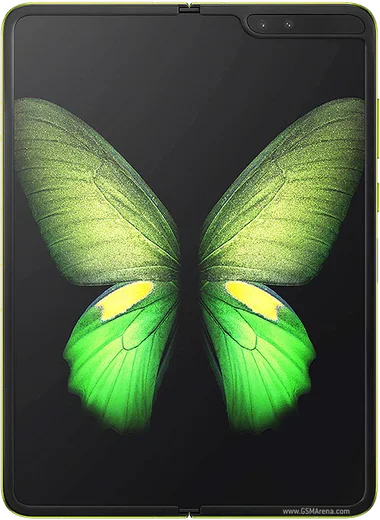
WhatsApp on Samsung Galaxy Fold
Samsung Android

WhatsApp for Samsung Galaxy Fold

Snapdragon 855, 7.3-inch foldable AMOLED, first fold

WhatsApp Messenger 4.7 · 64.2M reviews Free · Android · ~40 MB · by WhatsApp LLC
Download WhatsApp

Ask a question / report a problem

You can ask any question about WhatsApp support on the Samsung Galaxy Fold — leave it below and we'll help.

Ask a question

Can the Samsung Galaxy Fold run WhatsApp?

Fully supported
  • Operating systemAndroid
  • ProcessorSnapdragon 855
  • WhatsApp versionLatest supported

Latest known WhatsApp problems on Samsung Galaxy Fold

1

Why doesn't WhatsApp use the full screen on my Galaxy Fold's inner display?

WhatsApp sometimes locks itself to a phone-sized aspect ratio on the big screen, leaving black bars on the sides. Go to Settings > Display > Full screen apps, find WhatsApp and make sure it's toggled on. On some One UI versions the related control is under Settings > Advanced features > Labs (App continuity / aspect ratio). After changing it, fully close and reopen WhatsApp on the unfolded screen. If it still won't stretch, force-stop it via Settings > Apps > WhatsApp > Force stop and relaunch. See how others solved this on Reddit
2

WhatsApp notifications stopped working completely on my Z Fold 7, how do I fix it?

This is usually battery optimization killing WhatsApp in the background, often after a One UI update. Go to Settings > Apps > WhatsApp > Battery and set it to Unrestricted, then in Settings > Notifications confirm WhatsApp and all its categories are toggled on. Also open WhatsApp > Settings > Notifications to verify they're enabled there; toggling system notifications off and back on once often re-registers them with the phone. See how others solved this on Reddit
3

Images in WhatsApp look broken or won't load on my Galaxy Fold 7, what's wrong?

On the Fold 7 this is often a rendering glitch made worse by a stale cache. First update WhatsApp to the latest version from the Play Store, then clear its cache via Settings > Apps > WhatsApp > Storage > Clear cache (do NOT clear data, that wipes chats). If photos still won't display, check Settings > Apps > WhatsApp > Permissions and confirm Photos/media access is allowed, then restart the phone. See how others solved this on Reddit
4

Can I move my WhatsApp chats from an iPhone to a Galaxy Fold 7?

Yes, but it has to be done during the Fold's initial setup (or after a factory reset), because the iOS-to-Android chat transfer can't be triggered later. Connect the two phones with a USB-C to Lightning cable and run Samsung Smart Switch on the Fold. When prompted, install the 'Move to Android' app on the iPhone and scan the QR code that WhatsApp shows to transfer chats and media. Your iPhone WhatsApp must use the same phone number you'll verify on the Fold afterward. See how others solved this on Reddit
5

WhatsApp voice messages won't play or record properly on my Fold, how do I fix it?

This usually happens when the microphone permission gets revoked or audio routing gets confused after folding and unfolding. Go to Settings > Apps > WhatsApp > Permissions and make sure Microphone is allowed, then clear the cache under Settings > Apps > WhatsApp > Storage. If playback is silent, confirm no Bluetooth device is grabbing the audio, then restart the phone to re-initialize the audio path. See how others solved this on Reddit
6

How do I reply to WhatsApp messages from the lock screen on my Galaxy Fold?

Quick-reply needs the notification content to be visible on the lock screen. Go to Settings > Notifications > Lock screen notifications (on some versions it's under Settings > Lock screen > Notifications) and set it to Show content rather than Hide content, then make sure WhatsApp notifications are enabled under Settings > Apps > WhatsApp > Notifications. With both on, the lock-screen notification will expand with a reply field so you can type without unlocking. See how others solved this on Reddit

Ask a question / report a problem

You can ask any question about WhatsApp support on the Samsung Galaxy Fold — leave it below and we'll help.

Ask a question

Watch: setting up WhatsApp

Prefer to watch? This short walkthrough shows the whole installation and number-verification flow.

How to install WhatsApp on Samsung Galaxy Fold — video walkthrough

How to install WhatsApp on Samsung Galaxy Fold

1

Choose how to download

On your Samsung Galaxy Fold you can get the official app two ways: from the Google Play Store — the easiest option, since it keeps WhatsApp updated automatically — or directly from the official website. You can download an APK file, by clicking a link “Download WhatsApp directly”.

2

Open WhatsApp

Launch WhatsApp from your home screen or app drawer and accept the Terms of Service to start setup.

3

Verify your phone number

Enter your phone number. If your Samsung Galaxy Fold uses dual SIM, pick the line you want WhatsApp tied to, then enter the 6-digit code it sends by SMS — it usually fills in automatically.

4

Restore chats and finish setup

Restore your chat history from Google Drive (use the same Google account), add your name and photo, and tap Allow for notifications so messages and calls arrive reliably.

Stay safe: only ever install WhatsApp from the official Android source. The Download button above already points there — modified copies (GB/Plus/Aero WhatsApp) can get your number banned.

Comments (7)

No registration needed. No email required.
P
plz help meeFeb 1, 2026

Très simple, fait en 2 minutes sur mon galaxy fold 👍

P
pete.cDec 13, 2025

Man this worked great on my fold 😍

G
gabe68Aug 29, 2025

man worked like a charm 💯

V
val66Jun 12, 2025

Ngl finally a guide that makes sense

S
sol_realMay 31, 2025

omg PLEASE i need whatsapp on my Galaxy Fold its urgent

AppWhatsOfficialJun 1, 2025

Relax, it is simpler than it looks. Press Download, install, then verify with the SMS code. You got this!

P
pete.uMar 20, 2025

tbh downloaded and installed on my Samsung Galaxy Fold

AppWhatsOfficialMar 21, 2025

Happy it helped you!

M
mmmaaaxxxSep 4, 2024

man all good on my Samsung Galaxy Fold now thx