Samsung Android

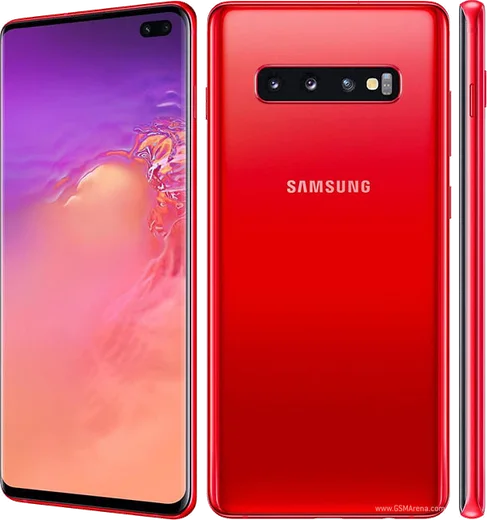
WhatsApp for Samsung Galaxy S10

Snapdragon 855, 6.1-inch QHD+ Dynamic AMOLED

WhatsApp Messenger 4.7 · 64.2M reviews Free · Android · ~40 MB · by WhatsApp LLC
Download WhatsApp

Ask a question / report a problem

You can ask any question about WhatsApp support on the Samsung Galaxy S10 — leave it below and we'll help.

Ask a question

Can the Samsung Galaxy S10 run WhatsApp?

Fully supported
  • Operating systemAndroid
  • ProcessorSnapdragon 855
  • WhatsApp versionLatest supported

Latest known WhatsApp problems on Samsung Galaxy S10

1

Why does WhatsApp keep lagging and freezing on my Galaxy S10?

On Samsung phones this is usually caused by One UI's aggressive power management putting WhatsApp to sleep in the background. Open Settings > Apps > WhatsApp > Battery and set it to Unrestricted, then go to Settings > Battery and device care > Battery > Background usage limits and remove WhatsApp from both the Sleeping and Deep sleeping apps lists. If it still feels sluggish, clear the cache (not data) via Settings > Apps > WhatsApp > Storage > Clear cache, which won't delete your chats. See how others solved this on Reddit
2

Why am I not getting WhatsApp notifications until I open the app on my S10?

Delayed notifications on the S10 almost always come from One UI putting WhatsApp into deep sleep so it stops checking for messages. Open Settings > Battery and device care > Battery > Background usage limits and remove WhatsApp from the Sleeping and Deep sleeping apps lists, then set Settings > Apps > WhatsApp > Battery to Unrestricted. Finally confirm notifications are enabled both inside WhatsApp (Settings > Notifications) and in the system settings (Settings > Apps > WhatsApp > Notifications). See how others solved this on Reddit
3

My Galaxy S10 shows WhatsApp messages but plays no notification sound, how do I fix it?

This is usually a broken or muted notification channel. Go to Settings > Apps > WhatsApp > Notifications, open the Message notifications category, and re-select a Sound, making sure importance is set so it 'Makes sound' (Alert) rather than Silent. Also check that Do Not Disturb isn't active (Settings > Notifications > Do not disturb). If it still won't sound, clear the WhatsApp cache via Settings > Apps > WhatsApp > Storage, then toggle the notification channel off and back on to rebuild it. See how others solved this on Reddit
4

Why doesn't my S10 screen light up when a WhatsApp message arrives?

To make the screen turn on for messages, the notification channel must be set to alert with a pop-up, not run silently. Open Settings > Apps > WhatsApp > Notifications, tap the Message notifications category, set it to 'Alerting' / make sound, and enable 'Pop-up'. Then in Settings > Notifications, make sure pop-up style is set to Detailed (not Brief, which is less likely to wake the screen). Low-importance or silent channels never wake the display, so fixing the channel level is the key step. See how others solved this on Reddit
5

How do I make WhatsApp notifications pop up as a banner on my Galaxy S10?

For a heads-up banner you need the channel set to alert with pop-up enabled. Go to Settings > Apps > WhatsApp > Notifications > Message notifications, set importance to 'Alerting' (makes sound and pops on screen), and turn on 'Pop-up'. In Settings > Notifications set the pop-up notification style to Detailed so the banner shows content. Keeping WhatsApp out of the Sleeping/Deep sleeping lists (Settings > Battery and device care > Background usage limits) ensures these banners arrive in real time. See how others solved this on Reddit
6

WhatsApp notification sound stopped working after a Samsung update, what should I do?

After a One UI update the custom sound for WhatsApp's channel can reset to Silent or None. Reopen Settings > Apps > WhatsApp > Notifications > Message notifications > Sound and pick a tone again, and confirm Do Not Disturb isn't on (Settings > Notifications > Do not disturb). If the sound still won't apply, clear the WhatsApp cache in Settings > Apps > WhatsApp > Storage, and as a last resort reinstall WhatsApp from the Play Store so the notification channels are recreated cleanly. See how others solved this on Reddit

Ask a question / report a problem

You can ask any question about WhatsApp support on the Samsung Galaxy S10 — leave it below and we'll help.

Ask a question

Watch: setting up WhatsApp

Prefer to watch? This short walkthrough shows the whole installation and number-verification flow.

How to install WhatsApp on Samsung Galaxy S10 — video walkthrough

How to install WhatsApp on Samsung Galaxy S10

1

Choose how to download

On your Samsung Galaxy S10 you can get the official app two ways: from the Google Play Store — the easiest option, since it keeps WhatsApp updated automatically — or directly from the official website. You can download an APK file, by clicking a link “Download WhatsApp directly”.

2

Open WhatsApp

Launch WhatsApp from your home screen or app drawer and accept the Terms of Service to start setup.

3

Verify your phone number

Enter your phone number. If your Samsung Galaxy S10 uses dual SIM, pick the line you want WhatsApp tied to, then enter the 6-digit code it sends by SMS — it usually fills in automatically.

4

Restore chats and finish setup

Restore your chat history from Google Drive (use the same Google account), add your name and photo, and tap Allow for notifications so messages and calls arrive reliably.

Stay safe: only ever install WhatsApp from the official Android source. The Download button above already points there — modified copies (GB/Plus/Aero WhatsApp) can get your number banned.

Comments (7)

No registration needed. No email required.
A
andy_xApr 16, 2026

ngl downloaded and installed on my samsung galaxy s10 😍

T
the_real_noahMar 14, 2026

Set up whatsapp on my dads Galaxy S10 no problem lol

N
noah_omaJan 11, 2026

Guys pleeeease i really need whatsapp on my Galaxy S10 today 🙏

AppWhatsOfficialJan 15, 2026

Don't worry, you can do this! Use the Download button, install the app, and enter your number to verify. You got this!

J
joe34Sep 17, 2025

endlich richtig klare schritte für das galaxy s10 💯

F
finn_jayJan 22, 2025

the download was a bit slow but it worked

X
xX_peteDec 25, 2024

honestly installed in 2 min thx

T
tina_marSep 4, 2024

Perfect steps for the Galaxy S10 thx