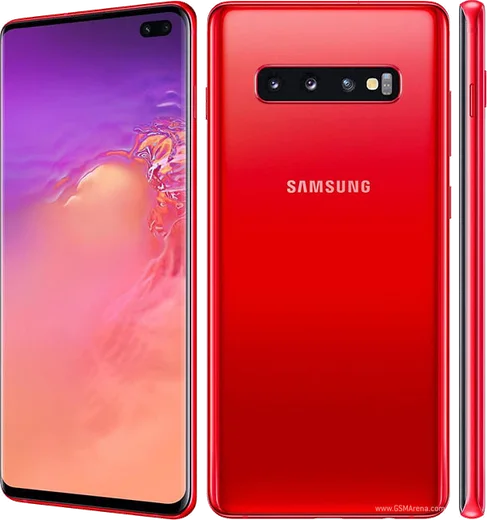
WhatsApp on Samsung Galaxy S10 Plus
Samsung Android

WhatsApp for Samsung Galaxy S10 Plus

Snapdragon 855, 6.4-inch QHD+, dual selfie

WhatsApp Messenger 4.7 · 64.2M reviews Free · Android · ~40 MB · by WhatsApp LLC
Download WhatsApp

Ask a question / report a problem

You can ask any question about WhatsApp support on the Samsung Galaxy S10 Plus — leave it below and we'll help.

Ask a question

Can the Samsung Galaxy S10 Plus run WhatsApp?

Fully supported
  • Operating systemAndroid
  • ProcessorSnapdragon 855
  • WhatsApp versionLatest supported

Latest known WhatsApp problems on Samsung Galaxy S10 Plus

1

Why does WhatsApp ruin my Galaxy S10 Plus photo quality when I send them?

WhatsApp downscales and recompresses photos by default to save data, which makes your S10 Plus camera shots look soft and washed out. In WhatsApp tap the three-dot menu, go to Settings > Storage and data > Media upload quality and set it to HD (Best quality), and when attaching a picture use the document (file) icon instead of the gallery icon to send it as an uncompressed original. For received media that looks bad, the only fix is asking the sender to enable HD or send it as a document too. See how others solved this on Reddit
2

Why is my front camera so blurry and pixelated during WhatsApp video calls on my S10 Plus?

WhatsApp video calls run the selfie camera at a low, heavily compressed resolution that has nothing to do with your S10 Plus hardware, and a weak Wi-Fi or mobile signal makes it worse. Make sure WhatsApp has Camera and Microphone permission under Settings > Apps > WhatsApp > Permissions, clean the front lens, and call over a strong 5GHz Wi-Fi connection for the best stream. Call quality is capped by WhatsApp's servers, so a stable, fast connection is the biggest factor you control. See how others solved this on Reddit
3

Why do my WhatsApp calls immediately go on hold on my Galaxy S10 Plus?

This usually happens when One UI's battery optimization or a clash with the regular phone-call audio channel suspends WhatsApp the moment a call connects. Go to Settings > Apps > WhatsApp > Battery and set it to Unrestricted, then under Settings > Apps > WhatsApp > Mobile data make sure Allow background data usage and Allow data usage while Data saver is on are both enabled. Also end any active normal phone call first, since the S10 Plus will park a WhatsApp call on hold if it thinks another call is using the audio. See how others solved this on Reddit
4

Why am I not getting WhatsApp notifications on my Samsung Galaxy S10 Plus?

One UI's aggressive power management is the usual culprit, putting WhatsApp to sleep so messages only appear when you open the app. Go to Settings > Apps > WhatsApp > Battery and choose Unrestricted, then open Settings > Device care > Battery > Background usage limits and remove WhatsApp from both the Sleeping and Deep sleeping app lists. Finally confirm Settings > Apps > WhatsApp > Notifications is on and that Do not disturb isn't silencing it. See how others solved this on Reddit
5

Why does WhatsApp say no internet connection on my S10 Plus when other apps work fine?

When a single app loses data while everything else connects, it's almost always a stale cache, a restricted-data setting, or a VPN/private DNS quirk affecting just WhatsApp. Go to Settings > Apps > WhatsApp > Mobile data and enable Allow background data usage, then clear the cache via Settings > Apps > WhatsApp > Storage > Clear cache and restart the phone. If you use a VPN or have set a Private DNS under Settings > Connections > More connection settings, try turning it off, since those can selectively block WhatsApp's servers. See how others solved this on Reddit
6

Can I run the same WhatsApp account on my Galaxy S10 Plus and a Samsung tablet at the same time?

Yes, your S10 Plus stays the main phone and you add the tablet through WhatsApp's linked-devices feature rather than a second install. On the S10 Plus open WhatsApp > three-dot menu > Linked devices > Link a device, then use it to scan the QR code shown by WhatsApp on the tablet (companion mode) or by WhatsApp Web. The tablet can then send and receive on the same number independently, even when your phone is offline for up to about two weeks. See how others solved this on Reddit

Ask a question / report a problem

You can ask any question about WhatsApp support on the Samsung Galaxy S10 Plus — leave it below and we'll help.

Ask a question

Watch: setting up WhatsApp

Prefer to watch? This short walkthrough shows the whole installation and number-verification flow.

How to install WhatsApp on Samsung Galaxy S10 Plus — video walkthrough

How to install WhatsApp on Samsung Galaxy S10 Plus

1

Choose how to download

On your Samsung Galaxy S10 Plus you can get the official app two ways: from the Google Play Store — the easiest option, since it keeps WhatsApp updated automatically — or directly from the official website. You can download an APK file, by clicking a link “Download WhatsApp directly”.

2

Open WhatsApp

Launch WhatsApp from your home screen or app drawer and accept the Terms of Service to start setup.

3

Verify your phone number

Enter your phone number. If your Samsung Galaxy S10 Plus uses dual SIM, pick the line you want WhatsApp tied to, then enter the 6-digit code it sends by SMS — it usually fills in automatically.

4

Restore chats and finish setup

Restore your chat history from Google Drive (use the same Google account), add your name and photo, and tap Allow for notifications so messages and calls arrive reliably.

Stay safe: only ever install WhatsApp from the official Android source. The Download button above already points there — modified copies (GB/Plus/Aero WhatsApp) can get your number banned.

Comments (10)

No registration needed. No email required.
F
finn31May 4, 2026

man this worked great on my s10 plus

A
andy.wDec 14, 2025

Been at this for hours pls someone help me 🙏

AppWhatsOfficialDec 15, 2025

We are here to help. Hit Download, follow the steps on this page, and if the code is slow just request it again. You will be set up on your phone in no time.

X
xX_maxxOct 8, 2025

tout fonctionne, merci beaucoup 💯

N
noobmasterAug 3, 2025

well thank u, whatsapp installed on my Galaxy S10 Plus 💯

N
nightowlJul 16, 2025

My whatsapp had stopped working but this fixed it :)

N
not_joeMay 20, 2025

So worked like a charm

AppWhatsOfficialMay 22, 2025

Love to hear it!

L
lou92Feb 2, 2025

did it on my Galaxy S10 Plus in like 2 minutes

R
ray.xDec 30, 2024

Omg all good on my s10plus now

T
tina23Nov 23, 2024

honestly you guys are life savers

B
big_gabeJul 30, 2024

super guide, ça a marché sur mon Samsung Galaxy S10 Plus