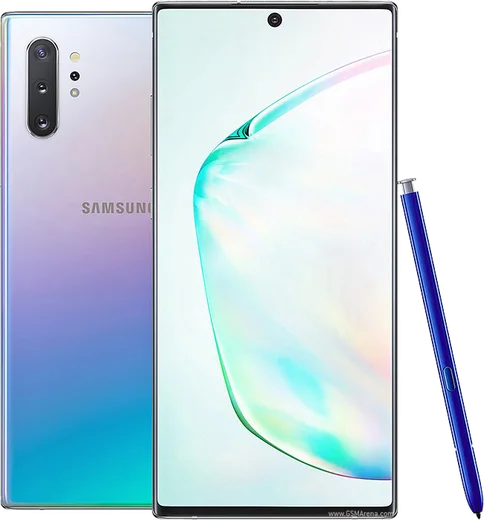
WhatsApp on Samsung Galaxy Note 10 Plus
Samsung Android

WhatsApp for Samsung Galaxy Note 10 Plus

Exynos 9825, 6.8-inch QHD+ AMOLED, S Pen

WhatsApp Messenger 4.7 · 64.2M reviews Free · Android · ~40 MB · by WhatsApp LLC
Download WhatsApp

Ask a question / report a problem

You can ask any question about WhatsApp support on the Samsung Galaxy Note 10 Plus — leave it below and we'll help.

Ask a question

Can the Samsung Galaxy Note 10 Plus run WhatsApp?

Fully supported
  • Operating systemAndroid
  • ProcessorExynos 9825
  • WhatsApp versionLatest supported

Latest known WhatsApp problems on Samsung Galaxy Note 10 Plus

1

Why don't I get WhatsApp notifications until I unlock my Galaxy Note 10 Plus?

One UI's aggressive battery management is putting WhatsApp to sleep, so messages only sync when you wake the screen. Go to Settings > Apps > WhatsApp > Battery and set it to Unrestricted, then open Settings > Battery and device care > Battery > Background usage limits and make sure WhatsApp is removed from both Sleeping apps and Deep sleeping apps. See how others solved this on Reddit
2

My Galaxy Note 10 Plus doesn't vibrate or alert for WhatsApp messages anymore

This usually means WhatsApp's own notification channel lost its vibration and sound settings after an update. Open WhatsApp > tap the three dots > Settings > Notifications and re-enable sounds and vibration, then confirm in One UI under Settings > Apps > WhatsApp > Notifications > Messages that the channel is on with vibration enabled. Also check that Do Not Disturb isn't silently active under Settings > Notifications. See how others solved this on Reddit
3

My WhatsApp notification sounds stopped playing on my Galaxy Note 10 Plus

The notification tone for the Messages channel likely got reset to Silent during a system or app update. In WhatsApp go to Settings > Notifications and tap Notification tone to pick a sound, then verify the same in One UI at Settings > Apps > WhatsApp > Notifications > Messages > Sound. If it still won't stick, clearing WhatsApp's cache via Settings > Apps > WhatsApp > Storage usually restores it. See how others solved this on Reddit
4

WhatsApp notifications arrive late or delayed on my Galaxy Note 10 Plus

Delayed notifications happen when One UI throttles WhatsApp's background connection to save power. Set Settings > Apps > WhatsApp > Battery to Unrestricted, turn off any power saving mode under Settings > Battery and device care, and allow background data in Settings > Apps > WhatsApp > Mobile data > Allow background data usage. Keeping WhatsApp out of the Sleeping apps list is the most important step. See how others solved this on Reddit
5

WhatsApp notifications come through silently on my Galaxy Note 10 Plus

Android sometimes auto-categorizes the WhatsApp channel as Silent, which shows the message without sound or a banner. Long-press a WhatsApp notification, tap the gear, and switch the Messages channel from Silent to Default/Alerting, or set it in Settings > Apps > WhatsApp > Notifications > Messages. Toggling Pop on screen on for that channel restores the heads-up banner too. See how others solved this on Reddit
6

Should I just reinstall WhatsApp on my Galaxy Note 10 Plus if notifications still won't work?

If channel and battery fixes don't help, a clean reinstall often resolves a corrupted notification state. First back up your chats via WhatsApp > Settings > Chats > Chat backup to Google Drive, then uninstall from the Play Store, reinstall, and restore the backup during setup. After reinstalling, immediately set the app to Unrestricted battery so One UI doesn't re-sleep it. See how others solved this on Reddit

Ask a question / report a problem

You can ask any question about WhatsApp support on the Samsung Galaxy Note 10 Plus — leave it below and we'll help.

Ask a question

Watch: setting up WhatsApp

Prefer to watch? This short walkthrough shows the whole installation and number-verification flow.

How to install WhatsApp on Samsung Galaxy Note 10 Plus — video walkthrough

How to install WhatsApp on Samsung Galaxy Note 10 Plus

1

Choose how to download

On your Samsung Galaxy Note 10 Plus you can get the official app two ways: from the Google Play Store — the easiest option, since it keeps WhatsApp updated automatically — or directly from the official website. You can download an APK file, by clicking a link “Download WhatsApp directly”.

2

Open WhatsApp

Launch WhatsApp from your home screen or app drawer and accept the Terms of Service to start setup.

3

Verify your phone number

Enter your phone number. If your Samsung Galaxy Note 10 Plus uses dual SIM, pick the line you want WhatsApp tied to, then enter the 6-digit code it sends by SMS — it usually fills in automatically.

4

Restore chats and finish setup

Restore your chat history from Google Drive (use the same Google account), add your name and photo, and tap Allow for notifications so messages and calls arrive reliably.

Stay safe: only ever install WhatsApp from the official Android source. The Download button above already points there — modified copies (GB/Plus/Aero WhatsApp) can get your number banned.

Comments (11)

No registration needed. No email required.
D
dan81Apr 21, 2026

omg SOS i cant figure out how to install whatsapp heeelp 😭

AppWhatsOfficialApr 22, 2026

Hey, no need to stress! Tap the green Download button at the top, follow the steps, and you will have WhatsApp in a minute. You got this!

K
kai.zApr 5, 2026

The app crashes every time i open it

AppWhatsOfficialApr 9, 2026

Good question, sorry to hear that. Please clear the app cache in Settings, make sure your system software is updated, then reinstall the latest version. Hope that helps!

M
mr_solFeb 11, 2026

Yo finally got whatsapp running on my note 10 plus

E
eeeeeemmmmmaaaaaJan 23, 2026

anyone? is this gb whatsapp

AppWhatsOfficialJan 24, 2026

This is the genuine WhatsApp. Avoid GB or Plus mods, they break the rules and risk a ban.

M
maxx62Dec 18, 2025

Echt installiert und läuft auf meinem samsung galaxy note 10 plus 🙏

I
ivan_solSep 11, 2025

running whatsapp on my Samsung Galaxy Note 10 Plus like new

AppWhatsOfficialSep 12, 2025

Happy it helped you!

A
ash1990Aug 22, 2025

ngl my samsung galaxy note 10 plus was being difficult but this sorted it 🎉

F
finn.aAug 14, 2025

ok so quick and painless

X
xX_yukiNov 25, 2024

sorry but how do i restore my old messages ?

AppWhatsOfficialNov 30, 2024

Of course, yes, as long as you had a backup. Use the same number and choose Restore during setup to bring your messages back. Glad to help.

B
bea_danAug 21, 2024

Por fin excelente guía, gracias

J
jess92Jul 15, 2024

No problems installing on my note10plus thanks again