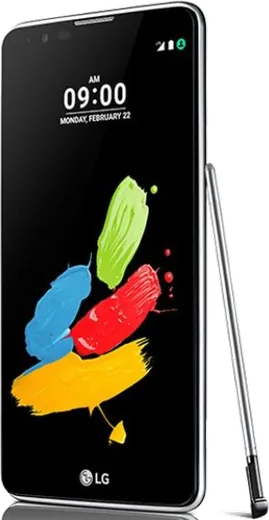
WhatsApp on LG Stylus 2
LG Android

WhatsApp for LG Stylus 2

Install the official WhatsApp on your LG Stylus 2 in a few simple steps.

WhatsApp Messenger 4.7 · 64.2M reviews Free · Android · ~40 MB · by WhatsApp LLC
Download WhatsApp

Ask a question / report a problem

You can ask any question about WhatsApp support on the LG Stylus 2 — leave it below and we'll help.

Ask a question

Can the LG Stylus 2 run WhatsApp?

Support ending soon
  • Operating systemAndroid
  • WhatsApp versionLatest supported

Latest known WhatsApp problems on LG Stylus 2

1

Why is my LG Stylus 2 so slow and laggy, and can I fix it without buying a new phone?

The Stylus 2 has only about 1.5 GB of RAM, so it bogs down once too many apps run in the background. Go to Settings > Apps, open the apps you don't need and tap Force stop, and disable any bloatware you can't uninstall. Then clear cached data under Settings > Storage. If it's still sluggish, back up your data and do a factory reset via Settings > Backup & reset > Factory data reset to clear years of accumulated junk. Keeping fewer apps installed and freeing up internal storage also helps the most on a phone with this little RAM. See how others solved this on Reddit
2

WhatsApp gets stuck at 99% when restoring my backup on the LG Stylus 2 - how do I finish it?

On older LG phones the restore can stall near 99% when the Google Drive backup is large or the connection drops, so keep the phone on Wi-Fi, plugged into a charger, and leave it on that screen for 20-30 minutes since it often completes on its own. If it truly freezes, force stop WhatsApp from Settings > Apps, confirm you're using the same phone number and Google account tied to the backup, then reinstall WhatsApp and let it pull the backup during setup. As a fallback, WhatsApp also keeps a local backup in the phone's internal storage under WhatsApp/Databases, which can restore without Google Drive. See how others solved this on Reddit
3

Is the LG Stylus 2 still worth keeping in 2025, or should I upgrade to something like a Moto G?

The Stylus 2 is stuck on Android 6 (some variants 7) with no further updates, so it's reasonable to move on as apps drop support over time. A budget Moto G is a common, well-regarded upgrade that runs near-stock Android with current app support. Before switching, transfer your chats by making a Google Drive backup in WhatsApp on the Stylus 2 (Settings > Chats > Chat backup), then restore that backup on the new phone using the same number and Google account during WhatsApp setup. See how others solved this on Reddit
4

My LG Stylus 2 has poor battery life and gets warm - what can I do?

The Stylus 2 has a removable back and a swappable battery, so fitting a fresh replacement battery is usually the single biggest fix for an aging unit. Beyond that, lower the screen brightness, turn off background account sync under Settings > Accounts, and open Settings > Battery to see which app is draining the most and restrict it. Demanding tasks like video calls run the older chipset hard and generate heat, so stick to voice or text when the phone is already warm. See how others solved this on Reddit
5

How reliable is the LG Stylus 2 long-term - I've heard LG phones develop hardware faults?

LG's mid-range phones from that era were known for bootloops and screen issues as they aged, so back up regularly to avoid losing data if the phone suddenly fails. Keep a current WhatsApp backup on Google Drive (Settings > Chats > Chat backup) and let Google Photos sync your pictures so nothing is lost if the hardware dies. If it does start randomly rebooting, a factory reset sometimes buys time, but plan to migrate to a newer phone before it fails completely. See how others solved this on Reddit

Ask a question / report a problem

You can ask any question about WhatsApp support on the LG Stylus 2 — leave it below and we'll help.

Ask a question

Watch: setting up WhatsApp

Prefer to watch? This short walkthrough shows the whole installation and number-verification flow.

How to install WhatsApp on LG Stylus 2 — video walkthrough

How to install WhatsApp on LG Stylus 2

1

Choose how to download

On your LG Stylus 2 you can get the official app two ways: from the Google Play Store — the easiest option, since it keeps WhatsApp updated automatically — or directly from the official website. You can download an APK file, by clicking a link “Download WhatsApp directly”.

2

Open WhatsApp

Launch WhatsApp from your home screen or app drawer and accept the Terms of Service to start setup.

3

Verify your phone number

Enter your phone number. If your LG Stylus 2 uses dual SIM, pick the line you want WhatsApp tied to, then enter the 6-digit code it sends by SMS — it usually fills in automatically.

4

Restore chats and finish setup

Restore your chat history from Google Drive (use the same Google account), add your name and photo, and tap Allow for notifications so messages and calls arrive reliably.

Stay safe: only ever install WhatsApp from the official Android source. The Download button above already points there — modified copies (GB/Plus/Aero WhatsApp) can get your number banned.

Comments (6)

No registration needed. No email required.
J
jay_theFeb 24, 2026

The Stylus 2 steps actually work unlike other sites ✌️

I
ivan_proFeb 24, 2026

quick q can i use the same number on two phones

AppWhatsOfficialMar 1, 2026

Sure, whatsApp supports linked devices now, so you can use your account on more than one phone. Open Linked Devices in Settings to add another. Enjoy WhatsApp on your your phone!

Q
quickfixNov 23, 2025

someone HELP it just wont work on my Stylus 2 😭😭

AppWhatsOfficialNov 25, 2025

Hey, no need to stress! Tap the green Download button at the top, follow the steps, and you will have WhatsApp in a minute. It is easier than it looks, promise.

M
mobilegeekNov 15, 2025

Tbh works like a charm on the lg stylus 2 :)

O
omar1990Sep 16, 2025

hey installiert und läuft auf meinem LG Stylus 2 🙏

M
mmmaaaxxxAug 9, 2025

Couldnt install whatsapp on my lg stylus 2 until i found this