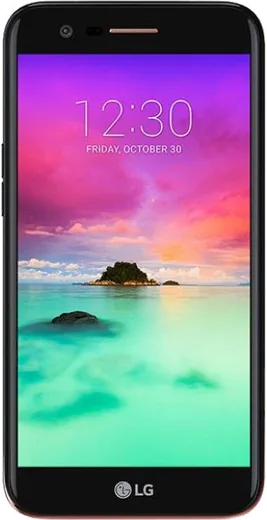
WhatsApp on LG K10
LG Android

WhatsApp for LG K10

Install the official WhatsApp on your LG K10 in a few simple steps.

WhatsApp Messenger 4.7 · 64.2M reviews Free · Android · ~40 MB · by WhatsApp LLC
Download WhatsApp

Ask a question / report a problem

You can ask any question about WhatsApp support on the LG K10 — leave it below and we'll help.

Ask a question

Can the LG K10 run WhatsApp?

Support ending soon
  • Operating systemAndroid
  • WhatsApp versionLatest supported

Latest known WhatsApp problems on LG K10

1

My LG K10 says my PIN is wrong even though it's correct and won't let me reset it. How do I get back in?

First reboot the phone by holding the Power button, since a frozen lock screen sometimes rejects the right PIN until the system restarts. If it still refuses and no 'Forgot PIN' option or Google account unlock appears, your only reliable path is a factory reset from recovery: power off, then hold Power + Volume Down until the LG logo appears, release and re-hold briefly, then use the volume keys to select 'Wipe data/factory reset' and confirm with the Power button. This erases everything on the phone, so use it only as a last resort, and afterward you'll need your linked Google account to finish setup. See how others solved this on Reddit
2

My LG K10 won't send any SMS text messages anymore. How do I fix it?

Open Settings > Apps, pick your default Messaging app and tap Storage > Clear cache, then reopen the app and confirm the message center (SMSC) number under its Settings matches your carrier's. Also check that mobile data/signal is active and that your message storage isn't full, since a full inbox can block new sends, so delete old threads. If it persists, toggle Airplane mode on and off to re-register on the network, or power off and reinsert the SIM card. See how others solved this on Reddit
3

Is it safe to use one of those apps to run WhatsApp on a tablet alongside my LG K10?

Skip the third-party 'WhatsApp for tablet' clones, as they often ask you to scan your account into an unofficial client and can get your number banned or your messages exposed. Instead use WhatsApp's official Linked Devices feature: on your LG K10 open WhatsApp > tap the three-dot Menu > Linked devices > Link a device, then scan the QR code shown on the tablet at web.whatsapp.com. This is the only sanctioned way to mirror your chats to a second screen. See how others solved this on Reddit
4

On my LG K10, WhatsApp voice notes play through the loudspeaker instead of the earpiece when I hold it to my ear. How do I fix that?

This usually means the proximity sensor near the top of the screen isn't being triggered, so WhatsApp never switches output to the earpiece. Wipe any screen protector film, dust or smudges off the sensor area above the display, and make sure a case isn't covering it. If it still won't switch, restart the phone and play a voice note while holding the K10 normally to your ear; if cleaning and rebooting don't help, a faulty proximity sensor is the likely cause. See how others solved this on Reddit
5

My LG K10 has gotten really slow and laggy, especially with WhatsApp. Can I make it usable again?

The K10's limited RAM struggles once storage fills up, so go to Settings > Apps > WhatsApp > Storage and tap Clear cache, then inside WhatsApp use Settings > Storage and data > Manage storage to delete large forwarded videos and files. Free up internal space by moving photos to a microSD card or Google Drive, and turn off media auto-download under WhatsApp Settings > Storage and data. A periodic reboot and closing background apps keeps an aging device like this more responsive. See how others solved this on Reddit
6

Is the LG K10 still a reasonable phone to keep using for WhatsApp and calls, or should I replace it?

The K10 still handles calls, SMS and a current copy of WhatsApp fine, but it runs an old Android version that no longer receives security patches, so treat it as a basic or backup device rather than your main phone. Keep WhatsApp updated from the Play Store while it's still supported, avoid banking and other sensitive apps on it, and back up your chats via WhatsApp Settings > Chats > Chat backup to Google Drive. Once apps start refusing to install because of the old OS, that's the practical sign it's time to upgrade. See how others solved this on Reddit

Ask a question / report a problem

You can ask any question about WhatsApp support on the LG K10 — leave it below and we'll help.

Ask a question

Watch: setting up WhatsApp

Prefer to watch? This short walkthrough shows the whole installation and number-verification flow.

How to install WhatsApp on LG K10 — video walkthrough

How to install WhatsApp on LG K10

1

Choose how to download

On your LG K10 you can get the official app two ways: from the Google Play Store — the easiest option, since it keeps WhatsApp updated automatically — or directly from the official website. You can download an APK file, by clicking a link “Download WhatsApp directly”.

2

Open WhatsApp

Launch WhatsApp from your home screen or app drawer and accept the Terms of Service to start setup.

3

Verify your phone number

Enter your phone number. If your LG K10 uses dual SIM, pick the line you want WhatsApp tied to, then enter the 6-digit code it sends by SMS — it usually fills in automatically.

4

Restore chats and finish setup

Restore your chat history from Google Drive (use the same Google account), add your name and photo, and tap Allow for notifications so messages and calls arrive reliably.

Stay safe: only ever install WhatsApp from the official Android source. The Download button above already points there — modified copies (GB/Plus/Aero WhatsApp) can get your number banned.

Comments (5)

No registration needed. No email required.
I
ivan_ytJun 12, 2026

Tutto funziona sul mio K10, mille grazie

T
tom21Nov 26, 2025

Update installed on my k10, super simple

P
pete.mSep 4, 2025

My new LG K10 is all set up now 👍

M
maxx.dFeb 24, 2025

someone pleeeease i really need whatsapp on my k10 today 😭😭

AppWhatsOfficialFeb 28, 2025

Hey, no need to stress! Tap the green Download button at the top, follow the steps, and you will have WhatsApp in a minute.

J
joe82Jan 7, 2025

Update this fixed whatsapp on my lg k10 🎉