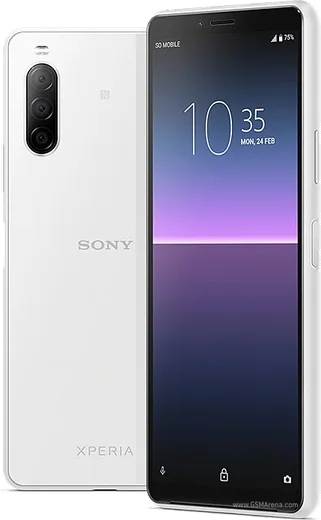
WhatsApp on Xperia 10 II
Sony Xperia Android

WhatsApp for Xperia 10 II

Snapdragon 665, 6-inch 21:9 OLED, triple camera

WhatsApp Messenger 4.7 · 64.2M reviews Free · Android · ~40 MB · by WhatsApp LLC
Download WhatsApp

Ask a question / report a problem

You can ask any question about WhatsApp support on the Xperia 10 II — leave it below and we'll help.

Ask a question

Can the Xperia 10 II run WhatsApp?

Fully supported
  • Operating systemAndroid
  • ProcessorSnapdragon 665
  • WhatsApp versionLatest supported

Latest known WhatsApp problems on Xperia 10 II

1

Why can't I answer WhatsApp calls through my Bluetooth headset on the Xperia 10 II?

WhatsApp calls are VoIP, so the answer button on some Bluetooth headsets and car kits won't pick up unless WhatsApp has the right permissions. On the Xperia 10 II go to Settings > Apps > WhatsApp > Permissions and enable Phone and Nearby devices. Then re-pair the headset under Settings > Device connection > Bluetooth and update WhatsApp from the Play Store, since older builds had a known headset-answer bug. If it still fails, try answering from the phone screen first to confirm the call itself is working. See how others solved this on Reddit
2

How do I run two WhatsApp accounts on the Xperia 10 II?

Stock Sony software on the Xperia 10 II has no built-in app cloning or app-twin feature. Modern WhatsApp supports two numbers natively: open WhatsApp > Settings > tap the arrow next to your name > Add account, then verify the second number (each number needs to receive its own SMS code). Alternatively, install WhatsApp Business from the Play Store alongside regular WhatsApp for a second number. Avoid third-party clone APKs, as they risk getting your number banned. See how others solved this on Reddit
3

How do I transfer my old WhatsApp chats to my new Sony Xperia 10 II?

WhatsApp backs up to Google Drive on Android, so on your old phone open WhatsApp > Settings > Chats > Chat backup and back up to the same Google account you'll use on the Xperia 10 II. On the new phone, install WhatsApp from the Play Store, verify the same phone number, and choose Restore from Google Drive when prompted. If you're moving from an iPhone, use WhatsApp's official Move to Android tool with a USB-C cable, since iCloud backups can't be restored directly on Android. See how others solved this on Reddit
4

Where do WhatsApp photos save on the Xperia 10 II, and why aren't they in my Gallery?

Auto-downloaded WhatsApp images go to Internal storage > Android > media > com.whatsapp > WhatsApp > Media > WhatsApp Images, not the main camera folder, so they may not appear in the gallery if media visibility is off. In WhatsApp go to Settings > Chats and turn on Media visibility, then check the folder using Files by Google or the Album app. If they still don't show, confirm WhatsApp has Photos and videos permission under Settings > Apps > WhatsApp > Permissions. See how others solved this on Reddit
5

Why is my Xperia 10 II getting hot and draining battery, including during WhatsApp use?

Heat and fast drain on the Xperia 10 II usually come from an app staying awake in the background or aggressive sync, so check Settings > Battery > Battery usage to see which app is responsible. Set heavy apps like WhatsApp to optimized battery use under Settings > Apps > WhatsApp > Battery, turn off Ambient (always-on) display, and enable STAMINA mode for everyday use. If it overheats during charging or calls, remove any thick case and avoid using the phone while it charges. See how others solved this on Reddit
6

Why is the camera quality so low when I take photos inside WhatsApp on the Xperia 10 II?

WhatsApp uses its own basic in-app camera that doesn't use Sony's image processing, so in-chat shots look softer than the stock Camera app. For better results, take the photo with the Xperia's Camera app first, then attach it in WhatsApp via the gallery/attach icon instead of the camera icon. Also open WhatsApp > Settings > Storage and data > Media upload quality and set it to HD to reduce compression on what you send. See how others solved this on Reddit

Ask a question / report a problem

You can ask any question about WhatsApp support on the Xperia 10 II — leave it below and we'll help.

Ask a question

Watch: setting up WhatsApp

Prefer to watch? This short walkthrough shows the whole installation and number-verification flow.

How to install WhatsApp on Xperia 10 II — video walkthrough

How to install WhatsApp on Xperia 10 II

1

Choose how to download

On your Xperia 10 II you can get the official app two ways: from the Google Play Store — the easiest option, since it keeps WhatsApp updated automatically — or directly from the official website. You can download an APK file, by clicking a link “Download WhatsApp directly”.

2

Open WhatsApp

Launch WhatsApp from your home screen or app drawer and accept the Terms of Service to start setup.

3

Verify your phone number

Enter your phone number. If your Xperia 10 II uses dual SIM, pick the line you want WhatsApp tied to, then enter the 6-digit code it sends by SMS — it usually fills in automatically.

4

Restore chats and finish setup

Restore your chat history from Google Drive (use the same Google account), add your name and photo, and tap Allow for notifications so messages and calls arrive reliably.

Stay safe: only ever install WhatsApp from the official Android source. The Download button above already points there — modified copies (GB/Plus/Aero WhatsApp) can get your number banned.

Comments (5)

No registration needed. No email required.
H
helpmeAug 22, 2025

Honestly verified my number on the xperia 10ii with no trouble

AppWhatsOfficialAug 25, 2025

Thanks for sharing!

P
priya_katJun 26, 2025

ehi installato e funzionante sul mio 10 ii 🎉

J
joe99Apr 14, 2025

Quick q how do i use whatsapp on a second phone

AppWhatsOfficialApr 18, 2025

Happy to help, whatsApp supports linked devices now, so you can use your account on more than one phone. Open Linked Devices in Settings to add another. Reach out anytime.

B
ben25Nov 10, 2024

HELP it just wont work on my 10 ii 😭

AppWhatsOfficialNov 14, 2024

No panic needed. The Download button takes you to the official app, then just install and verify your number.

S
sol.rAug 7, 2024

Well simple and fast thanks again