Sony Xperia Android

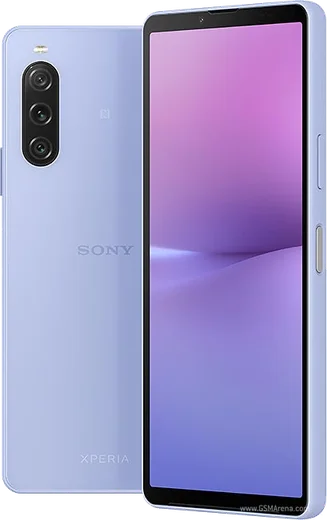
WhatsApp for Xperia 10 IV

Snapdragon 695 5G, 6-inch OLED, 5000mAh battery

WhatsApp Messenger 4.7 · 64.2M reviews Free · Android · ~40 MB · by WhatsApp LLC
Download WhatsApp

Ask a question / report a problem

You can ask any question about WhatsApp support on the Xperia 10 IV — leave it below and we'll help.

Ask a question

Can the Xperia 10 IV run WhatsApp?

Fully supported
  • Operating systemAndroid
  • ProcessorSnapdragon 695 5G
  • WhatsApp versionLatest supported

Latest known WhatsApp problems on Xperia 10 IV

1

How do I transfer my WhatsApp chats to my new Xperia 10 IV from an old Android phone?

On your old Android phone, open WhatsApp and go to Settings > Chats > Chat backup, then tap Back up to Google Drive using the same Google account you'll sign into on the Xperia 10 IV. Install WhatsApp on the Xperia, verify the same phone number, and when prompted choose Restore to pull the backup down from Google Drive. Make sure both phones use the same Google account and that the Xperia is connected to Wi-Fi before restoring. See how others solved this on Reddit
2

Can I move my WhatsApp messages from an iPhone to my Xperia 10 IV?

WhatsApp's official iOS-to-Android transfer requires a USB-C to Lightning cable and the Android setup wizard: during the Xperia 10 IV's first-time setup (or after a factory reset), connect the iPhone with the cable, and when WhatsApp prompts you, scan the QR code to move chats and media directly. iCloud backups are not compatible with Android, so a Google Drive restore won't work coming from iPhone, and you must complete this during the guided setup step rather than after WhatsApp is already running. See how others solved this on Reddit
3

WhatsApp doesn't open the Sony camera app on my Xperia 10 IV, so photos look bad. How do I fix it?

WhatsApp uses its own basic in-app camera rather than Sony's Photography Pro, so quality is lower by design and there's no setting to swap it. For better results, exit the WhatsApp camera, open the Sony camera app to take the shot, then attach it from the gallery using the paperclip/attachment icon in the chat. Also confirm WhatsApp has Camera permission under Settings > Apps > WhatsApp > Permissions so the in-app camera works at all. See how others solved this on Reddit
4

Can I run two WhatsApp accounts on my Xperia 10 IV?

The cleanest way is WhatsApp's built-in multi-account feature: open WhatsApp, go to Settings, tap the dropdown arrow next to your name at the top, and choose Add account to register a second number (you'll need a second SIM or a number that can receive the verification code). The Xperia 10 IV has no system-level app cloner, so if the built-in option isn't available, install WhatsApp Business from the Play Store as a separate app for your second number. See how others solved this on Reddit
5

WhatsApp keeps crashing on my Xperia 10 IV. What should I do?

First update WhatsApp in the Play Store, then clear its cache via Settings > Apps > WhatsApp > Storage > Clear cache (avoid Clear storage, which deletes chats unless you've backed up). If it still crashes, check that battery optimization isn't killing it: go to Settings > Apps > WhatsApp > Battery and set it to Unrestricted, then reboot the phone. See how others solved this on Reddit
6

My microphone sounds terrible on WhatsApp calls and voice notes on the Xperia 10 IV. How can I improve it?

Confirm WhatsApp has Microphone permission under Settings > Apps > WhatsApp > Permissions > Microphone (set to Allow), and clean out the small mic hole near the USB-C port in case it's blocked by lint. If quality is still poor, update WhatsApp, and during recording keep the bottom of the phone clear of your hand; persistent low volume across all apps points to a hardware mic issue worth raising with Sony support. See how others solved this on Reddit

Ask a question / report a problem

You can ask any question about WhatsApp support on the Xperia 10 IV — leave it below and we'll help.

Ask a question

Watch: setting up WhatsApp

Prefer to watch? This short walkthrough shows the whole installation and number-verification flow.

How to install WhatsApp on Xperia 10 IV — video walkthrough

How to install WhatsApp on Xperia 10 IV

1

Choose how to download

On your Xperia 10 IV you can get the official app two ways: from the Google Play Store — the easiest option, since it keeps WhatsApp updated automatically — or directly from the official website. You can download an APK file, by clicking a link “Download WhatsApp directly”.

2

Open WhatsApp

Launch WhatsApp from your home screen or app drawer and accept the Terms of Service to start setup.

3

Verify your phone number

Enter your phone number. If your Xperia 10 IV uses dual SIM, pick the line you want WhatsApp tied to, then enter the 6-digit code it sends by SMS — it usually fills in automatically.

4

Restore chats and finish setup

Restore your chat history from Google Drive (use the same Google account), add your name and photo, and tap Allow for notifications so messages and calls arrive reliably.

Stay safe: only ever install WhatsApp from the official Android source. The Download button above already points there — modified copies (GB/Plus/Aero WhatsApp) can get your number banned.

Comments (7)

No registration needed. No email required.
J
jess_linFeb 7, 2026

finally whatsapp running great on my xperia 10iv ✌️

R
randomuserJan 14, 2026

Thank u, whatsapp installed on my xperia 10iv

B
big_louDec 20, 2025

guys perfect, exactly what i needed thanks again

E
ella.yNov 19, 2025

Honestly 10 out of 10 lol

J
justmeAug 15, 2025

finally great stuff, much appreciated 👍

A
ash_jesMar 3, 2025

omg pleaseee my 10 iv wont install whatsapp i give up 😩

AppWhatsOfficialMar 5, 2025

Breathe! Follow the steps above one by one, tap Download first, and you will be chatting in no time.

P
pete41Dec 11, 2024

installé et opérationnel sur mon xperia 10iv