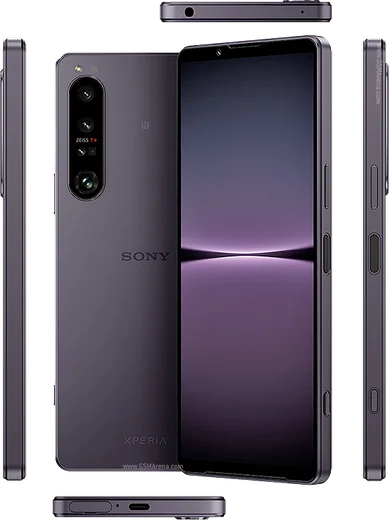
WhatsApp on Xperia 5 IV
Sony Xperia Android

WhatsApp for Xperia 5 IV

Snapdragon 8 Gen 1, compact 6.1-inch 120Hz OLED

WhatsApp Messenger 4.7 · 64.2M reviews Free · Android · ~40 MB · by WhatsApp LLC
Download WhatsApp

Ask a question / report a problem

You can ask any question about WhatsApp support on the Xperia 5 IV — leave it below and we'll help.

Ask a question

Can the Xperia 5 IV run WhatsApp?

Fully supported
  • Operating systemAndroid
  • ProcessorSnapdragon 8 Gen 1
  • WhatsApp versionLatest supported

Latest known WhatsApp problems on Xperia 5 IV

1

Why is my microphone quality so bad on WhatsApp calls on the Xperia 5 IV?

Callers often report you sound muffled or distant on WhatsApp even though regular phone calls are fine. First confirm the hardware is OK by recording a clip in the Recorder app and listening back. Then make sure WhatsApp has clean mic access in Settings > Apps > WhatsApp > Permissions > Microphone (set to Allow), and gently clean the small bottom mic hole next to the USB-C port, since lint there muffles the sound. If it persists, try toggling Bluetooth off (a connected accessory can route the mic away) and reinstall WhatsApp to rule out a corrupt install. See how others solved this on Reddit
2

My mic cuts out during WhatsApp video calls on the Xperia 5 IV - how do I fix it?

This usually happens when battery optimization suspends WhatsApp mid-call or another app is holding the microphone. Go to Settings > Apps > WhatsApp > App battery usage and set it to Unrestricted so it isn't throttled. Turn off STAMINA mode under Settings > Battery while on calls, and close any app that uses the mic in the background (a voice recorder, Assistant, or another video/voice app). Re-granting the microphone permission under Settings > Apps > WhatsApp > Permissions also clears the glitch for many users. See how others solved this on Reddit
3

WhatsApp keeps crashing on my Xperia 5 IV - what should I do?

Start by clearing the app's temporary cache: Settings > Apps > WhatsApp > Storage & cache > Clear cache (this keeps your chats and is safe). If it still closes, update WhatsApp from the Google Play Store and update Android System WebView and Google Play services as well, since an outdated WebView is a common crash trigger on Xperia devices. As a last resort, back up your chats in WhatsApp > Settings > Chats > Chat backup, then reinstall the app. See how others solved this on Reddit
4

I can't find my WhatsApp auto-saved photos in the Gallery on my Xperia 5 IV - where are they?

WhatsApp saves received media to its own folder, and Sony's Album app may not show it until media visibility is enabled. In WhatsApp go to Settings > Chats and turn on Media visibility so newly received photos appear in your gallery. To make a specific chat's media save, open the chat > tap the contact name > Media visibility > On. Photos already received can be browsed with a file manager under Internal storage/Android/media/com.whatsapp/WhatsApp/Media/WhatsApp Images. See how others solved this on Reddit
5

Can I run two WhatsApp accounts on the Sony Xperia 5 IV?

Yes. WhatsApp now supports a second account natively: open WhatsApp > Settings, tap the arrow/chevron next to your name at the top, choose Add account, and register your second number (you need a second SIM or eSIM, or another way to receive the verification code). This is more reliable than app-cloning workarounds, since the Xperia 5 IV's stock software does not include a built-in dual-app cloning feature. See how others solved this on Reddit
6

Why do photos taken inside WhatsApp look so bad on the Xperia 5 IV?

WhatsApp's built-in camera uses a basic capture path that ignores Sony's image processing, so shots come out soft and noisy, and WhatsApp then compresses them further. For anything that matters, shoot with the stock Camera app first, then attach the image via the paperclip/gallery icon in the chat. Also set WhatsApp > Settings > Storage and data > Media upload quality to HD to cut down on the heavy compression. See how others solved this on Reddit

Ask a question / report a problem

You can ask any question about WhatsApp support on the Xperia 5 IV — leave it below and we'll help.

Ask a question

Watch: setting up WhatsApp

Prefer to watch? This short walkthrough shows the whole installation and number-verification flow.

How to install WhatsApp on Xperia 5 IV — video walkthrough

How to install WhatsApp on Xperia 5 IV

1

Choose how to download

On your Xperia 5 IV you can get the official app two ways: from the Google Play Store — the easiest option, since it keeps WhatsApp updated automatically — or directly from the official website. You can download an APK file, by clicking a link “Download WhatsApp directly”.

2

Open WhatsApp

Launch WhatsApp from your home screen or app drawer and accept the Terms of Service to start setup.

3

Verify your phone number

Enter your phone number. If your Xperia 5 IV uses dual SIM, pick the line you want WhatsApp tied to, then enter the 6-digit code it sends by SMS — it usually fills in automatically.

4

Restore chats and finish setup

Restore your chat history from Google Drive (use the same Google account), add your name and photo, and tap Allow for notifications so messages and calls arrive reliably.

Stay safe: only ever install WhatsApp from the official Android source. The Download button above already points there — modified copies (GB/Plus/Aero WhatsApp) can get your number banned.

Comments (7)

No registration needed. No email required.
N
newbieFeb 12, 2026

Pls help verification keeps failing for me ?

AppWhatsOfficialFeb 13, 2026

Thanks for asking, make sure the number and country code are correct, then ask for a new code. A quick restart of the phone often helps too. Glad to help.

A
andy.xAug 15, 2025

Cant do this alone HELP how do i download :(

AppWhatsOfficialAug 16, 2025

Relax, it is simpler than it looks. Press Download, install, then verify with the SMS code. You got this!

L
leo.aAug 1, 2025

Worked perfect on my Xperia 5 IV

K
kai.lJun 9, 2025

Ehi installato sul xperia 5iv di mia madre senza problemi 😍

G
gabe55Apr 25, 2025

omg my xperia 5iv has whatsapp now thanks to this

S
sam_xOct 10, 2024

wow thank u, whatsapp installed on my xperia 5 iv :)

X
xX_ninaSep 8, 2024

So all good on my 5 iv now