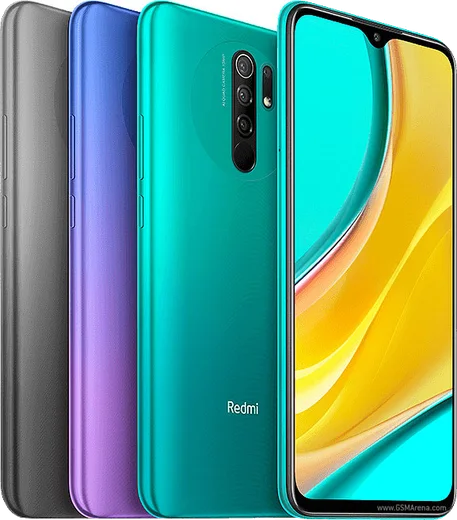
WhatsApp on Redmi 9
Xiaomi Android

WhatsApp for Redmi 9

Helio G80, 6.53-inch LCD, 13MP quad camera, 5020mAh

WhatsApp Messenger 4.7 · 64.2M reviews Free · Android · ~40 MB · by WhatsApp LLC
Download WhatsApp

Ask a question / report a problem

You can ask any question about WhatsApp support on the Redmi 9 — leave it below and we'll help.

Ask a question

Can the Redmi 9 run WhatsApp?

Fully supported
  • Operating systemAndroid
  • ProcessorHelio G80
  • WhatsApp versionLatest supported

Latest known WhatsApp problems on Redmi 9

1

Why does my Redmi 9 screen stay black during WhatsApp calls and won't wake up?

This is the proximity sensor staying triggered after a call, a common MIUI quirk on the Redmi 9 series. Test the sensor by opening the dialer and entering *#*#6484#*#* (or *#*#64663#*#*) to reach the hardware test menu, then run the proximity sensor check; if it reads incorrectly, clean the top bezel and remove any screen protector covering the sensor. If it still misbehaves, force-stop WhatsApp in Settings > Apps > Manage apps > WhatsApp, clear the app cache, and reboot. See how others solved this on Reddit
2

WhatsApp voice notes are very quiet on my Redmi 9, how do I make them louder?

On the Redmi 9 this usually happens because the proximity sensor thinks the phone is at your ear, so playback routes to the quiet earpiece instead of the loudspeaker. Make sure nothing covers the top of the screen and that you tap Play with the phone flat on a table, not near your face. If it persists, clear WhatsApp's cache in Settings > Apps > Manage apps > WhatsApp > Clear data > Clear cache, and turn media volume up with the side keys while a voice note is actually playing. See how others solved this on Reddit
3

WhatsApp stopped working after I updated MIUI on my Redmi 9, what should I do?

MIUI updates often re-apply aggressive battery rules that kill background apps. Go to Settings > Apps > Manage apps > WhatsApp > Battery saver and set it to No restrictions, then back in App info enable Autostart. Also open the Security app > Permissions > Autostart and toggle WhatsApp on, then reboot so the changes take effect. See how others solved this on Reddit
4

My Redmi 9 keeps disconnecting from WhatsApp Web, how can I keep it connected?

MIUI's battery optimization suspends WhatsApp in the background, which drops the Web session. Set WhatsApp to No restrictions under Settings > Apps > Manage apps > WhatsApp > Battery saver, and lock WhatsApp in the Recents screen by pulling its card down and tapping the lock icon so MIUI won't clear it. Keeping the phone on Wi-Fi and turning off battery saver mode also helps the link stay alive. See how others solved this on Reddit
5

I don't get WhatsApp message notifications on my Redmi 9 unless I open the app, how do I fix it?

This is MIUI killing WhatsApp in the background, the most common Redmi 9 notification issue. Enable Autostart for WhatsApp (Security app > Autostart), set Battery saver to No restrictions in Settings > Apps > Manage apps > WhatsApp, and confirm notifications are allowed under that same app's Notifications section. Finally, turn off background-activity restrictions under Settings > Battery > Battery saver. See how others solved this on Reddit
6

WhatsApp calls ring on my Redmi 9 but the call screen or notification never appears, what's wrong?

MIUI is delivering the call audio but blocking the full-screen notification. In Settings > Apps > Manage apps > WhatsApp > Notifications, open the Calls category and enable it with Floating notifications and lock-screen display turned on. Also grant WhatsApp the Display pop-up windows while running in background permission under its Other permissions, and turn Autostart on so incoming calls show properly. See how others solved this on Reddit

Ask a question / report a problem

You can ask any question about WhatsApp support on the Redmi 9 — leave it below and we'll help.

Ask a question

Watch: setting up WhatsApp

Prefer to watch? This short walkthrough shows the whole installation and number-verification flow.

How to install WhatsApp on Redmi 9 — video walkthrough

How to install WhatsApp on Redmi 9

1

Choose how to download

On your Redmi 9 you can get the official app two ways: from the Google Play Store — the easiest option, since it keeps WhatsApp updated automatically — or directly from the official website. You can download an APK file, by clicking a link “Download WhatsApp directly”.

2

Open WhatsApp

Launch WhatsApp from your home screen or app drawer and accept the Terms of Service to start setup.

3

Verify your phone number

Enter your phone number. If your Redmi 9 uses dual SIM, pick the line you want WhatsApp tied to, then enter the 6-digit code it sends by SMS — it usually fills in automatically.

4

Restore chats and finish setup

Restore your chat history from Google Drive (use the same Google account), add your name and photo, and tap Allow for notifications so messages and calls arrive reliably.

Stay safe: only ever install WhatsApp from the official Android source. The Download button above already points there — modified copies (GB/Plus/Aero WhatsApp) can get your number banned.

Comments (8)

No registration needed. No email required.
T
tan.lMay 21, 2026

Help meee i pressed everything and nothing 😭 😭

AppWhatsOfficialMay 22, 2026

Don't worry, you can do this! Use the Download button, install the app, and enter your number to verify.

Z
zoe99May 12, 2026

ngl this worked great on my redmi 9 💯

M
marc_valMay 11, 2026

omg no annoying ads which is nice lol

AppWhatsOfficialMay 15, 2026

Good to hear!

O
omar1Nov 28, 2025

sorry but how to add a profile photo

AppWhatsOfficialDec 1, 2025

Hi! In Settings tap your profile at the top, then the camera icon lets you pick or take a new picture. Enjoy WhatsApp on your your phone!

N
newphoneJun 10, 2025

Guys best guide for the 9 by far

A
anonJun 10, 2025

instalado y funcionando en mi redmi 9 👍

J
just_valMar 22, 2025

Ok so this fixed whatsapp on my Redmi 9 thanks again

R
rosa.yJan 2, 2025

so whatsapp running great on my 9