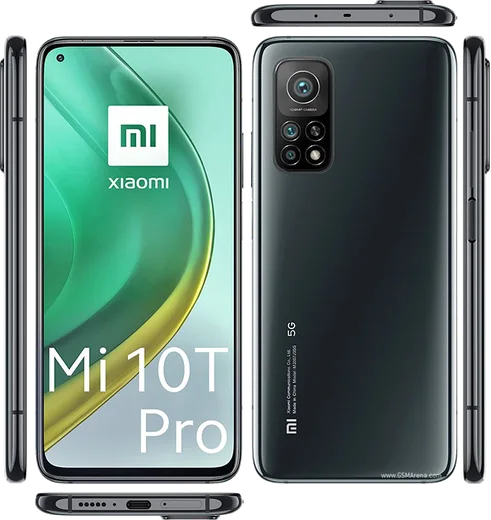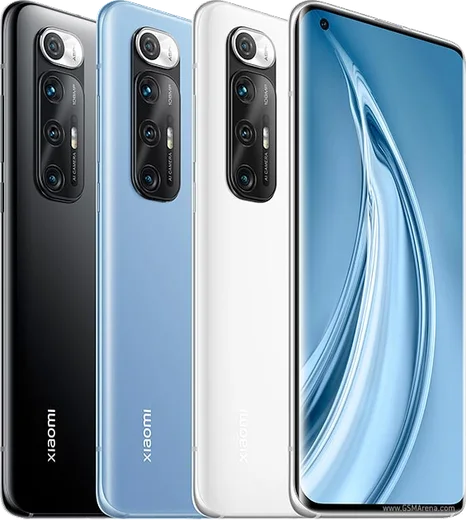
Xiaomi Android

WhatsApp for Mi 10 Pro

Snapdragon 865, 108MP quad cam, 6.67-inch 90Hz AMOLED

WhatsApp Messenger 4.7 · 64.2M reviews Free · Android · ~40 MB · by WhatsApp LLC
Download WhatsApp

Ask a question / report a problem

You can ask any question about WhatsApp support on the Mi 10 Pro — leave it below and we'll help.

Ask a question

Can the Mi 10 Pro run WhatsApp?

Fully supported
  • Operating systemAndroid
  • ProcessorSnapdragon 865
  • WhatsApp versionLatest supported

Latest known WhatsApp problems on Mi 10 Pro

1

Why does WhatsApp not show notifications on my Mi 10 Pro?

MIUI's aggressive battery saver is the usual culprit: open Settings > Apps > Manage apps > WhatsApp, set Battery saver to No restrictions, and toggle on Autostart so the app can wake in the background. Then go to Settings > Notifications & Control Center and confirm WhatsApp notifications are fully enabled, including the Messages and Calls channels. See how others solved this on Reddit
2

Why do I only get WhatsApp messages when I open the app on my Mi 10 Pro?

This delayed-delivery behavior happens when MIUI kills WhatsApp's background process to save power. Long-press the WhatsApp card in Recent apps and tap the lock icon so it isn't cleared, then set Battery saver to No restrictions under Settings > Apps > Manage apps > WhatsApp. Enabling Autostart for WhatsApp in the same menu keeps the connection alive for instant delivery. See how others solved this on Reddit
3

Why are WhatsApp notifications so bad and delayed on my Mi 10 Pro after a MIUI update?

MIUI updates often reset background limits, so re-grant Autostart and set Battery saver to No restrictions under Settings > Apps > Manage apps > WhatsApp. Keep the WhatsApp notification channels enabled with Sound and Banner under Settings > Notifications & Control Center > App notifications > WhatsApp to restore reliable alerts. See how others solved this on Reddit
4

Why am I missing WhatsApp call notifications on my Mi 10 Pro?

Incoming WhatsApp calls fail to ring when the app can't run in the background or the Calls channel is muted. In Settings > Apps > Manage apps > WhatsApp open Other permissions and enable Display pop-up windows while running in the background and Show on Lock screen, then confirm the Calls channel is on with sound under Notifications. Pair this with Autostart enabled and Battery saver set to No restrictions. See how others solved this on Reddit
5

I get a WhatsApp notification error on my Mi 10 Pro, how do I fix it?

Notification errors usually point to a stale app cache or a notification channel that failed to register. Go to Settings > Apps > Manage apps > WhatsApp > Clear data and tap Clear cache, then reopen WhatsApp so it re-registers its notification channels. If it persists, update WhatsApp from the Play Store and re-enable its notifications under Settings > Notifications & Control Center > App notifications. See how others solved this on Reddit
6

Why can't I open documents or PDFs received in WhatsApp on my Mi 10 Pro?

This happens when no default app is set to handle the file type or storage permission is denied. Grant WhatsApp file access under Settings > Apps > Manage apps > WhatsApp > Permissions > Files and media, and install a viewer like Google Drive PDF Viewer or WPS Office from the Play Store. Tapping the document then choosing Always with that viewer will open attachments going forward. See how others solved this on Reddit

Ask a question / report a problem

You can ask any question about WhatsApp support on the Mi 10 Pro — leave it below and we'll help.

Ask a question

Watch: setting up WhatsApp

Prefer to watch? This short walkthrough shows the whole installation and number-verification flow.

How to install WhatsApp on Mi 10 Pro — video walkthrough

How to install WhatsApp on Mi 10 Pro

1

Choose how to download

On your Mi 10 Pro you can get the official app two ways: from the Google Play Store — the easiest option, since it keeps WhatsApp updated automatically — or directly from the official website. You can download an APK file, by clicking a link “Download WhatsApp directly”.

2

Open WhatsApp

Launch WhatsApp from your home screen or app drawer and accept the Terms of Service to start setup.

3

Verify your phone number

Enter your phone number. If your Mi 10 Pro uses dual SIM, pick the line you want WhatsApp tied to, then enter the 6-digit code it sends by SMS — it usually fills in automatically.

4

Restore chats and finish setup

Restore your chat history from Google Drive (use the same Google account), add your name and photo, and tap Allow for notifications so messages and calls arrive reliably.

Stay safe: only ever install WhatsApp from the official Android source. The Download button above already points there — modified copies (GB/Plus/Aero WhatsApp) can get your number banned.

Comments (8)

No registration needed. No email required.
T
theuserJan 14, 2026

honestly the 10 pro guide was spot on

G
gamerxDec 18, 2025

the code never arrives, what do i do

AppWhatsOfficialDec 19, 2025

Thanks for asking, if the SMS will not arrive, you can choose the call option to hear the code, just make sure your number is entered correctly. Reach out anytime.

J
joe.fDec 15, 2025

uff instalado y funcionando en mi mi 10 pro 🎉

L
lou07Dec 2, 2025

Pls help verification keeps failing for me thanks

AppWhatsOfficialDec 4, 2025

Happy to help, double check the country code and that you have signal, then request a fresh SMS code. If it still fails, wait a few minutes before trying again.

O
oldschoolAug 25, 2025

omg whyyy is this so hard pls help me get whatsapp

AppWhatsOfficialAug 29, 2025

We are here to help. Hit Download, follow the steps on this page, and if the code is slow just request it again. You will be set up on your phone in no time.

R
rob36Jul 12, 2025

man perfect, exactly what i needed lol

L
lucy70Jun 14, 2025

Best guide for the mi 10 pro by far

AppWhatsOfficialJun 16, 2025

Good to hear!

S
sol_rajSep 18, 2024

how do i use whatsapp on a second phone thanks

AppWhatsOfficialSep 22, 2024

Happy to help, whatsApp supports linked devices now, so you can use your account on more than one phone. Open Linked Devices in Settings to add another. Hope that helps!