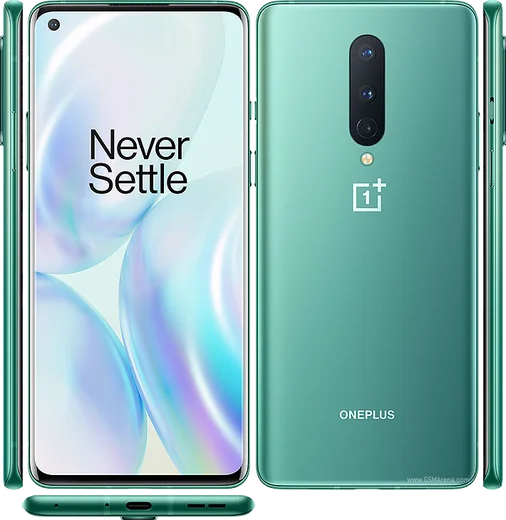
WhatsApp on OnePlus 8
OnePlus Android

WhatsApp for OnePlus 8

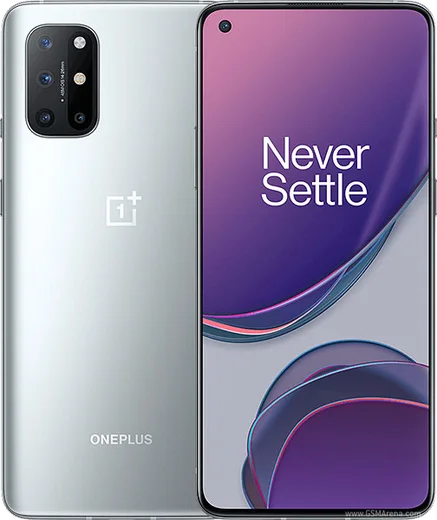
Snapdragon 865, 6.55-inch 90Hz AMOLED, 5G

WhatsApp Messenger 4.7 · 64.2M reviews Free · Android · ~40 MB · by WhatsApp LLC
Download WhatsApp

Ask a question / report a problem

You can ask any question about WhatsApp support on the OnePlus 8 — leave it below and we'll help.

Ask a question

Can the OnePlus 8 run WhatsApp?

Fully supported
  • Operating systemAndroid
  • ProcessorSnapdragon 865
  • WhatsApp versionLatest supported

Latest known WhatsApp problems on OnePlus 8

1

WhatsApp won't get past the registration screen on my OnePlus 8 after the Android update, what do I do?

First confirm the date and time are set to automatic under Settings > System > Date & time, since a wrong clock blocks SMS/registration verification. Then update WhatsApp from the Play Store and grant it Phone and SMS permissions in Settings > Apps > WhatsApp > Permissions. If the SMS code never arrives, wait for the timer to finish and choose 'Call me' to get the code by voice call instead. See how others solved this on Reddit
2

Why don't I get WhatsApp notifications on my OnePlus 8 until I open the app?

This is OxygenOS battery optimization killing WhatsApp in the background, so go to Settings > Apps > WhatsApp > Battery and set it to 'Don't optimize' or Unrestricted. Then open Recent Apps, swipe down on the WhatsApp card (or tap its icon) and choose Lock so OxygenOS won't clear it from memory. Also confirm notifications are enabled in Settings > Apps > WhatsApp > Notifications. See how others solved this on Reddit
3

WhatsApp messages and calls aren't arriving properly on my OnePlus 8, how can I fix it?

Most reliability issues come from OxygenOS restricting background activity, so enable background data under Settings > Apps > WhatsApp > Mobile data & Wi-Fi > allow Background data, and turn off Data saver. Then in Settings > Apps > WhatsApp > Battery set it to Unrestricted, and make sure WhatsApp is updated to the latest Play Store version so calls and messages sync in real time. See how others solved this on Reddit
4

My OnePlus 8 screen doesn't wake up when I get a WhatsApp call, how do I make it ring properly?

Grant WhatsApp the 'Display over other apps' permission under Settings > Apps > Special app access > Display over other apps > WhatsApp, which lets the full incoming-call screen appear. Set WhatsApp's battery usage to Unrestricted under Settings > Apps > WhatsApp > Battery so it can wake the device, confirm Do Not Disturb is off, and make sure the call notification channel is on in Settings > Apps > WhatsApp > Notifications. See how others solved this on Reddit
5

Why won't WhatsApp calls play through my Bluetooth headset on the OnePlus 8?

Make sure WhatsApp has the Microphone and Nearby devices permissions under Settings > Apps > WhatsApp > Permissions, since denied access can stop it from routing audio over Bluetooth. Reconnect the headset from Settings > Bluetooth, and if audio still comes from the phone speaker, toggle the speaker/Bluetooth button on the WhatsApp call screen or restart the phone to reset the audio routing. See how others solved this on Reddit

Ask a question / report a problem

You can ask any question about WhatsApp support on the OnePlus 8 — leave it below and we'll help.

Ask a question

Watch: setting up WhatsApp

Prefer to watch? This short walkthrough shows the whole installation and number-verification flow.

How to install WhatsApp on OnePlus 8 — video walkthrough

How to install WhatsApp on OnePlus 8

1

Choose how to download

On your OnePlus 8 you can get the official app two ways: from the Google Play Store — the easiest option, since it keeps WhatsApp updated automatically — or directly from the official website. You can download an APK file, by clicking a link “Download WhatsApp directly”.

2

Open WhatsApp

Launch WhatsApp from your home screen or app drawer and accept the Terms of Service to start setup.

3

Verify your phone number

Enter your phone number. If your OnePlus 8 uses dual SIM, pick the line you want WhatsApp tied to, then enter the 6-digit code it sends by SMS — it usually fills in automatically.

4

Restore chats and finish setup

Restore your chat history from Google Drive (use the same Google account), add your name and photo, and tap Allow for notifications so messages and calls arrive reliably.

Stay safe: only ever install WhatsApp from the official Android source. The Download button above already points there — modified copies (GB/Plus/Aero WhatsApp) can get your number banned.

Comments (7)

No registration needed. No email required.
K
kev_louMay 23, 2026

Ugh pleaseee my oneplus 8 wont install whatsapp i give up 😭😭

AppWhatsOfficialMay 27, 2026

Hey, no need to stress! Tap the green Download button at the top, follow the steps, and you will have WhatsApp in a minute. It is easier than it looks, promise.

G
gamerxNov 23, 2025

Omg got my 8 sorted thanks to you 🙏

R
raj00Aug 22, 2025

Wow installiert und läuft auf meinem OnePlus 8 🙏

M
mobilegeekJul 7, 2025

Hi where do i change my profile photo thanks

AppWhatsOfficialJul 8, 2025

Sure, open WhatsApp, go to Settings, tap your name at the top, then tap the camera icon to set a new photo. Let us know if you need anything else.

B
ben.eMay 22, 2025

Wow i had to enable unknown sources but then it was fine

P
pete_noaApr 29, 2025

so installed on my OnePlus 8, super simple

AppWhatsOfficialApr 30, 2025

Glad we could help!

L
lucy32Oct 16, 2024

sorry but is old android supported pls

AppWhatsOfficialOct 20, 2024

Of course, if the store lets you install it, you are supported. Very old systems may eventually lose support though. Enjoy WhatsApp on your your phone!