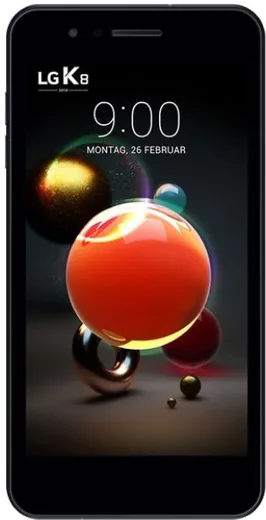
WhatsApp on LG K8 (2018)
LG Android

WhatsApp for LG K8 (2018)

Install the official WhatsApp on your LG K8 (2018) in a few simple steps.

WhatsApp Messenger 4.7 · 64.2M reviews Free · Android · ~40 MB · by WhatsApp LLC
Download WhatsApp

Ask a question / report a problem

You can ask any question about WhatsApp support on the LG K8 (2018) — leave it below and we'll help.

Ask a question

Can the LG K8 (2018) run WhatsApp?

Fully supported
  • Operating systemAndroid
  • WhatsApp versionLatest supported

Latest known WhatsApp problems on LG K8 (2018)

1

Does the LG K8 (2018) support Wi-Fi calling, and how do I turn it on?

Wi-Fi calling on the K8 (2018) only appears if your carrier and the carrier-branded firmware enable it. Check Settings > Networks > Call (or Settings > Networks > Mobile networks) for a Wi-Fi Calling toggle. If that toggle isn't there, your unlocked or unsupported variant won't get it, and the practical workaround is to place voice calls over WhatsApp, Signal, or your carrier's own calling app instead. See how others solved this on Reddit
2

My LG K8 (2018) is slow and laggy, can I speed it up?

With only 2GB of RAM and Android 7.1, the K8 (2018) struggles once apps and chat history grow. Free up space in Settings > General > Storage by clearing cached data, and in WhatsApp open Settings > Storage and data > Manage storage to delete large media. To make it feel snappier, unlock Developer options via Settings > General > About phone > Software info, then tap Build number seven times; go back to Settings > General > Developer options and set Window animation scale, Transition animation scale, and Animator duration scale to 0.5x. See how others solved this on Reddit
3

WhatsApp keeps stopping or won't install on my LG K8 (2018) because storage is full

The 16GB of internal storage fills fast, which blocks installs and media downloads. Open Settings > General > Storage to see what's using space and clear app caches, then in WhatsApp go to Settings > Storage and data > Manage storage to delete forwarded and large files. Also turn off auto-download under WhatsApp Settings > Storage and data so new photos and videos stop filling the phone. Moving existing photos to a microSD card via a file manager frees more room. See how others solved this on Reddit
4

After a factory reset my LG K8 (2018) asks me to sign in with the previous owner's Google account

That is Factory Reset Protection, triggered because the device was wiped without first removing the Google account, and it blocks setup until you sign in with the original account that was on the phone. Enter that original Google email and password to continue. To avoid it next time, remove the account first via Settings > General > Accounts & sync > Google > (account) > Remove account before doing the reset. See how others solved this on Reddit
5

Is the LG K8 (2018) good enough to run heavier apps and games?

The K8 (2018)'s entry-level Snapdragon 425 and 2GB of RAM are fine for WhatsApp, calls, and light browsing but will stutter or crash on demanding games and heavy multitasking. Keep background apps minimal by closing them from the Recents key, and if an app force-closes, clear its cache under Settings > General > Apps > (app) > Storage > Clear cache rather than expecting smooth heavy gaming. See how others solved this on Reddit
6

My LG K8 (2018) battery drains too fast for everyday use

Background sync and screen-on time drain the modest 2500mAh battery. Turn on Settings > Battery & power saving > Battery saver to cap background activity, and lower brightness and screen timeout under Settings > Display. You can also restrict an app's background data in Settings > General > Apps > (app) > Mobile data, and limit chatty apps via Settings > Networks > Data usage so the phone isn't constantly waking up. See how others solved this on Reddit

Ask a question / report a problem

You can ask any question about WhatsApp support on the LG K8 (2018) — leave it below and we'll help.

Ask a question

Watch: setting up WhatsApp

Prefer to watch? This short walkthrough shows the whole installation and number-verification flow.

How to install WhatsApp on LG K8 (2018) — video walkthrough

How to install WhatsApp on LG K8 (2018)

1

Choose how to download

On your LG K8 (2018) you can get the official app two ways: from the Google Play Store — the easiest option, since it keeps WhatsApp updated automatically — or directly from the official website. You can download an APK file, by clicking a link “Download WhatsApp directly”.

2

Open WhatsApp

Launch WhatsApp from your home screen or app drawer and accept the Terms of Service to start setup.

3

Verify your phone number

Enter your phone number. If your LG K8 (2018) uses dual SIM, pick the line you want WhatsApp tied to, then enter the 6-digit code it sends by SMS — it usually fills in automatically.

4

Restore chats and finish setup

Restore your chat history from Google Drive (use the same Google account), add your name and photo, and tap Allow for notifications so messages and calls arrive reliably.

Stay safe: only ever install WhatsApp from the official Android source. The Download button above already points there — modified copies (GB/Plus/Aero WhatsApp) can get your number banned.

Comments (6)

No registration needed. No email required.
L
lina.lDec 16, 2025

update got my LG K8 sorted thanks to you thx

N
nick_finAug 4, 2025

endlich whatsapp auf meinem lg k8 installiert

S
saaaaamMar 1, 2025

honestly my lg k8 has whatsapp now thanks to this ✌️

AppWhatsOfficialMar 2, 2025

That is great to hear!

D
deni31Feb 24, 2025

stuck and so stressed how do i get whatsapp on LG K8 😭😭

AppWhatsOfficialFeb 28, 2025

We are here to help. Hit Download, follow the steps on this page, and if the code is slow just request it again.

M
ms_finnNov 15, 2024

Update got my K8 sorted thanks to you ❤️

P
priya21Aug 22, 2024

so this is the only one that worked for me