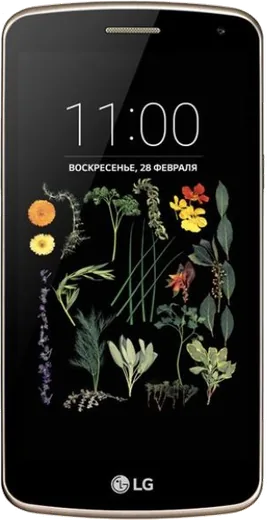
WhatsApp on LG K5
LG Android

WhatsApp for LG K5

Install the official WhatsApp on your LG K5 in a few simple steps.

WhatsApp Messenger 4.7 · 64.2M reviews Free · Android · ~40 MB · by WhatsApp LLC
Download WhatsApp

Ask a question / report a problem

You can ask any question about WhatsApp support on the LG K5 — leave it below and we'll help.

Ask a question

Can the LG K5 run WhatsApp?

Not supported
  • Operating systemAndroid
  • WhatsApp versionNot supported

Latest known WhatsApp problems on LG K5

1

Why doesn't my LG K5 show WhatsApp notifications until I open the app?

This is almost always Android's battery saving putting WhatsApp to sleep in the background. On the LG K5 open Settings > General > Battery & power saving > Battery usage, tap WhatsApp and disable power-saving/optimization for it so it stays alive. Also make sure WhatsApp is not added under 'Power saving exclusions' or any task-killer. Then open WhatsApp > Menu > Settings > Notifications and confirm message notifications and tones are enabled. See how others solved this on Reddit
2

WhatsApp calls don't ring or show on my LG K5 lock screen

Open WhatsApp > Menu > Settings > Notifications and make sure 'Call notifications', call ringtone and vibrate are turned on (not set to None). On the phone, go to Settings > Sound & notification > App notifications > WhatsApp and ensure it is allowed and not blocked or set to priority-only. Finally check Settings > Sound & notification > When device is locked so notifications can show on the lock screen. Battery saving cutting WhatsApp off in the background is the most common cause of missed call alerts. See how others solved this on Reddit
3

My LG K5 only shows WhatsApp call notifications sometimes, not every time

Intermittent alerts on the K5 usually mean Android is dropping WhatsApp's background connection when the screen is off to save battery. Disable optimization for it via Settings > General > Battery & power saving > Battery usage > WhatsApp, and keep it out of any 'sleeping apps' or task-killer list. Keeping WhatsApp updated through the Play Store also fixes call-notification bugs present in older versions. See how others solved this on Reddit
4

How do I fix WhatsApp notifications not working at all on my LG K5?

Start with the basics: in Settings > Sound & notification, make sure Do Not Disturb / interruptions is off, and under App notifications confirm WhatsApp is allowed. Then clear WhatsApp's cache under Settings > Apps > WhatsApp > Storage and reboot the phone. If alerts are still missing, reinstall the latest version from the Google Play Store so notification settings reset cleanly. See how others solved this on Reddit
5

WhatsApp notifications on my LG K5 stopped after an update or settings change

App or system updates can reset WhatsApp's notification settings so they fall back to silent. Reopen WhatsApp > Menu > Settings > Notifications and re-enable message and group notifications, then set the notification tone, vibrate and pop-up the way you want. Also confirm in Settings > Sound & notification > App notifications that WhatsApp wasn't blocked during the update. See how others solved this on Reddit
6

Do I need a stable connection for WhatsApp notifications to arrive on my LG K5?

Yes, push notifications only arrive while the K5 holds a working data or Wi-Fi connection, and aggressive battery saving can drop that connection when the screen sleeps. In Settings > Apps > WhatsApp make sure background data is allowed and that data saver isn't restricting it. If you switch networks often, toggling airplane mode off and on forces WhatsApp to reconnect and re-register for push delivery. See how others solved this on Reddit

Ask a question / report a problem

You can ask any question about WhatsApp support on the LG K5 — leave it below and we'll help.

Ask a question

Watch: setting up WhatsApp

Prefer to watch? This short walkthrough shows the whole installation and number-verification flow.

How to install WhatsApp on LG K5 — video walkthrough

How to install WhatsApp on LG K5

1

Choose how to download

On your LG K5 you can get the official app two ways: from the Google Play Store — the easiest option, since it keeps WhatsApp updated automatically — or directly from the official website. You can download an APK file, by clicking a link “Download WhatsApp directly”.

2

Open WhatsApp

Launch WhatsApp from your home screen or app drawer and accept the Terms of Service to start setup.

3

Verify your phone number

Enter your phone number. If your LG K5 uses dual SIM, pick the line you want WhatsApp tied to, then enter the 6-digit code it sends by SMS — it usually fills in automatically.

4

Restore chats and finish setup

Restore your chat history from Google Drive (use the same Google account), add your name and photo, and tap Allow for notifications so messages and calls arrive reliably.

Stay safe: only ever install WhatsApp from the official Android source. The Download button above already points there — modified copies (GB/Plus/Aero WhatsApp) can get your number banned.

Comments (5)

No registration needed. No email required.
V
val_petMay 31, 2026

omg whatsapp finally on my K5 ❤️

AppWhatsOfficialJun 1, 2026

Glad we could help!

P
plz help meeFeb 22, 2026

installé et opérationnel sur mon k5 💯

D
deni.gOct 4, 2025

tbh whatsapp running great on my k5 🎉

T
techguyFeb 2, 2025

update much better then the other sites

G
gabe2000Sep 18, 2024

PLEASE i need whatsapp on my LG K5 its urgent

AppWhatsOfficialSep 22, 2024

You are almost there! Tap Download, allow the install, open WhatsApp and confirm your number. You got this!