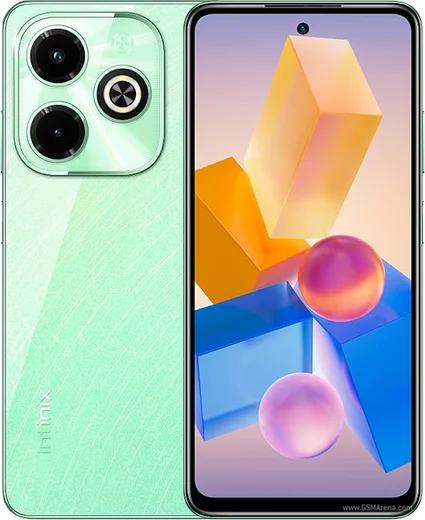
WhatsApp on Infinix Hot 40
Infinix Android

WhatsApp for Infinix Hot 40

Helio G99, 6.78-inch 90Hz display, 33W charging

WhatsApp Messenger 4.7 · 64.2M reviews Free · Android · ~40 MB · by WhatsApp LLC
Download WhatsApp

Ask a question / report a problem

You can ask any question about WhatsApp support on the Infinix Hot 40 — leave it below and we'll help.

Ask a question

Can the Infinix Hot 40 run WhatsApp?

Fully supported
  • Operating systemAndroid
  • ProcessorHelio G99
  • WhatsApp versionLatest supported

Latest known WhatsApp problems on Infinix Hot 40

1

Why are my WhatsApp messages and notifications delayed on the Infinix Hot 40?

Infinix's XOS power management aggressively suspends background apps, so WhatsApp messages can be held until you open the app. Go to Settings > Apps > App management > WhatsApp > Battery and set it to 'No restrictions' (or 'Allow background activity'). Then open Phone Master (the built-in cleaner), find Auto-launch / Auto-start management and enable WhatsApp so it can run in the background. Also turn off any 'Smart power saving' or 'Ultra power saving' mode while you rely on WhatsApp alerts. See how others solved this on Reddit
2

Why don't I see WhatsApp call or video call notifications on my Infinix Hot 40?

Incoming-call alerts fail when WhatsApp is blocked from background activity or its call notification channel is off. In Settings > Apps > App management > WhatsApp > Notifications, make sure 'Allow notifications' is on and the 'Calls' channel is enabled with sound and pop-on-screen. Then set the app's Battery to 'No restrictions' and enable Auto-launch in Phone Master so an incoming call can wake the screen even when the phone is idle. See how others solved this on Reddit
3

Why does WhatsApp video calling lag or freeze on my Infinix Hot 40?

Video-call stutter on Infinix is usually background load and battery throttling rather than the call itself. Clear other apps from the recents tray, turn off Battery saver during the call, and use a strong Wi-Fi or mobile signal since WhatsApp drops video quality on weak networks. If it started after an XOS update, also clear WhatsApp's cache via Settings > Apps > App management > WhatsApp > Storage > Clear cache. See how others solved this on Reddit
4

After updating XOS, my WhatsApp settings reset and notifications broke on the Infinix Hot 40 — how do I fix it?

Major XOS updates often re-apply battery restrictions and reset notification permissions, which silences WhatsApp. After updating, re-grant everything: Settings > Apps > App management > WhatsApp > Notifications (turn the channels back on) and Battery > No restrictions, then re-enable Auto-launch in Phone Master. If alerts are still flaky, clear WhatsApp's cache and reboot once so the new build re-registers its notifications. See how others solved this on Reddit
5

WhatsApp keeps getting closed in the background on my Infinix Hot 40 — how do I stop it?

Infinix's built-in memory cleaner closes WhatsApp to free RAM. Open the recents screen, find the WhatsApp card and tap the lock/pin icon so the cleaner skips it, then set its battery to 'No restrictions' (Settings > Apps > App management > WhatsApp > Battery). Disabling unused preloaded apps under Settings > Apps frees memory so WhatsApp stays alive longer in the background. See how others solved this on Reddit
6

Is the Infinix Hot 40 reliable for daily WhatsApp use, and how do I get the most stable experience?

The hardware handles WhatsApp fine; most complaints trace back to XOS's aggressive battery management rather than messaging itself. For the steadiest results, set WhatsApp's Battery to 'No restrictions', enable Auto-launch in Phone Master, and keep its notifications fully allowed. Keeping the phone on the latest stable XOS build (Settings > System > System update) also clears up many early notification bugs. See how others solved this on Reddit

Ask a question / report a problem

You can ask any question about WhatsApp support on the Infinix Hot 40 — leave it below and we'll help.

Ask a question

Watch: setting up WhatsApp

Prefer to watch? This short walkthrough shows the whole installation and number-verification flow.

How to install WhatsApp on Infinix Hot 40 — video walkthrough

How to install WhatsApp on Infinix Hot 40

1

Choose how to download

On your Infinix Hot 40 you can get the official app two ways: from the Google Play Store — the easiest option, since it keeps WhatsApp updated automatically — or directly from the official website. You can download an APK file, by clicking a link “Download WhatsApp directly”.

2

Open WhatsApp

Launch WhatsApp from your home screen or app drawer and accept the Terms of Service to start setup.

3

Verify your phone number

Enter your phone number. If your Infinix Hot 40 uses dual SIM, pick the line you want WhatsApp tied to, then enter the 6-digit code it sends by SMS — it usually fills in automatically.

4

Restore chats and finish setup

Restore your chat history from Google Drive (use the same Google account), add your name and photo, and tap Allow for notifications so messages and calls arrive reliably.

Stay safe: only ever install WhatsApp from the official Android source. The Download button above already points there — modified copies (GB/Plus/Aero WhatsApp) can get your number banned.

Comments (10)

No registration needed. No email required.
N
nightowlJun 2, 2026

omg verified my number on the Hot 40 with no trouble

G
greg79May 1, 2026

Hey omggg i cant install it someone heeelp 🙏

AppWhatsOfficialMay 5, 2026

Hey, no need to stress! Tap the green Download button at the top, follow the steps, and you will have WhatsApp in a minute.

T
tina50Mar 20, 2026

Sorry but how do i restore my old messages

AppWhatsOfficialMar 26, 2026

Hey there, yes, as long as you had a backup. Use the same number and choose Restore during setup to bring your messages back. Enjoy WhatsApp on your your phone!

N
newphoneFeb 16, 2026

Hey i dont want people to see im online

AppWhatsOfficialFeb 17, 2026

Hi! Yes, go to Settings then Privacy and set Last Seen and Online to Nobody or My Contacts. Your activity stays private. Enjoy WhatsApp on your your phone!

P
pablo56Aug 8, 2025

enfin des étapes super claires pour le hot 40 🎉

M
mike10May 7, 2025

well couldnt be easier 👍

D
deni07Feb 14, 2025

Tutto funziona sul mio Hot 40, mille grazie

S
speedyFeb 11, 2025

Guys verified my number on the hot 40 with no trouble

N
nick_realJan 25, 2025

set up whatsapp on my dads Hot 40 no problem

D
dan_benDec 27, 2024

hey the download is very slow is that normal thanks

AppWhatsOfficialDec 31, 2024

Sure, speed comes down to your data or wifi. On a good connection it only takes a few seconds. Let us know if you need anything else.