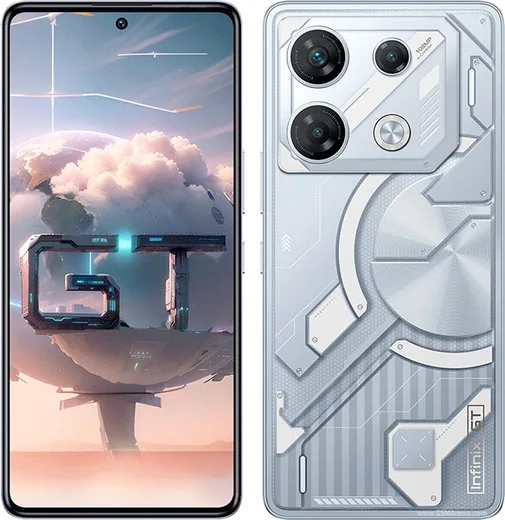
WhatsApp on Infinix GT 10 Pro
Infinix Android

WhatsApp for Infinix GT 10 Pro

Dimensity 8050, 6.67-inch 120Hz AMOLED gaming phone

WhatsApp Messenger 4.7 · 64.2M reviews Free · Android · ~40 MB · by WhatsApp LLC
Download WhatsApp

Ask a question / report a problem

You can ask any question about WhatsApp support on the Infinix GT 10 Pro — leave it below and we'll help.

Ask a question

Can the Infinix GT 10 Pro run WhatsApp?

Fully supported
  • Operating systemAndroid
  • ProcessorDimensity 8050
  • WhatsApp versionLatest supported

Latest known WhatsApp problems on Infinix GT 10 Pro

1

WhatsApp messages and notifications are delayed on my Infinix GT 10 Pro until I open the app

This is the most common Infinix complaint, caused by XOS battery management closing WhatsApp in the background. Go to Settings > Apps > App management > WhatsApp > Battery usage and set it to 'No restrictions' (or 'Allow background activity'). Then open WhatsApp's recent-apps card, tap the lock icon (or pull the card down and lock it) so the system stops clearing it from memory. Finally, check Settings > Battery and make sure any 'Power saving' or 'Ultra power saving' mode is off, since these also delay notifications. See how others solved this on Reddit
2

My Infinix shows a 'too many notifications' warning and stops alerting me for WhatsApp

Android and XOS will rate-limit an app that posts a high volume of notifications, which can silence WhatsApp. First, open Settings > Notifications & status bar > App notifications > WhatsApp and confirm Messages, Calls and Group notifications are all switched on with sound and pop-up (banner) enabled. Then make sure WhatsApp isn't being killed: set it to 'No restrictions' under Settings > Apps > WhatsApp > Battery and lock it in recent apps. Inside WhatsApp, go to Settings > Notifications and turn on high-priority notifications so alerts appear even after the warning. See how others solved this on Reddit
3

WhatsApp video calls lag and stutter on my Infinix GT 10 Pro

Video-call lag on Infinix is usually a weak connection combined with aggressive power saving. Turn off Settings > Battery > Power saving mode during calls, and allow background data in Settings > Apps > App management > WhatsApp > Data usage > Background data. If it persists on Wi-Fi, switch to the 5GHz band or test on mobile data, and clear WhatsApp's cache via Settings > Apps > App management > WhatsApp > Storage > Clear cache. See how others solved this on Reddit
4

There's no sound when I post a WhatsApp video status from my Infinix

This usually isn't an Infinix bug. WhatsApp only keeps audio on status videos up to 30 seconds long; if your clip is longer it gets split into segments and the extra parts can lose sound, so trim it under 30 seconds and re-post. Also confirm the source video itself isn't muted and that you haven't tapped the speaker/mute icon while previewing the status before sending. See how others solved this on Reddit
5

Is the Infinix GT 10 Pro reliable enough for daily WhatsApp use and updates

Owners report the hardware is solid for messaging and calls, but XOS ships heavy preinstalled apps and slower security patches than Samsung or Pixel. For dependable WhatsApp, keep the app updated from the Play Store, disable any preinstalled cleaner/booster app that closes background apps, and exclude WhatsApp from RAM cleanup by locking it in recent apps. Back up your chats regularly via WhatsApp > Settings > Chats > Chat backup to Google Drive. See how others solved this on Reddit

Ask a question / report a problem

You can ask any question about WhatsApp support on the Infinix GT 10 Pro — leave it below and we'll help.

Ask a question

Watch: setting up WhatsApp

Prefer to watch? This short walkthrough shows the whole installation and number-verification flow.

How to install WhatsApp on Infinix GT 10 Pro — video walkthrough

How to install WhatsApp on Infinix GT 10 Pro

1

Choose how to download

On your Infinix GT 10 Pro you can get the official app two ways: from the Google Play Store — the easiest option, since it keeps WhatsApp updated automatically — or directly from the official website. You can download an APK file, by clicking a link “Download WhatsApp directly”.

2

Open WhatsApp

Launch WhatsApp from your home screen or app drawer and accept the Terms of Service to start setup.

3

Verify your phone number

Enter your phone number. If your Infinix GT 10 Pro uses dual SIM, pick the line you want WhatsApp tied to, then enter the 6-digit code it sends by SMS — it usually fills in automatically.

4

Restore chats and finish setup

Restore your chat history from Google Drive (use the same Google account), add your name and photo, and tap Allow for notifications so messages and calls arrive reliably.

Stay safe: only ever install WhatsApp from the official Android source. The Download button above already points there — modified copies (GB/Plus/Aero WhatsApp) can get your number banned.

Comments (11)

No registration needed. No email required.
A
alex.oApr 6, 2026

Yo set up whatsapp on my dads infinix gt 10 pro no problem 😍

A
apploverMar 13, 2026

Guys i NEED this app pleaseeee how do i do it 🙏

AppWhatsOfficialMar 14, 2026

No panic needed. The Download button takes you to the official app, then just install and verify your number.

J
jay_finMar 7, 2026

Tbh perfect steps for the Infinix GT 10 Pro ✌️

T
theo_realJan 28, 2026

guys did it on my Infinix GT 10 Pro in like 2 minutes

S
saaaaamNov 26, 2025

Ngl got my gt 10 Pro sorted thanks to you

C
chris_benNov 18, 2025

franchement super guide merci

B
big_samNov 1, 2025

ok so 10 out of 10

A
amy92Oct 10, 2025

omg restarted the phone and then it installed

L
luca.sJan 28, 2025

Hey is whatsapp free or do i have to pay anyone

AppWhatsOfficialJan 31, 2025

Good question, it is completely free. There is no fee for the app, only your usual data or wifi is used. Glad to help.

R
rob.kNov 7, 2024

franchement le meilleur site, marché du premier coup

G
greg80Jul 18, 2024

Ngl whatsapp is working on my gt 10 pro now