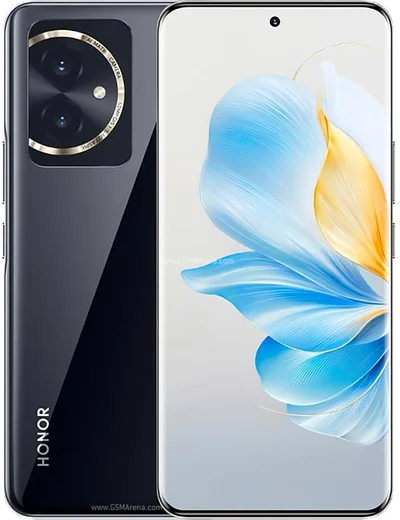
Honor Android

WhatsApp for Honor Magic 5 Lite

Snapdragon 695, 6.67-inch AMOLED, 5100mAh battery

WhatsApp Messenger 4.7 · 64.2M reviews Free · Android · ~40 MB · by WhatsApp LLC
Download WhatsApp

Ask a question / report a problem

You can ask any question about WhatsApp support on the Honor Magic 5 Lite — leave it below and we'll help.

Ask a question

Can the Honor Magic 5 Lite run WhatsApp?

Fully supported
  • Operating systemAndroid
  • ProcessorSnapdragon 695
  • WhatsApp versionLatest supported

Latest known WhatsApp problems on Honor Magic 5 Lite

1

Why don't I get WhatsApp notifications on my Honor Magic 5 Lite?

MagicOS's aggressive battery management kills WhatsApp in the background, which blocks notifications. Open Settings > Apps > App launch, find WhatsApp, turn off Manage automatically, then in the pop-up enable Auto-launch, Secondary launch, and Run in background. Also go to Settings > Notifications > WhatsApp and make sure notifications and the Messages channel are allowed. See how others solved this on Reddit
2

WhatsApp incoming calls don't show on my Honor Magic 5 Lite screen, how do I fix it?

This happens when WhatsApp can't display over other apps and when MagicOS suspends it in the background. Go to Settings > Apps > Apps > WhatsApp and enable Display over other apps, then in Settings > Apps > App launch turn off Manage automatically for WhatsApp and switch on all three background toggles. In WhatsApp itself, open Settings > Notifications and confirm Incoming call notifications are on. See how others solved this on Reddit
3

Why don't WhatsApp calls appear on my Honor Magic 5 Lite lock screen?

MagicOS often suppresses full-screen call banners on the lock screen unless WhatsApp is explicitly allowed. Go to Settings > Notifications > WhatsApp, enable Lock screen notifications and turn on Banners, then grant Display over other apps under Settings > Apps > Apps > WhatsApp. Excluding WhatsApp from battery optimization in Settings > Battery also helps keep the call screen alive. See how others solved this on Reddit
4

WhatsApp calls keep dropping on Wi-Fi on my Honor Magic 5 Lite

MagicOS power management can throttle the Wi-Fi radio when the screen is off, which cuts WhatsApp voice and video calls. Exclude WhatsApp from battery optimization in Settings > Battery (set it to Don't optimize / no restrictions), and in Settings > Apps > App launch set WhatsApp to manual with Run in background enabled. If calls still drop, test on mobile data to confirm whether the router or Wi-Fi band is the cause. See how others solved this on Reddit
5

The camera won't open inside WhatsApp on my Honor Magic 5 Lite

This is usually a revoked or stuck camera permission after a WhatsApp or MagicOS update. Go to Settings > Apps > Apps > WhatsApp > Permissions and confirm Camera is set to Allow, then force-stop WhatsApp and reopen it. If the in-app camera still freezes, clearing WhatsApp's cache via Settings > Apps > Apps > WhatsApp > Storage usually restores it. See how others solved this on Reddit
6

Messaging apps like WhatsApp randomly freeze or lag on my Honor Magic 5 Lite

The freezes come from MagicOS reloading apps it cleared from memory, plus a bloated WhatsApp cache. Lock WhatsApp in recents (open recent apps, swipe down on the WhatsApp card or tap the lock icon) so it isn't killed, and clear its cache under Settings > Apps > Apps > WhatsApp > Storage. Setting App launch to manual in Settings > Apps > App launch also reduces the stutter when reopening chats. See how others solved this on Reddit

Ask a question / report a problem

You can ask any question about WhatsApp support on the Honor Magic 5 Lite — leave it below and we'll help.

Ask a question

Watch: setting up WhatsApp

Prefer to watch? This short walkthrough shows the whole installation and number-verification flow.

How to install WhatsApp on Honor Magic 5 Lite — video walkthrough

How to install WhatsApp on Honor Magic 5 Lite

1

Choose how to download

On your Honor Magic 5 Lite you can get the official app two ways: from the Google Play Store — the easiest option, since it keeps WhatsApp updated automatically — or directly from the official website. You can download an APK file, by clicking a link “Download WhatsApp directly”.

2

Open WhatsApp

Launch WhatsApp from your home screen or app drawer and accept the Terms of Service to start setup.

3

Verify your phone number

Enter your phone number. If your Honor Magic 5 Lite uses dual SIM, pick the line you want WhatsApp tied to, then enter the 6-digit code it sends by SMS — it usually fills in automatically.

4

Restore chats and finish setup

Restore your chat history from Google Drive (use the same Google account), add your name and photo, and tap Allow for notifications so messages and calls arrive reliably.

Stay safe: only ever install WhatsApp from the official Android source. The Download button above already points there — modified copies (GB/Plus/Aero WhatsApp) can get your number banned.

Comments (8)

No registration needed. No email required.
D
dan_proJun 10, 2026

Tbh smooth install on the Honor Magic 5 Lite thx

T
tina.lJan 5, 2026

well quick and painless 😍

I
im_omarNov 11, 2025

Yo i had to enable unknown sources but then it was fine :)

N
nightowlOct 9, 2025

ottima guida, ha funzionato sul mio 5 lite 💯

M
mr_ninaApr 28, 2025

ngl couldnt install whatsapp on my magic 5lite until i found this 🔥

P
pablo97Nov 26, 2024

ok so did it on my Honor Magic 5 Lite in like 2 minutes

V
val.oOct 3, 2024

Did it without any help, very simple

AppWhatsOfficialOct 5, 2024

Thanks for sharing!

X
xX_nickAug 1, 2024

guys i NEED this app pleaseeee how do i do it :(

AppWhatsOfficialAug 4, 2024

We are here to help. Hit Download, follow the steps on this page, and if the code is slow just request it again.