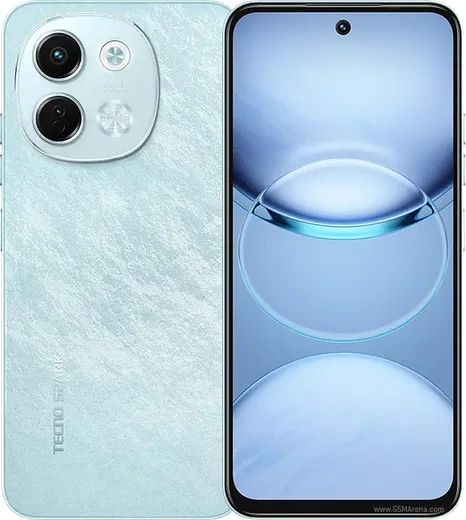
WhatsApp on Tecno Spark 30 5G
Tecno Android

WhatsApp for Tecno Spark 30 5G

Dimensity 6300, 6.67-inch 120Hz display

WhatsApp Messenger 4.7 · 64.2M reviews Free · Android · ~40 MB · by WhatsApp LLC
Download WhatsApp

Ask a question / report a problem

You can ask any question about WhatsApp support on the Tecno Spark 30 5G — leave it below and we'll help.

Ask a question

Can the Tecno Spark 30 5G run WhatsApp?

Fully supported
  • Operating systemAndroid
  • ProcessorDimensity 6300
  • WhatsApp versionLatest supported

Latest known WhatsApp problems on Tecno Spark 30 5G

1

WhatsApp calls won't connect or keep dropping on my Tecno Spark 30 5G

Tecno's power-saving features aggressively kill background apps, which blocks incoming WhatsApp calls. Go to Settings > Apps > WhatsApp > App battery usage (or Battery) and set it to Unrestricted, then open the Phone Master app, find Auto-launch / background app management, and allow WhatsApp to keep running. Also confirm WhatsApp has the Microphone and Phone permissions enabled under Settings > Apps > WhatsApp > Permissions. See how others solved this on Reddit
2

WhatsApp lags, freezes or the System UI keeps crashing on the Spark 30 5G

These HiOS-related lag and System UI crash issues are usually eased by clearing cached data and updating the system. Go to Settings > Apps > WhatsApp > Storage and tap Clear cache (not Clear data, which would log you out), then check Settings > System > System update for the latest HiOS patch. If lag persists, enable Developer options (tap the build number 7 times in Settings > About phone) and set Window/Transition/Animator animation scale to 0.5x to make the UI feel snappier. See how others solved this on Reddit
3

My Tecno Spark 30 5G suddenly turns off and I miss WhatsApp messages and calls

Random shutdowns on Tecno devices are often caused by a faulty battery reading or an unstable HiOS build rather than a true power fault. First update the system under Settings > System > System update, then boot into Safe Mode (hold the power button, then long-press the Power off option) to see if a third-party app is the cause. If it keeps shutting down, back up your chats via WhatsApp > Settings > Chats > Chat backup and have the battery checked at a Tecno service center. See how others solved this on Reddit
4

WhatsApp video calls and selfies look blurry in low light on the Spark 30 5G

The front camera produces motion blur in dim lighting because it lowers the shutter speed to capture more light, so any movement smears the image. For clearer WhatsApp video calls, add a front-facing light source and hold the phone steady. For still selfies sent in chats, use the stock Camera app's photo mode rather than WhatsApp's in-app camera, since the photo mode applies more processing and stabilization than the live call stream. See how others solved this on Reddit
5

WhatsApp notifications are delayed or silent on my Tecno Spark 30 5G

HiOS battery optimization is the main reason WhatsApp messages arrive late or without a sound. Go to Settings > Apps > WhatsApp > App battery usage and set it to Unrestricted, then enable Auto-launch for WhatsApp in the Phone Master app so it can run in the background. Finally, open WhatsApp > Settings > Notifications and confirm the conversation tones and notification sound are turned on. See how others solved this on Reddit
6

Is the Tecno Spark 30 5G good enough to run WhatsApp smoothly, and how do I set it up right?

The Spark 30 5G handles WhatsApp fine, but the bundled HiOS bloatware and ad-heavy system apps can slow it down out of the box. After first boot, update the system via Settings > System > System update, then disable unwanted preinstalled apps under Settings > Apps and turn off recommendation ads in the Phone Master and App Market settings. This frees up RAM and storage so WhatsApp media, backups and calls stay responsive. See how others solved this on Reddit

Ask a question / report a problem

You can ask any question about WhatsApp support on the Tecno Spark 30 5G — leave it below and we'll help.

Ask a question

Watch: setting up WhatsApp

Prefer to watch? This short walkthrough shows the whole installation and number-verification flow.

How to install WhatsApp on Tecno Spark 30 5G — video walkthrough

How to install WhatsApp on Tecno Spark 30 5G

1

Choose how to download

On your Tecno Spark 30 5G you can get the official app two ways: from the Google Play Store — the easiest option, since it keeps WhatsApp updated automatically — or directly from the official website. You can download an APK file, by clicking a link “Download WhatsApp directly”.

2

Open WhatsApp

Launch WhatsApp from your home screen or app drawer and accept the Terms of Service to start setup.

3

Verify your phone number

Enter your phone number. If your Tecno Spark 30 5G uses dual SIM, pick the line you want WhatsApp tied to, then enter the 6-digit code it sends by SMS — it usually fills in automatically.

4

Restore chats and finish setup

Restore your chat history from Google Drive (use the same Google account), add your name and photo, and tap Allow for notifications so messages and calls arrive reliably.

Stay safe: only ever install WhatsApp from the official Android source. The Download button above already points there — modified copies (GB/Plus/Aero WhatsApp) can get your number banned.

Comments (10)

No registration needed. No email required.
O
omar_ytMay 20, 2026

this worked great on my Tecno Spark 30 5G :)

L
lurkerApr 1, 2026

quick q the app opens to a black screen thanks

AppWhatsOfficialApr 2, 2026

Thanks for asking, a black screen usually clears after a restart. If not, reinstall the newest version and it should open fine. Reach out anytime.

M
mobilegeekJan 4, 2026

wow this fixed whatsapp on my Tecno Spark 30 5G

R
rob13Jan 2, 2026

omg omggg i cant install it someone heeelp 😩

AppWhatsOfficialJan 4, 2026

We are here to help. Hit Download, follow the steps on this page, and if the code is slow just request it again. Reply here if you get stuck.

P
plz help meeAug 1, 2025

Tbh this worked great on my Tecno Spark 30 5G 😍

E
ella_realMar 2, 2025

hé tout fonctionne, merci beaucoup

K
kai_jayJan 22, 2025

ngl installed whatsapp on my 305g with no issues 😍

P
priya_tanOct 25, 2024

installed on my spark 30 5g, super simple

E
ella92Oct 5, 2024

yo restarted the phone and then it installed

I
im_noahJul 12, 2024

wow súper sencillo, ya está listo gracias