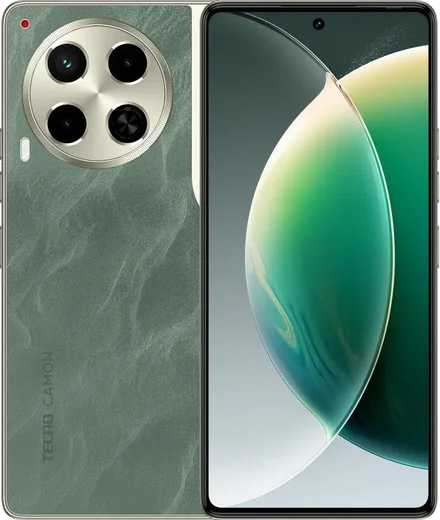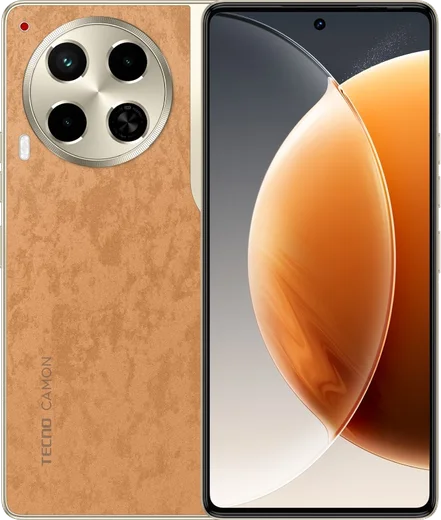
WhatsApp on Tecno Camon 30 5G
Tecno Android

WhatsApp for Tecno Camon 30 5G

Dimensity 7020, 6.78-inch 120Hz AMOLED

WhatsApp Messenger 4.7 · 64.2M reviews Free · Android · ~40 MB · by WhatsApp LLC
Download WhatsApp

Ask a question / report a problem

You can ask any question about WhatsApp support on the Tecno Camon 30 5G — leave it below and we'll help.

Ask a question

Can the Tecno Camon 30 5G run WhatsApp?

Fully supported
  • Operating systemAndroid
  • ProcessorDimensity 7020
  • WhatsApp versionLatest supported

Latest known WhatsApp problems on Tecno Camon 30 5G

1

WhatsApp calls don't ring or fail to connect on my Tecno Camon 30 5G

Tecno's HiOS power manager aggressively kills WhatsApp in the background, which stops incoming calls from ringing. Open Settings > Apps > App management > WhatsApp > Battery and set it to 'No restrictions' (allow background activity). Then go to Settings > Battery > App launch, find WhatsApp, turn off 'Manage automatically' and manually enable auto-launch, secondary launch and run in background. Finally, under Settings > Apps > Special access > Display over other apps, make sure WhatsApp is allowed so the incoming-call screen can appear. See how others solved this on Reddit
2

I'm not getting notifications until I open the app on my Camon 30

On HiOS, battery optimization freezes apps in the background, so messages and other notifications only sync once you open the app. Open Settings > Apps > App management > [app] > Battery and choose 'No restrictions', then in Settings > Battery > App launch turn off 'Manage automatically' for that app and enable its background activity. Also check Settings > Notifications to confirm the app's notifications are switched on, and turn off Data Saver / 'Restrict background data' for messaging apps under Settings > Mobile network so notifications push in real time. See how others solved this on Reddit
3

WhatsApp voice notes play on speaker instead of the earpiece on my Camon 30 (CL6)

On the CL6 / Camon 30, the proximity sensor near the top of the screen can misread, so voice notes stay on speaker or cut out when you raise the phone to your ear. Make sure no screen protector or dirt is covering the sensor area at the top of the screen, and clean that area. If a specific voice note still won't play correctly, clear WhatsApp's cache under Settings > Apps > App management > WhatsApp > Storage > Clear cache (this does not delete chats) and update WhatsApp from the Play Store. See how others solved this on Reddit
4

My Tecno Camon 30 5G lags and System UI keeps crashing

HiOS ships with heavy animations and background bloat that can cause stutter and occasional System UI crashes. Enable Developer options (Settings > About phone, tap the build number 7 times), then in Settings > System > Developer options set Window, Transition and Animator animation scale to 0.5x. Clear the cache of any app that crashes often under Settings > Apps. If crashes persist after a HiOS update, back up your data and try a factory reset, since some of these are firmware bugs that Tecno fixes in later patches. See how others solved this on Reddit
5

Is the Tecno Camon 30 5G actually good for daily WhatsApp and social use, or are there deal-breakers?

For everyday WhatsApp, browsing and social media it performs well thanks to the 5G chipset and large display, and most complaints trace back to HiOS's aggressive background management rather than weak hardware. The first thing to fix is the battery optimization for your messaging apps: set them to 'No restrictions' under Settings > Apps > App management > [app] > Battery and disable 'Manage automatically' in Settings > Battery > App launch, so notifications and calls aren't delayed. It's a solid-value phone for messaging-heavy users once those tweaks are done. See how others solved this on Reddit

Ask a question / report a problem

You can ask any question about WhatsApp support on the Tecno Camon 30 5G — leave it below and we'll help.

Ask a question

Watch: setting up WhatsApp

Prefer to watch? This short walkthrough shows the whole installation and number-verification flow.

How to install WhatsApp on Tecno Camon 30 5G — video walkthrough

How to install WhatsApp on Tecno Camon 30 5G

1

Choose how to download

On your Tecno Camon 30 5G you can get the official app two ways: from the Google Play Store — the easiest option, since it keeps WhatsApp updated automatically — or directly from the official website. You can download an APK file, by clicking a link “Download WhatsApp directly”.

2

Open WhatsApp

Launch WhatsApp from your home screen or app drawer and accept the Terms of Service to start setup.

3

Verify your phone number

Enter your phone number. If your Tecno Camon 30 5G uses dual SIM, pick the line you want WhatsApp tied to, then enter the 6-digit code it sends by SMS — it usually fills in automatically.

4

Restore chats and finish setup

Restore your chat history from Google Drive (use the same Google account), add your name and photo, and tap Allow for notifications so messages and calls arrive reliably.

Stay safe: only ever install WhatsApp from the official Android source. The Download button above already points there — modified copies (GB/Plus/Aero WhatsApp) can get your number banned.

Comments (13)

No registration needed. No email required.
Y
yuki14Apr 21, 2026

Quick q im not getting the sms code pls

AppWhatsOfficialApr 26, 2026

Of course, double check the country code and that you have signal, then request a fresh SMS code. If it still fails, wait a few minutes before trying again.

P
phonefanMar 7, 2026

ok so 10 out of 10

AppWhatsOfficialMar 8, 2026

Glad we could help!

A
ali76Mar 4, 2026

والله أخيراً ثبّت واتساب على Tecno Camon 30 5G 👍

S
sol13Feb 24, 2026

Anyone? does this cost money pls

AppWhatsOfficialMar 2, 2026

No worries, it is completely free. There is no fee for the app, only your usual data or wifi is used. Feel free to ask if you get stuck.

G
gamerxJan 6, 2026

so my whatsapp had stopped working but this fixed it 😍

L
luca98Sep 20, 2025

Wow gracias, mi camon 30 5g ya tiene whatsapp 🙏

H
helpmeSep 19, 2025

ugh anyone pls i cant download it heeeelp me

AppWhatsOfficialSep 22, 2025

Take a breath, we got you. Press Download above, then Install, then verify your number. That is all it takes.

O
omar_tomJul 24, 2025

Honestly installed in 2 min cheers

E
ella51May 23, 2025

My new camon 305g is all set up now

J
jay_xXMay 12, 2025

Anyone? can i hide when i was last online

AppWhatsOfficialMay 18, 2025

Good question, in Privacy settings you can set Last Seen and Online to Nobody, so no one sees when you are active. Glad to help.

W
whyyyyyNov 29, 2024

Sorry but the code never arrives, what do i do

AppWhatsOfficialDec 5, 2024

Thanks for asking, double check the country code and that you have signal, then request a fresh SMS code. If it still fails, wait a few minutes before trying again.

P
pete_leoSep 30, 2024

Gracias, mi 30 5g ya tiene whatsapp

R
rosa9Aug 23, 2024

Got it working on my 30 5g first try :)