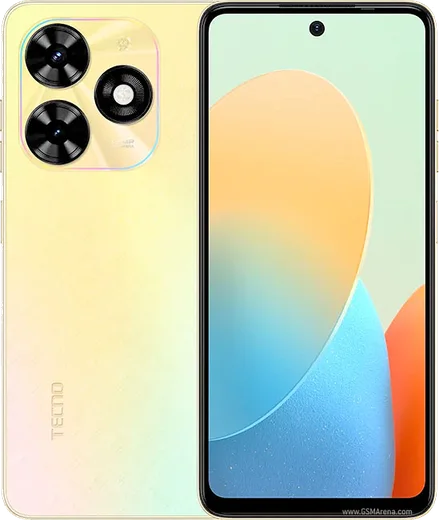
WhatsApp on Tecno Pop 8
Tecno Android

WhatsApp for Tecno Pop 8

Unisoc T606, 6.6-inch 90Hz display, entry-level

WhatsApp Messenger 4.7 · 64.2M reviews Free · Android · ~40 MB · by WhatsApp LLC
Download WhatsApp

Ask a question / report a problem

You can ask any question about WhatsApp support on the Tecno Pop 8 — leave it below and we'll help.

Ask a question

Can the Tecno Pop 8 run WhatsApp?

Fully supported
  • Operating systemAndroid
  • ProcessorUnisoc T606
  • WhatsApp versionLatest supported

Latest known WhatsApp problems on Tecno Pop 8

1

Why are my WhatsApp notifications silent on my Tecno Pop 8?

Open WhatsApp Settings > Notifications and make sure a sound is selected for Message and Group notifications, then go to phone Settings > Apps > WhatsApp > Notifications and confirm the 'Messages' channel is set to 'Make sound and pop on screen' rather than 'Silent'. Android stores its own per-channel sound, so even if WhatsApp's internal tone is set, a silenced system channel will mute everything. Also check that Do Not Disturb and any battery-saver schedule aren't quietly suppressing the alert tone. See how others solved this on Reddit
2

WhatsApp pop-up (heads-up) notifications stopped working on my Tecno Pop 8 after an update

Updates can reset notification importance, so go to Settings > Apps > WhatsApp > Notifications > Messages and switch the behavior back to 'Urgent (Make sound and pop on screen)'. On the Tecno Pop 8 also open Settings > Apps > Special app access > Display over other apps and ensure WhatsApp is allowed, since heads-up banners need that permission. If banners still don't appear, clearing WhatsApp's cache under Settings > Apps > WhatsApp > Storage often restores them without affecting your chats. See how others solved this on Reddit
3

WhatsApp pop-up notification option is missing or greyed out on my Tecno Pop 8

When the pop-up toggle disappears, it is usually because the 'Messages' notification channel itself was turned off, so re-enable it under Settings > Apps > WhatsApp > Notifications and the pop-on-screen option will reappear. If it is still missing, clear WhatsApp's data for notifications via Storage and reopen the app so it regenerates the channels. Avoid third-party notification-cleaner apps, which on Tecno's HiOS can strip these channels. See how others solved this on Reddit
4

WhatsApp shows no pop on screen and no sound on my Tecno Pop 8 even though messages arrive

This is almost always Tecno's aggressive battery management putting WhatsApp to sleep, so open Settings > Battery and use the background/auto-launch management screen to allow WhatsApp to run in the background. Then in Settings > Apps > WhatsApp > Battery, choose 'Unrestricted' so HiOS stops throttling its notification service. After that, confirm the Messages channel still has sound and pop-on-screen enabled, since the throttling can also have muted it. See how others solved this on Reddit
5

Is there a fix for WhatsApp notifications not popping up at all on the Tecno Pop 8?

Work through it in order: enable WhatsApp under Settings > Apps > Special app access > Display over other apps, set its battery usage to Unrestricted, and set the Messages channel to Urgent with pop-on-screen and sound. If notifications still fail, toggle WhatsApp's Messages channel off and back on under Settings > Apps > WhatsApp > Notifications to force Android to rebuild it, and as a last resort reinstall WhatsApp after backing up chats to Google Drive. Keeping WhatsApp updated from the Play Store also matters, as older builds can break notifications on newer HiOS versions. See how others solved this on Reddit

Ask a question / report a problem

You can ask any question about WhatsApp support on the Tecno Pop 8 — leave it below and we'll help.

Ask a question

Watch: setting up WhatsApp

Prefer to watch? This short walkthrough shows the whole installation and number-verification flow.

How to install WhatsApp on Tecno Pop 8 — video walkthrough

How to install WhatsApp on Tecno Pop 8

1

Choose how to download

On your Tecno Pop 8 you can get the official app two ways: from the Google Play Store — the easiest option, since it keeps WhatsApp updated automatically — or directly from the official website. You can download an APK file, by clicking a link “Download WhatsApp directly”.

2

Open WhatsApp

Launch WhatsApp from your home screen or app drawer and accept the Terms of Service to start setup.

3

Verify your phone number

Enter your phone number. If your Tecno Pop 8 uses dual SIM, pick the line you want WhatsApp tied to, then enter the 6-digit code it sends by SMS — it usually fills in automatically.

4

Restore chats and finish setup

Restore your chat history from Google Drive (use the same Google account), add your name and photo, and tap Allow for notifications so messages and calls arrive reliably.

Stay safe: only ever install WhatsApp from the official Android source. The Download button above already points there — modified copies (GB/Plus/Aero WhatsApp) can get your number banned.

Comments (11)

No registration needed. No email required.
O
omar_solMar 5, 2026

Honestly works like a charm on the pop8 🔥

S
sara.oFeb 1, 2026

honestly didnt work at first but second time was fine 😍

O
omar.gOct 3, 2025

Anyone? same account on two devices possible

AppWhatsOfficialOct 6, 2025

Good question, yes, use Linked Devices in Settings to add a second phone with the same account.

A
apploverSep 27, 2025

Honestly cheers for the clear instructions 👌

H
helpmeSep 3, 2025

yo no registration needed, love that

I
im_theoJun 22, 2025

guys PLEASE i need whatsapp on my pop 8 its urgent

AppWhatsOfficialJun 25, 2025

We are here to help. Hit Download, follow the steps on this page, and if the code is slow just request it again.

H
halppJun 2, 2025

ehi il mio Pop 8 ha finalmente whatsapp, fantastico

N
nina42May 13, 2025

hey auf dem Pop 8 meiner mutter problemlos installiert

R
rob_greApr 15, 2025

the video helped me understand

I
its_rayMar 3, 2025

great stuff, much appreciated

I
ivan_xOct 31, 2024

Honestly did it on my tecno pop 8 in like 2 minutes