WhatsApp on Poco C65
Poco Android

WhatsApp for Poco C65

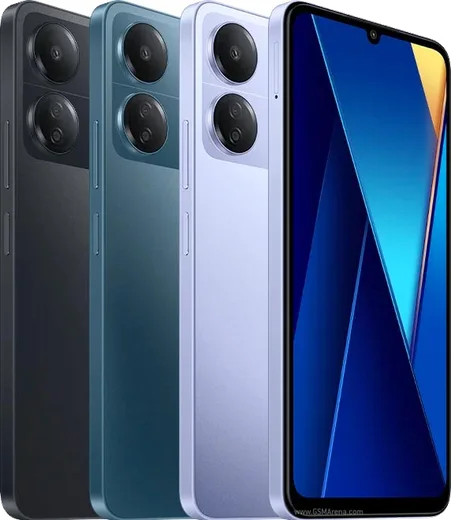
Helio G85, 6.74-inch 90Hz LCD, 50MP camera

WhatsApp Messenger 4.7 · 64.2M reviews Free · Android · ~40 MB · by WhatsApp LLC
Download WhatsApp

Ask a question / report a problem

You can ask any question about WhatsApp support on the Poco C65 — leave it below and we'll help.

Ask a question

Can the Poco C65 run WhatsApp?

Fully supported
  • Operating systemAndroid
  • ProcessorHelio G85
  • WhatsApp versionLatest supported

Latest known WhatsApp problems on Poco C65

1

Why don't WhatsApp notifications show up on my Poco C65 lock screen?

HyperOS restricts which app notifications reach the lock screen by default. Go to Settings > Notifications & Control Center > App notifications > WhatsApp and turn on 'Show on lock screen' and 'Floating notifications'. Then open Settings > Apps > Manage apps > WhatsApp > Battery saver and set it to 'No restrictions' so the WhatsApp background service stays alive and messages reach the lock screen instantly. See how others solved this on Reddit
2

My Poco C65 WhatsApp notifications are delayed or only arrive when I open the app, how do I fix it?

HyperOS aggressively kills background apps, so messages only sync when you open WhatsApp. First enable autostart: Settings > Apps > Permissions > Autostart and toggle WhatsApp on. Then set Settings > Apps > Manage apps > WhatsApp > Battery saver to 'No restrictions'. Finally, open the Recents (multitasking) screen, swipe down on the WhatsApp card and tap the lock icon so the system can't close it. See how others solved this on Reddit
3

WhatsApp notifications stopped working after the HyperOS update on my Poco C65, what should I check?

System updates often reset autostart and battery permissions for WhatsApp. Re-enable autostart in Settings > Apps > Permissions > Autostart by toggling WhatsApp on, then set Settings > Apps > Manage apps > WhatsApp > Battery saver to 'No restrictions'. If notifications still fail, clear the app cache via Settings > Apps > Manage apps > WhatsApp > Clear data > Clear cache (this does not delete your chats) and reboot the phone. See how others solved this on Reddit
4

How do I get WhatsApp messages to pop up as a banner at the top of the screen on my Poco C65?

Heads-up banners are controlled by HyperOS, not WhatsApp. Go to Settings > Notifications & Control Center > App notifications > WhatsApp and turn on 'Floating notifications' to make new messages appear as a banner at the top of the screen. If banners still don't show, confirm 'Show notifications' is enabled for WhatsApp in the same menu and that Do Not Disturb is off in the Control Center. See how others solved this on Reddit
5

I get no sound or vibration for WhatsApp messages on my Poco C65 even though notifications are on, how do I fix it?

Each WhatsApp notification channel has its own sound and vibration setting that HyperOS can mute independently. In WhatsApp go to Settings > Notifications and set a tone for both Messages and Groups. Then open Settings > Notifications & Control Center > App notifications > WhatsApp > Messages and confirm 'Sound' and 'Vibrate' are enabled. Also check that 'Do Not Disturb' is off in the Control Center, since it silences alerts even when the notifications still appear. See how others solved this on Reddit
6

Is the Poco C65 good enough to run WhatsApp smoothly, or should I expect lag?

The Poco C65 is an entry-level phone, so WhatsApp runs fine for chatting, but heavy media or many groups can feel sluggish. Keep it smooth by clearing space via WhatsApp > Settings > Storage and data > Manage storage to delete large forwarded files, and turn off media 'Auto-download' on mobile data. If the app stutters, close background apps to free up RAM and avoid running WhatsApp Web and the phone app heavily at the same time. See how others solved this on Reddit

Ask a question / report a problem

You can ask any question about WhatsApp support on the Poco C65 — leave it below and we'll help.

Ask a question

Watch: setting up WhatsApp

Prefer to watch? This short walkthrough shows the whole installation and number-verification flow.

How to install WhatsApp on Poco C65 — video walkthrough

How to install WhatsApp on Poco C65

1

Choose how to download

On your Poco C65 you can get the official app two ways: from the Google Play Store — the easiest option, since it keeps WhatsApp updated automatically — or directly from the official website. You can download an APK file, by clicking a link “Download WhatsApp directly”.

2

Open WhatsApp

Launch WhatsApp from your home screen or app drawer and accept the Terms of Service to start setup.

3

Verify your phone number

Enter your phone number. If your Poco C65 uses dual SIM, pick the line you want WhatsApp tied to, then enter the 6-digit code it sends by SMS — it usually fills in automatically.

4

Restore chats and finish setup

Restore your chat history from Google Drive (use the same Google account), add your name and photo, and tap Allow for notifications so messages and calls arrive reliably.

Stay safe: only ever install WhatsApp from the official Android source. The Download button above already points there — modified copies (GB/Plus/Aero WhatsApp) can get your number banned.

Comments (13)

No registration needed. No email required.
T
tan_kApr 14, 2026

man downloaded and installed on my c65 cheers

N
newbieMar 26, 2026

Súper sencillo, ya está listo

E
eeeeeemmmmmaaaaaFeb 27, 2026

أخيراً ثبّت واتساب

M
mr_benFeb 19, 2026

Omg help meee i pressed everything and nothing 😭 😭😭

AppWhatsOfficialFeb 21, 2026

Hey, no need to stress! Tap the green Download button at the top, follow the steps, and you will have WhatsApp in a minute. You got this!

M
mike_ivaSep 30, 2025

Finally running whatsapp on my Poco C65 like new 🔥

H
helpmeeeAug 1, 2025

Tbh installed on my Poco C65, super simple ❤️

Z
zoe.nFeb 16, 2025

finally installed in 2 min lol

P
pablo_xXFeb 6, 2025

omg the video helped me understand :)

R
rob_robDec 30, 2024

wow ahora mi poco c65 tiene whatsapp, genial

O
omar2Dec 28, 2024

well i tried 3 other guides before this one thanks again

B
budgetkingOct 19, 2024

honestly finally a guide that makes sense thanks again

B
big_tanAug 1, 2024

Hi my whatsapp keeps crashing after install anyone

AppWhatsOfficialAug 6, 2024

Thanks for asking, try clearing the cache and updating your phone software, then install the latest version again. That usually stops the crashing.

C
coolcatJul 10, 2024

Finally installed whatsapp on my Poco C65 with no issues