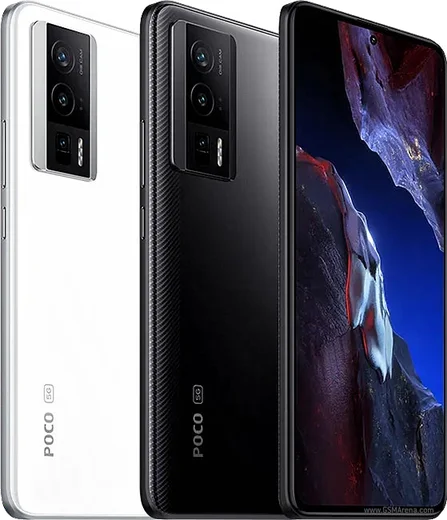
WhatsApp on Poco F5 Pro
Poco Android

WhatsApp for Poco F5 Pro

Snapdragon 8+ Gen 1, 6.67-inch 1.5K AMOLED, 120W

WhatsApp Messenger 4.7 · 64.2M reviews Free · Android · ~40 MB · by WhatsApp LLC
Download WhatsApp

Ask a question / report a problem

You can ask any question about WhatsApp support on the Poco F5 Pro — leave it below and we'll help.

Ask a question

Can the Poco F5 Pro run WhatsApp?

Fully supported
  • Operating systemAndroid
  • ProcessorSnapdragon 8+ Gen 1
  • WhatsApp versionLatest supported

Latest known WhatsApp problems on Poco F5 Pro

1

WhatsApp notifications not showing on my Poco F5 Pro (HyperOS), how do I fix it?

On HyperOS this is almost always battery optimization killing WhatsApp in the background. Go to Settings > Apps > Manage apps > WhatsApp > Battery saver and set it to "No restrictions", then go to Settings > Apps > Manage apps > WhatsApp and enable "Autostart". Finally, open WhatsApp in the Recents screen, swipe down on its card (or long-press it) and tap the lock icon so HyperOS doesn't clear it from memory. See how others solved this on Reddit
2

Why don't WhatsApp notifications appear on my Poco F5 Pro lock screen?

The lock screen notification setting for WhatsApp is likely disabled. Go to Settings > Notifications & Control Center > App notifications > WhatsApp, make sure notifications are on, then tap into the Messages channel and enable lock screen notifications (set it to show content). Also check Settings > Lock screen and confirm notifications aren't set to hide content on the lock screen. See how others solved this on Reddit
3

I keep getting an error sending messages on WhatsApp on my new Poco F5 Pro, what causes it?

This usually comes from HyperOS suspending WhatsApp's background network access. Set WhatsApp's battery to "No restrictions" under Settings > Apps > Manage apps > WhatsApp > Battery saver, and enable "Autostart" in the same Manage apps menu. If it persists, clear WhatsApp's cache via Settings > Apps > Manage apps > WhatsApp > Clear data > Clear cache, and confirm you're on the latest version from the Play Store. See how others solved this on Reddit
4

WhatsApp photos aren't showing up in my gallery on the Poco F5 Pro, how do I get them back?

First make sure media visibility is on: in WhatsApp go to Settings > Chats and enable "Media visibility" (also check the per-chat setting under each chat's info screen). Then grant WhatsApp full media access under Settings > Apps > Manage apps > WhatsApp > Permissions > Photos and videos > Allow all. If photos still don't appear, reboot the phone so HyperOS re-indexes the WhatsApp Images folder in the Gallery app. See how others solved this on Reddit
5

My Poco F5 Pro gets WhatsApp notifications but there's no sound, how do I fix that?

Open WhatsApp > Settings > Notifications and set a Message tone and Group tone (if they're set to None you'll get silent notifications). Then in HyperOS go to Settings > Notifications & Control Center > App notifications > WhatsApp > Messages and make sure that channel's importance is set to high with sound enabled. Also confirm Do Not Disturb isn't muting it under Settings > Sound & vibration > Do Not Disturb. See how others solved this on Reddit
6

WhatsApp doesn't wake my Poco F5 Pro and messages arrive late, what should I change?

Delayed notifications are caused by HyperOS putting WhatsApp into deep sleep. Disable battery restrictions at Settings > Apps > Manage apps > WhatsApp > Battery saver > No restrictions, turn on "Autostart" in the same menu, and lock WhatsApp in the Recents screen (tap the lock icon on its card) so it isn't killed. Make sure WhatsApp also has "No restrictions" rather than being included in any battery-saving sleep list. See how others solved this on Reddit

Ask a question / report a problem

You can ask any question about WhatsApp support on the Poco F5 Pro — leave it below and we'll help.

Ask a question

Watch: setting up WhatsApp

Prefer to watch? This short walkthrough shows the whole installation and number-verification flow.

How to install WhatsApp on Poco F5 Pro — video walkthrough

How to install WhatsApp on Poco F5 Pro

1

Choose how to download

On your Poco F5 Pro you can get the official app two ways: from the Google Play Store — the easiest option, since it keeps WhatsApp updated automatically — or directly from the official website. You can download an APK file, by clicking a link “Download WhatsApp directly”.

2

Open WhatsApp

Launch WhatsApp from your home screen or app drawer and accept the Terms of Service to start setup.

3

Verify your phone number

Enter your phone number. If your Poco F5 Pro uses dual SIM, pick the line you want WhatsApp tied to, then enter the 6-digit code it sends by SMS — it usually fills in automatically.

4

Restore chats and finish setup

Restore your chat history from Google Drive (use the same Google account), add your name and photo, and tap Allow for notifications so messages and calls arrive reliably.

Stay safe: only ever install WhatsApp from the official Android source. The Download button above already points there — modified copies (GB/Plus/Aero WhatsApp) can get your number banned.

Comments (15)

No registration needed. No email required.
T
tan.aMay 2, 2026

yo best site for this honestly

C
coolcatApr 3, 2026

well running whatsapp on my F5 Pro like new ❤️

K
kate19Jan 19, 2026

quick q can i hide when i was last online anyone

AppWhatsOfficialJan 25, 2026

Happy to help, in Privacy settings you can set Last Seen and Online to Nobody, so no one sees when you are active. Hope that helps!

N
nooooDec 13, 2025

سهل جداً بدون مشاكل 👍

H
helpmeeeNov 30, 2025

guys got it working on my poco f5 pro first try 👍

AppWhatsOfficialDec 3, 2025

Nice one, enjoy WhatsApp!

L
lou_jayOct 11, 2025

hey official app or a mod ?

AppWhatsOfficialOct 14, 2025

No worries, only the official app here. Modified versions can get your account banned, so we never link to them. Reach out anytime.

F
finn46Aug 26, 2025

Update no annoying ads which is nice

J
joe92Aug 7, 2025

wow super easy, alles startklar

M
ms_kateJul 15, 2025

Is the f5 Pro compatible with whatsapp pls

AppWhatsOfficialJul 20, 2025

Sure, the your phone works great with WhatsApp. Keep your system software current and you are good to go. Let us know if you need anything else.

N
newbieJun 29, 2025

echt tolle anleitung, hat auf meinem Poco F5 Pro geklappt

Q
quickfixJun 9, 2025

anyone? my phone has no google services, is it possible

AppWhatsOfficialJun 10, 2025

Of course, sure. Turn on unknown sources for your browser and grab the official APK, the guide explains how. Let us know if you need anything else.

T
tina_xXMay 27, 2025

so perfect steps for the f5 pro

F
finn60May 5, 2025

Ugh i NEED this app pleaseeee how do i do it

AppWhatsOfficialMay 9, 2025

You are almost there! Tap Download, allow the install, open WhatsApp and confirm your number. You will be set up on your phone in no time.

A
andy.jJan 20, 2025

is old android supported thanks

AppWhatsOfficialJan 24, 2025

Sure, if the store lets you install it, you are supported. Very old systems may eventually lose support though. Enjoy WhatsApp on your your phone!

R
raj07Jan 6, 2025

tbh i was scared it was a virus but its the real app