Poco Android

WhatsApp for Poco F5

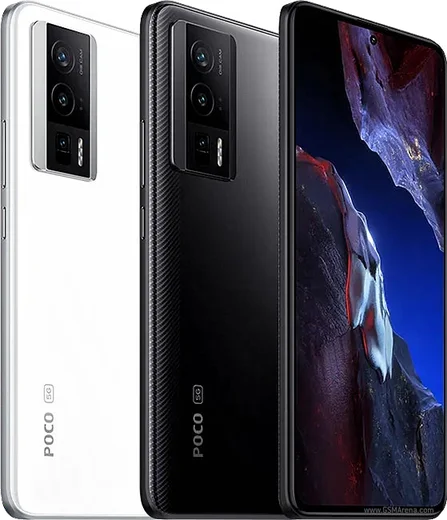
Snapdragon 7+ Gen 2, 6.67-inch AMOLED 120Hz

WhatsApp Messenger 4.7 · 64.2M reviews Free · Android · ~40 MB · by WhatsApp LLC
Download WhatsApp

Ask a question / report a problem

You can ask any question about WhatsApp support on the Poco F5 — leave it below and we'll help.

Ask a question

Can the Poco F5 run WhatsApp?

Fully supported
  • Operating systemAndroid
  • ProcessorSnapdragon 7+ Gen 2
  • WhatsApp versionLatest supported

Latest known WhatsApp problems on Poco F5

1

Why are my WhatsApp notifications not showing on my Poco F5 with HyperOS?

HyperOS aggressively manages background apps to save battery, which can stop WhatsApp from delivering notifications. Open Settings > Apps > Manage apps > WhatsApp, tap Battery saver and set it to No restrictions, then on the same page enable Autostart. Finally, open the Recents screen, long-press WhatsApp's card and tap the padlock to lock it so the system stops closing it in the background. See how others solved this on Reddit
2

I keep getting an error sending messages on WhatsApp on my new Poco F5 - how do I fix it?

This is often caused by HyperOS restricting WhatsApp's background data. Open Settings > Apps > Manage apps > WhatsApp > Restrict data usage and make sure both Wi-Fi and Mobile data are enabled, then set Battery saver to No restrictions on the same app page. If errors persist, clear the cache via Settings > Apps > Manage apps > WhatsApp > Clear data > Clear cache, and update WhatsApp to the latest version from the Play Store. See how others solved this on Reddit
3

WhatsApp photos aren't showing up in my gallery on the Poco F5 - where did they go?

WhatsApp's media visibility setting controls whether downloaded photos appear in the Gallery app. Open WhatsApp > Settings > Chats and turn on Media visibility, and for a specific chat tap the contact name and set Media visibility to On. If photos still don't appear, confirm WhatsApp has the Photos and media permission under Settings > Apps > Manage apps > WhatsApp > Permissions, then clear the Gallery cache via Settings > Apps > Manage apps > Gallery > Clear data > Clear cache. See how others solved this on Reddit
4

My WhatsApp notifications don't make any sound on the Poco F5 - how do I get the tone back?

First check WhatsApp > Settings > Notifications and make sure a Notification tone is set for both messages and groups instead of None. Then open Settings > Apps > Manage apps > WhatsApp > Notifications, tap the Messages channel and confirm it has a sound set and isn't silenced. Also make sure Do Not Disturb isn't active in the Control Center, as it mutes app alerts even when a tone is set. See how others solved this on Reddit
5

Why don't WhatsApp notifications appear on my Poco F5 lock screen?

HyperOS controls which apps can show content on the lock screen, and battery restrictions can suppress alerts while the phone is idle. Open Settings > Apps > Manage apps > WhatsApp > Notifications and make sure Lock screen notifications are enabled and set to show content, then set Battery saver to No restrictions on WhatsApp's app page. Enabling Autostart for WhatsApp on the same page also helps it deliver alerts reliably. See how others solved this on Reddit
6

After the HyperOS 2.0 update WhatsApp broke on my Poco F5 - what changed and how do I fix it?

The HyperOS 2.0 update can reset background and notification permissions, so WhatsApp behaves as if newly installed. Re-enable Autostart and set Battery saver to No restrictions via Settings > Apps > Manage apps > WhatsApp, then re-enable its notification channels under Settings > Apps > Manage apps > WhatsApp > Notifications. Updating WhatsApp from the Play Store to the newest build clears most remaining glitches from the upgrade. See how others solved this on Reddit

Ask a question / report a problem

You can ask any question about WhatsApp support on the Poco F5 — leave it below and we'll help.

Ask a question

Watch: setting up WhatsApp

Prefer to watch? This short walkthrough shows the whole installation and number-verification flow.

How to install WhatsApp on Poco F5 — video walkthrough

How to install WhatsApp on Poco F5

1

Choose how to download

On your Poco F5 you can get the official app two ways: from the Google Play Store — the easiest option, since it keeps WhatsApp updated automatically — or directly from the official website. You can download an APK file, by clicking a link “Download WhatsApp directly”.

2

Open WhatsApp

Launch WhatsApp from your home screen or app drawer and accept the Terms of Service to start setup.

3

Verify your phone number

Enter your phone number. If your Poco F5 uses dual SIM, pick the line you want WhatsApp tied to, then enter the 6-digit code it sends by SMS — it usually fills in automatically.

4

Restore chats and finish setup

Restore your chat history from Google Drive (use the same Google account), add your name and photo, and tap Allow for notifications so messages and calls arrive reliably.

Stay safe: only ever install WhatsApp from the official Android source. The Download button above already points there — modified copies (GB/Plus/Aero WhatsApp) can get your number banned.

Comments (10)

No registration needed. No email required.
R
rob_tanMar 29, 2026

got my Poco F5 sorted thanks to you cheers

F
finn2Feb 5, 2026

works like a charm on the f5 🎉

T
techguyOct 18, 2025

Worked perfect on my Poco F5 🔥

C
chris_lucMay 21, 2025

Omg finally got whatsapp running on my f5

M
mr_peteApr 26, 2025

finally a guide that makes sense ✌️

I
ivan97Mar 15, 2025

Yo installed whatsapp on my poco f5 with no issues :)

S
sam_aleJan 11, 2025

ugh omggg i cant install it someone heeelp

AppWhatsOfficialJan 14, 2025

No panic needed. The Download button takes you to the official app, then just install and verify your number.

N
newbieDec 24, 2024

franchement a marché parfaitement, merci

L
lina54Nov 29, 2024

the download is very slow is that normal

AppWhatsOfficialDec 4, 2024

Of course, a slow download is usually the network. A stable wifi connection will speed it up a lot. Let us know if you need anything else.

V
val.dNov 26, 2024

por fin instalado sin problemas