WhatsApp on Oppo Find X6
Oppo Android

WhatsApp for Oppo Find X6

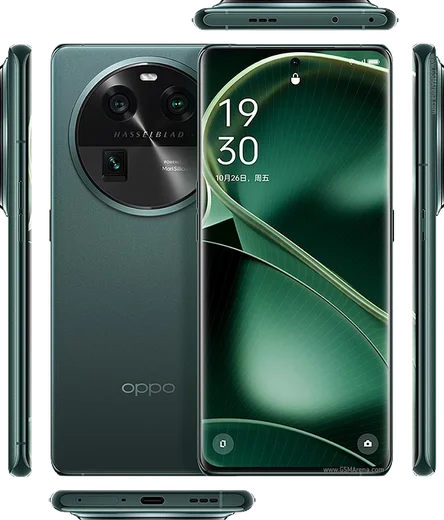
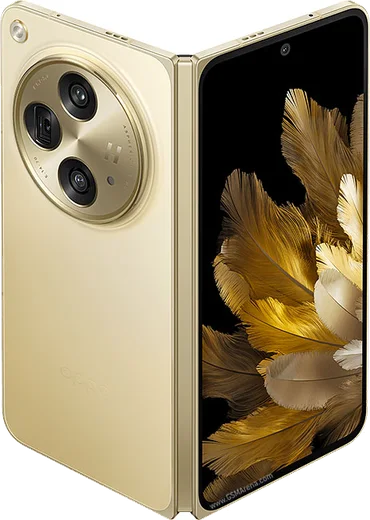
Dimensity 9200, 6.74-inch AMOLED, triple 50MP camera

WhatsApp Messenger 4.7 · 64.2M reviews Free · Android · ~40 MB · by WhatsApp LLC
Download WhatsApp

Ask a question / report a problem

You can ask any question about WhatsApp support on the Oppo Find X6 — leave it below and we'll help.

Ask a question

Can the Oppo Find X6 run WhatsApp?

Fully supported
  • Operating systemAndroid
  • ProcessorDimensity 9200
  • WhatsApp versionLatest supported

Latest known WhatsApp problems on Oppo Find X6

1

Why are my WhatsApp notifications delayed or not coming through on the Oppo Find X6?

ColorOS aggressively freezes background apps to save battery, which delays WhatsApp message and call alerts. Go to Settings > Battery > Power saving (or the More/gear menu) > App battery management, tap WhatsApp and set it to "Allow background activity" / "Don't optimize". Then under Settings > Apps > Auto launch, enable auto-launch for WhatsApp. Finally, lock WhatsApp in the Recent Apps screen (open recents, swipe down on the app card or tap its menu and select "Lock") so the system won't kill it. See how others solved this on Reddit
2

My Find X6 blocks notifications while the phone is asleep or idle, how do I fix it?

ColorOS has a "Sleep standby optimization" feature that cuts background connections overnight, so WhatsApp goes silent until you wake the phone. Open Settings > Battery > tap the More/three-dot menu (or Other battery settings) and turn off "Sleep standby optimization". Then set WhatsApp's battery usage to "Allow background activity" so it stays connected while the screen is off. See how others solved this on Reddit
3

WhatsApp and other Meta app notifications arrive late on my Find X6 unless I open the app, what's the proper setup?

Meta apps (WhatsApp, Messenger, Instagram) rely on a persistent background connection that ColorOS throttles. For each one, go to Settings > Battery > App battery management, select the app and set it to "Allow background activity", then in Settings > Apps > Auto launch enable auto-launch for that app. Make sure no data restriction is set under Settings > Mobile network > Data usage > Disable mobile data for the app. After applying this to every Meta app and rebooting, notifications should push in real time. See how others solved this on Reddit
4

WhatsApp calls don't show on the lock screen of my Oppo Find X6, how do I get the full-screen incoming call?

This happens when WhatsApp lacks the lock-screen and floating-window permissions ColorOS requires. Open Settings > Apps > Manage apps > WhatsApp > and enable "Display over other apps" / "Display pop-up windows while running in the background", plus "Display on lock screen". Then inside WhatsApp go to Settings > Notifications and confirm Call notifications are on. Keeping WhatsApp's background activity allowed (Settings > Battery) is also needed for incoming calls to ring reliably. See how others solved this on Reddit
5

WhatsApp notifications don't appear on the Always-On Display of my Find X6 Pro, can I enable them?

ColorOS Always-On Display only shows new-message indicators when notification display is enabled for it. Go to Settings > Personalizations > Always-On Display and turn on the notification option, then confirm WhatsApp notifications are allowed under Settings > Notification & status bar > Manage notifications > WhatsApp. Note that AOD only shows a generic app icon, not message previews, so for full alerts rely on the lock screen instead. See how others solved this on Reddit

Ask a question / report a problem

You can ask any question about WhatsApp support on the Oppo Find X6 — leave it below and we'll help.

Ask a question

Watch: setting up WhatsApp

Prefer to watch? This short walkthrough shows the whole installation and number-verification flow.

How to install WhatsApp on Oppo Find X6 — video walkthrough

How to install WhatsApp on Oppo Find X6

1

Choose how to download

On your Oppo Find X6 you can get the official app two ways: from the Google Play Store — the easiest option, since it keeps WhatsApp updated automatically — or directly from the official website. You can download an APK file, by clicking a link “Download WhatsApp directly”.

2

Open WhatsApp

Launch WhatsApp from your home screen or app drawer and accept the Terms of Service to start setup.

3

Verify your phone number

Enter your phone number. If your Oppo Find X6 uses dual SIM, pick the line you want WhatsApp tied to, then enter the 6-digit code it sends by SMS — it usually fills in automatically.

4

Restore chats and finish setup

Restore your chat history from Google Drive (use the same Google account), add your name and photo, and tap Allow for notifications so messages and calls arrive reliably.

Stay safe: only ever install WhatsApp from the official Android source. The Download button above already points there — modified copies (GB/Plus/Aero WhatsApp) can get your number banned.

Comments (13)

No registration needed. No email required.
O
omar.cJun 9, 2026

Update i was scared it was a virus but its the real app

AppWhatsOfficialJun 13, 2026

Great to hear it worked out!

K
kev1990Mar 11, 2026

Wow a marché parfaitement, merci 😍

K
kev55Feb 9, 2026

wow perfect steps for the Oppo Find X6 ❤️

K
khaled12Feb 4, 2026

سهل جداً بدون مشاكل شكراً

M
ms_ivanJan 23, 2026

Anyone? my phone is a few years old will it work

AppWhatsOfficialJan 27, 2026

Sure, older phones can work as long as the app is still offered to them. Updating the OS where possible helps a lot. Let us know if you need anything else.

J
joe.wJan 15, 2026

Quick q is old android supported anyone

AppWhatsOfficialJan 20, 2026

Thanks for asking, if the store lets you install it, you are supported. Very old systems may eventually lose support though.

L
lou81Dec 4, 2025

Sehr einfach, in 2 minuten erledigt 🎉

J
just_alexNov 10, 2025

finally got whatsapp running on my x6

T
tan_realSep 13, 2025

Omg SOS i cant figure out how to install whatsapp heeelp :(

AppWhatsOfficialSep 15, 2025

We are here to help. Hit Download, follow the steps on this page, and if the code is slow just request it again.

P
priya66May 1, 2025

guys all set up and chatting now

N
nina_amyJan 9, 2025

Wow whatsapp works fine on my oppo find x6 lol

L
lil_noahDec 29, 2024

so verified my number on the find x6 with no trouble

J
just_chrisDec 17, 2024

well best guide for the oppo find x6 by far