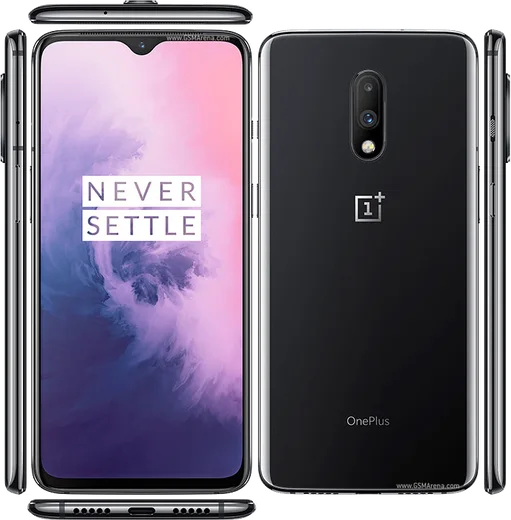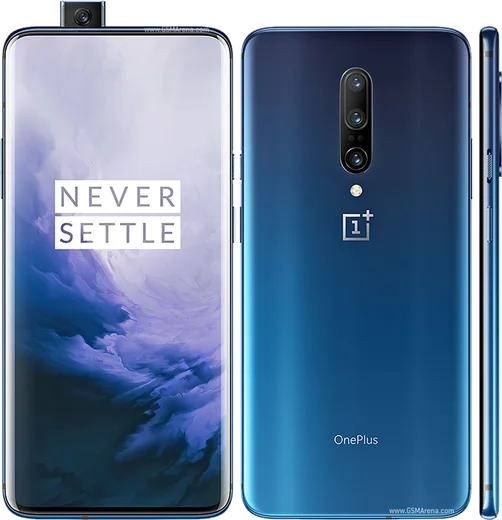
WhatsApp on OnePlus 7
OnePlus Android

WhatsApp for OnePlus 7

Snapdragon 855, 6.41-inch AMOLED, 48MP camera

WhatsApp Messenger 4.7 · 64.2M reviews Free · Android · ~40 MB · by WhatsApp LLC
Download WhatsApp

Ask a question / report a problem

You can ask any question about WhatsApp support on the OnePlus 7 — leave it below and we'll help.

Ask a question

Can the OnePlus 7 run WhatsApp?

Fully supported
  • Operating systemAndroid
  • ProcessorSnapdragon 855
  • WhatsApp versionLatest supported

Latest known WhatsApp problems on OnePlus 7

1

Why does WhatsApp freeze or lag on my OnePlus 7?

OxygenOS's aggressive memory and battery management can freeze apps like WhatsApp and Chrome when you switch between them. Go to Settings > Apps > WhatsApp > Battery and set it to Don't restrict (allow background activity). Then open Settings > Battery > Battery optimization, find WhatsApp and set it to Don't optimize, and in Settings > Battery > More (advanced) turn off Sleep standby optimization. A reboot after changing these usually clears up the stuttering. See how others solved this on Reddit
2

WhatsApp keeps draining my battery and heating up the OnePlus 7, what can I do?

Background activity and media auto-downloads are the usual cause of WhatsApp heating the OnePlus 7. Open WhatsApp > Settings > Storage and data and turn off auto-download for photos, audio, video and documents on mobile data and Wi-Fi. If heat persists, go to Android Settings > Apps > WhatsApp > Storage and clear the cache (this does not delete chats), then reboot. Keeping WhatsApp updated also helps, since older builds had known wakelock and battery-drain bugs. See how others solved this on Reddit
3

The screen goes black during WhatsApp voice calls on my OnePlus 7 (proximity sensor issue), how do I fix it?

This is a known OnePlus 7/7 Pro proximity sensor quirk where the screen stays black after a call. First remove any screen protector overhang and clean the top of the display near the earpiece, since dust or a protector edge throws the sensor off. Then make sure OxygenOS is fully updated, as several updates addressed proximity-sensor behavior. If it still misreads, reboot the phone; if the fault continues, the sensor may need recalibration via OnePlus support, as there is no reliable user-facing calibration toggle on this model. See how others solved this on Reddit
4

My WhatsApp notifications don't show up or are delayed on the OnePlus 7, how do I fix that?

OxygenOS puts apps to sleep to save power, which silences or delays WhatsApp notifications. Go to Settings > Apps > WhatsApp > Battery and set it to Don't restrict (allow background activity), then in Settings > Battery > More turn off Sleep standby optimization. Also confirm WhatsApp > Settings > Notifications has notifications enabled with High priority, and that Android's Do Not Disturb isn't blocking them. See how others solved this on Reddit
5

How do I transfer my WhatsApp chats from an old iPhone to my OnePlus 7?

WhatsApp's iCloud backups can't be restored directly onto Android, so the two backup systems aren't compatible. The official path is WhatsApp's Move to Android feature: factory reset (or set up fresh) the OnePlus 7, then during WhatsApp setup connect the iPhone with a USB-C cable and follow the on-screen Move to Android prompts. If your OnePlus build doesn't support it, you'll need a reputable paid third-party transfer tool, as manual iCloud-to-Google-Drive migration isn't supported. See how others solved this on Reddit
6

My WhatsApp Google Drive backup won't restore after switching to the OnePlus 7, what's wrong?

Restores fail when the Google account on the new phone doesn't match the one that made the backup, or when the verified phone number differs. During WhatsApp setup, verify the same phone number and sign in with the exact Google account used for the original backup, and make sure that account is added under Settings > Accounts on the OnePlus 7. A stable Wi-Fi connection is required, and the restore prompt only appears at the right step of setup, so don't skip it. See how others solved this on Reddit

Ask a question / report a problem

You can ask any question about WhatsApp support on the OnePlus 7 — leave it below and we'll help.

Ask a question

Watch: setting up WhatsApp

Prefer to watch? This short walkthrough shows the whole installation and number-verification flow.

How to install WhatsApp on OnePlus 7 — video walkthrough

How to install WhatsApp on OnePlus 7

1

Choose how to download

On your OnePlus 7 you can get the official app two ways: from the Google Play Store — the easiest option, since it keeps WhatsApp updated automatically — or directly from the official website. You can download an APK file, by clicking a link “Download WhatsApp directly”.

2

Open WhatsApp

Launch WhatsApp from your home screen or app drawer and accept the Terms of Service to start setup.

3

Verify your phone number

Enter your phone number. If your OnePlus 7 uses dual SIM, pick the line you want WhatsApp tied to, then enter the 6-digit code it sends by SMS — it usually fills in automatically.

4

Restore chats and finish setup

Restore your chat history from Google Drive (use the same Google account), add your name and photo, and tap Allow for notifications so messages and calls arrive reliably.

Stay safe: only ever install WhatsApp from the official Android source. The Download button above already points there — modified copies (GB/Plus/Aero WhatsApp) can get your number banned.

Comments (8)

No registration needed. No email required.
I
im_rosaJan 13, 2026

guys my whole family is waiting pls help me install it :(

AppWhatsOfficialJan 15, 2026

Hey, no need to stress! Tap the green Download button at the top, follow the steps, and you will have WhatsApp in a minute.

R
rob_leoOct 12, 2025

Finally got it working on my 7 first try

AppWhatsOfficialOct 15, 2025

Thanks for the feedback!

P
plz help meeSep 12, 2025

Whatsapp is working on my OnePlus 7 now 😍

E
ella_rayAug 30, 2025

man 10 out of 10 🔥

P
phoneaddictJul 22, 2025

honestly got it working on my OnePlus 7 first try

J
just_maxxMay 30, 2025

All good on my OnePlus 7 now 🙏

C
confuuusedDec 16, 2024

got my oneplus 7 sorted thanks to you

S
sam.eOct 9, 2024

davvero il miglior sito, al primo colpo