Nokia Android

WhatsApp for Nokia C31

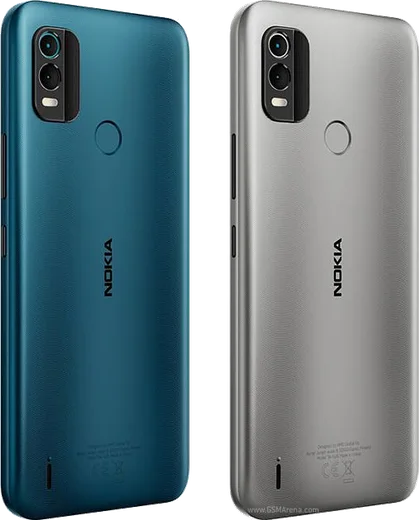
Unisoc SC9863A, 6.75-inch HD+, triple camera

WhatsApp Messenger 4.7 · 64.2M reviews Free · Android · ~40 MB · by WhatsApp LLC
Download WhatsApp

Ask a question / report a problem

You can ask any question about WhatsApp support on the Nokia C31 — leave it below and we'll help.

Ask a question

Can the Nokia C31 run WhatsApp?

Fully supported
  • Operating systemAndroid
  • ProcessorUnisoc SC9863A
  • WhatsApp versionLatest supported

Latest known WhatsApp problems on Nokia C31

1

WhatsApp is running slow and lagging on my Nokia C31 — how do I fix it?

The C31 is a budget phone (3GB RAM on the base variant, 4GB on the higher one) running Android 12, so WhatsApp lag usually comes from low free memory and a bloated cache. Go to Settings > Apps > WhatsApp > Storage and tap Clear cache (not Clear data), then restart the phone and swipe away background apps from the recent-apps view. Turning off auto-download under WhatsApp's Settings > Storage and data and keeping fewer photos/videos in chats will keep it more responsive on this low-RAM hardware. See how others solved this on Reddit
2

I see a 'WhatsApp' entry in my Nokia C31 logs but I never installed it — what is this?

On the C31 a 'WhatsApp' line in your notification log or battery/data usage usually means the app was pre-loaded, installed earlier under another account, or a contact's missed WhatsApp call got logged. Open Settings > Apps > See all apps and look for WhatsApp; if it's there and you don't want it, tap it and choose Uninstall (or Disable if the system won't let you remove it). If it isn't listed at all, the entry is just a record of an event such as someone calling you, and nothing is actively running on your device. See how others solved this on Reddit
3

Can I make WhatsApp voice and video calls on the Nokia C31?

Yes — unlike KaiOS feature phones such as the Nokia 2720 Flip, the C31 runs full Android, so WhatsApp voice and video calling work normally. Install WhatsApp from the Google Play Store, then grant the Microphone and Camera permissions when prompted (or later under Settings > Apps > WhatsApp > Permissions). Make sure you're on Wi-Fi or have mobile data enabled, since WhatsApp calls run over the internet rather than using your carrier minutes. See how others solved this on Reddit
4

My Nokia C31 won't turn on and I can't get to WhatsApp — what should I try?

First charge it for at least 30 minutes with a known-good cable and adapter, since a deeply drained battery can look like a dead phone. Then try a forced restart by holding the Power button for 15-30 seconds until the Nokia logo appears; if nothing happens, swap to a different charger and cable to rule out a faulty accessory. If it still won't boot, the battery or charging port likely needs service — your WhatsApp chats will be safe to restore later as long as you have a Google Drive backup. See how others solved this on Reddit
5

Is the Nokia C31 good enough to run WhatsApp reliably day to day?

The C31 is an entry-level Android handset, so WhatsApp messaging, photos, and calls all work, but heavy multitasking can feel sluggish on its modest Unisoc processor and 3–4GB RAM. For the smoothest experience keep the app updated via the Play Store, avoid running many apps at once, and periodically clear the cache under Settings > Apps > WhatsApp > Storage. If you mostly text and send the occasional photo it handles WhatsApp fine; just don't expect flagship-level speed. See how others solved this on Reddit
6

I want a simple phone but still need WhatsApp — does the Nokia C31 work for that?

Yes, the C31 is a good middle ground: it's a no-frills Android phone but still runs the full Google Play version of WhatsApp, which true 'dumb phones' and KaiOS devices can't do reliably. Just install WhatsApp from the Play Store, verify your number, and restore your chats from Google Drive if you're switching phones. You get a clean, simple device while keeping full WhatsApp messaging, calls, and backups. See how others solved this on Reddit

Ask a question / report a problem

You can ask any question about WhatsApp support on the Nokia C31 — leave it below and we'll help.

Ask a question

Watch: setting up WhatsApp

Prefer to watch? This short walkthrough shows the whole installation and number-verification flow.

How to install WhatsApp on Nokia C31 — video walkthrough

How to install WhatsApp on Nokia C31

1

Choose how to download

On your Nokia C31 you can get the official app two ways: from the Google Play Store — the easiest option, since it keeps WhatsApp updated automatically — or directly from the official website. You can download an APK file, by clicking a link “Download WhatsApp directly”.

2

Open WhatsApp

Launch WhatsApp from your home screen or app drawer and accept the Terms of Service to start setup.

3

Verify your phone number

Enter your phone number. If your Nokia C31 uses dual SIM, pick the line you want WhatsApp tied to, then enter the 6-digit code it sends by SMS — it usually fills in automatically.

4

Restore chats and finish setup

Restore your chat history from Google Drive (use the same Google account), add your name and photo, and tap Allow for notifications so messages and calls arrive reliably.

Stay safe: only ever install WhatsApp from the official Android source. The Download button above already points there — modified copies (GB/Plus/Aero WhatsApp) can get your number banned.

Comments (8)

No registration needed. No email required.
J
jess.tMay 17, 2026

well did this on my C31 and it just worked 🔥

AppWhatsOfficialMay 21, 2026

Glad we could help!

L
leo_officialMay 12, 2026

Guys all good on my nokia c31 now ✌️

E
eeeeeemmmmmaaaaaApr 25, 2026

quick q where do i change my profile photo ?

AppWhatsOfficialApr 27, 2026

Hi! In Settings tap your profile at the top, then the camera icon lets you pick or take a new picture.

E
eeeeeemmmmmaaaaaJan 6, 2026

ey todo bien en mi nokia c31, mil gracias gracias

N
not_alexMar 29, 2025

i been trying since morning pleaseee how to install on Nokia C31 😩

AppWhatsOfficialApr 2, 2025

You are almost there! Tap Download, allow the install, open WhatsApp and confirm your number.

L
lil_kateJan 1, 2025

Wow much better then the other sites

A
ash2000Oct 6, 2024

Man downloaded and installed on my C31

R
rob_theJul 13, 2024

the download was a bit slow but it worked