WhatsApp on Nokia G11
Nokia Android

WhatsApp for Nokia G11

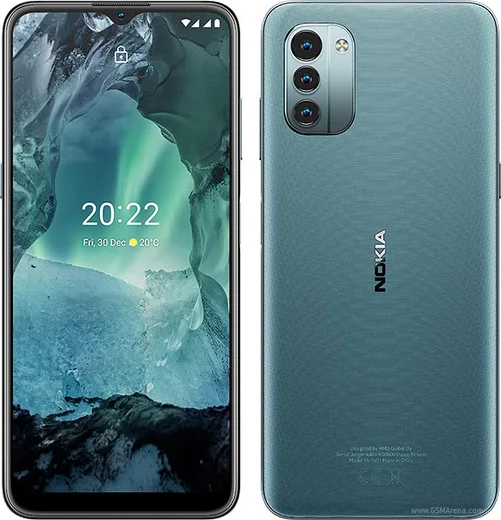
Unisoc T606, 6.5-inch 90Hz, 5050mAh battery

WhatsApp Messenger 4.7 · 64.2M reviews Free · Android · ~40 MB · by WhatsApp LLC
Download WhatsApp

Ask a question / report a problem

You can ask any question about WhatsApp support on the Nokia G11 — leave it below and we'll help.

Ask a question

Can the Nokia G11 run WhatsApp?

Fully supported
  • Operating systemAndroid
  • ProcessorUnisoc T606
  • WhatsApp versionLatest supported

Latest known WhatsApp problems on Nokia G11

1

Is WhatsApp even worth installing on the Nokia G11, or is the phone too slow and laggy?

The Nokia G11 runs full Android (11/12) on a Unisoc T606 chip with 3-4GB of RAM, so the official WhatsApp from the Google Play Store installs and runs fine for chats, voice and video calls. It is a budget phone, so reduce lag by clearing the cache occasionally under Settings > Apps > WhatsApp > Storage & cache > Clear cache, closing heavy background apps, and freeing space via WhatsApp > Settings > Storage and data > Manage storage. See how others solved this on Reddit
2

WhatsApp keeps crashing or freezing on my Nokia G11 right after I open it

On low-RAM Nokia G11 units this is almost always memory pressure or a stale cache. First go to Settings > Apps > WhatsApp > Storage & cache > Clear cache (do NOT clear data, that wipes chats), then restart the phone, and update WhatsApp in the Play Store since old builds crash on Android 12. If it persists, free internal storage and stop Android killing it in the background via Settings > Apps > WhatsApp > Battery > Unrestricted. See how others solved this on Reddit
3

Where are my WhatsApp media and chat files actually stored on the Nokia G11 and how do I get to them?

On the Nokia G11 your photos, videos and voice notes live in Internal storage > Android > media > com.whatsapp > WhatsApp > Media, which you can open with the Files app without root. The protected /data/data/com.whatsapp folder (where the chat database sits) is not accessible without root, so to move chats use WhatsApp's own backup instead: WhatsApp > Settings > Chats > Chat backup to save to Google Drive. See how others solved this on Reddit
4

How do I back up and restore my WhatsApp chats when moving to or from the Nokia G11?

Because the Nokia G11 is an Android phone, WhatsApp backs up to Google Drive, not iCloud. Open WhatsApp > Settings > Chats > Chat backup, sign in with the same Google account, and tap Back up; on the new device install WhatsApp, verify the same phone number, and choose Restore when prompted. Keep the backup tied to the Google account you actually use on the G11, otherwise the restore screen will not find it. See how others solved this on Reddit
5

I have an old Nokia feature phone too — can I run the same WhatsApp as my Nokia G11, and will it keep working?

No, those are two different worlds: the Nokia G11 runs real Android and gets the official WhatsApp from Google Play, while old KaiOS or S30+ Nokia handsets only ever had a stripped-down client that WhatsApp has now discontinued. Stick to installing WhatsApp from the Play Store on the G11, and do not sideload unofficial 'WhatsApp for old Nokia' clients, as they can get your number banned. See how others solved this on Reddit
6

WhatsApp says it is no longer supported or won't update on my Nokia G11 — what can I do?

WhatsApp drops support for old Android versions over time, so first update the phone via Settings > System > System update, then update WhatsApp in the Play Store. If the Play Store shows an error, clear its cache under Settings > Apps > Google Play Store > Storage & cache > Clear cache and confirm the date and time are set to automatic, since a wrong clock blocks both the install and WhatsApp's security check. See how others solved this on Reddit

Ask a question / report a problem

You can ask any question about WhatsApp support on the Nokia G11 — leave it below and we'll help.

Ask a question

Watch: setting up WhatsApp

Prefer to watch? This short walkthrough shows the whole installation and number-verification flow.

How to install WhatsApp on Nokia G11 — video walkthrough

How to install WhatsApp on Nokia G11

1

Choose how to download

On your Nokia G11 you can get the official app two ways: from the Google Play Store — the easiest option, since it keeps WhatsApp updated automatically — or directly from the official website. You can download an APK file, by clicking a link “Download WhatsApp directly”.

2

Open WhatsApp

Launch WhatsApp from your home screen or app drawer and accept the Terms of Service to start setup.

3

Verify your phone number

Enter your phone number. If your Nokia G11 uses dual SIM, pick the line you want WhatsApp tied to, then enter the 6-digit code it sends by SMS — it usually fills in automatically.

4

Restore chats and finish setup

Restore your chat history from Google Drive (use the same Google account), add your name and photo, and tap Allow for notifications so messages and calls arrive reliably.

Stay safe: only ever install WhatsApp from the official Android source. The Download button above already points there — modified copies (GB/Plus/Aero WhatsApp) can get your number banned.

Comments (7)

No registration needed. No email required.
T
theo_gabOct 25, 2025

endlich hat super funktioniert auf meinem G11 🙏

B
big_miaAug 7, 2025

smooth install on the g11

A
apploverMar 3, 2025

Ngl whatsapp works fine on my Nokia G11 ✌️

R
rob21Nov 6, 2024

man saved me so much time thx

AppWhatsOfficialNov 9, 2024

Good to hear!

M
ms_leoOct 20, 2024

ugh whyyy is this so hard pls help me get whatsapp 😭

AppWhatsOfficialOct 23, 2024

No panic needed. The Download button takes you to the official app, then just install and verify your number.

S
saaaaamSep 28, 2024

man verified my number on the nokia g11 with no trouble

J
just_tinaAug 30, 2024

Running whatsapp on my g11 like new thanks again