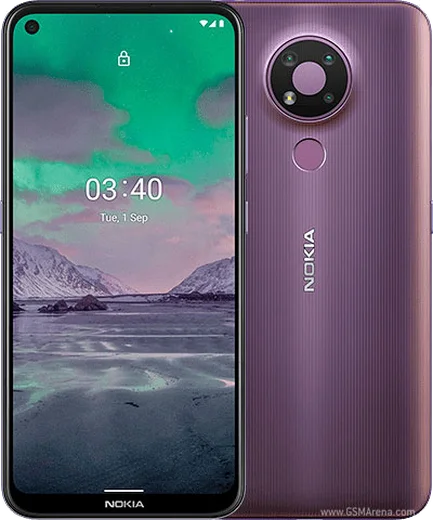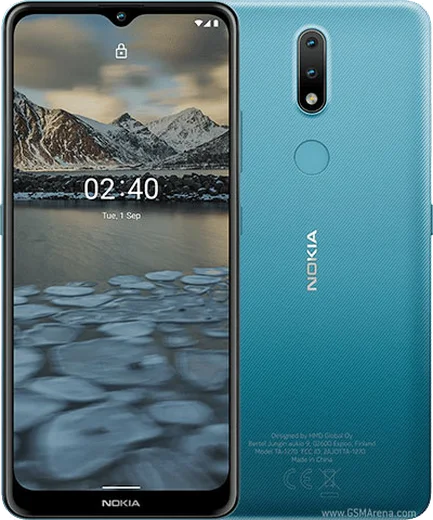
WhatsApp on Nokia 3.4
Nokia Android

WhatsApp for Nokia 3.4

Snapdragon 460, 6.39-inch HD+, triple camera

WhatsApp Messenger 4.7 · 64.2M reviews Free · Android · ~40 MB · by WhatsApp LLC
Download WhatsApp

Ask a question / report a problem

You can ask any question about WhatsApp support on the Nokia 3.4 — leave it below and we'll help.

Ask a question

Can the Nokia 3.4 run WhatsApp?

Fully supported
  • Operating systemAndroid
  • ProcessorSnapdragon 460
  • WhatsApp versionLatest supported

Latest known WhatsApp problems on Nokia 3.4

1

Is the Nokia 3.4 powerful enough to run WhatsApp smoothly?

Yes, the Nokia 3.4 ships with Android 10 (upgradable to Android 11) and meets WhatsApp's current requirements, so the app installs and runs fine from the Google Play Store. With only 3GB of RAM on most variants it can feel sluggish if you keep many apps open, so close background apps and clear cache via Settings > Apps > WhatsApp > Storage > Clear cache if messages or media start lagging. See how others solved this on Reddit
2

WhatsApp keeps freezing or lagging on my Nokia 3.4 - how do I fix it?

This is usually low free storage or a bloated cache, since the 3.4's entry-level chip and 32/64GB storage fill up quickly. Go to Settings > Apps > WhatsApp > Storage and tap Clear cache, then free up space by deleting old media under WhatsApp Settings > Storage and data > Manage storage, and reboot the phone. Keeping the app updated through the Play Store also resolves many stutter and crash issues. See how others solved this on Reddit
3

WhatsApp won't update on my Nokia 3.4 - what should I do?

Open the Google Play Store, tap your profile icon > Manage apps & device, and update WhatsApp from there; if it fails, clear the Play Store cache under Settings > Apps > Google Play Store > Storage > Clear cache. Since the Nokia 3.4 tops out at Android 11, also install the latest available security patch via Settings > System > System update so newer WhatsApp builds stay compatible. See how others solved this on Reddit
4

How do I move my WhatsApp chats to or from a Nokia 3.4?

WhatsApp on the Nokia 3.4 backs up to Google Drive, so open WhatsApp > Settings > Chats > Chat backup, sign in with your Google account, and tap Back up. On a new phone, install WhatsApp, verify the same number, and choose Restore when prompted - this only works between Android devices, since iPhone iCloud backups are not compatible. See how others solved this on Reddit
5

Why is everyone telling me to get WhatsApp on my Nokia 3.4?

WhatsApp is the default messaging app across Latin America, Europe, and much of Asia because it works over any data or Wi-Fi connection and is free, so most contacts will expect to reach you there. On the Nokia 3.4 simply install it from the Google Play Store, verify your phone number, and your existing contacts who use WhatsApp appear automatically. See how others solved this on Reddit
6

Can I run WhatsApp on an old Nokia phone if my Nokia 3.4 dies?

WhatsApp officially supports Android, iPhone, and a handful of KaiOS Nokia feature phones (like the 8000/6300 4G), but classic Symbian and S30+ Nokias rely on unofficial third-party clients that are unreliable and often break. Your best bet is to keep using the Nokia 3.4 with the official Play Store app, since it is a full Android device and gets genuine WhatsApp updates. See how others solved this on Reddit

Ask a question / report a problem

You can ask any question about WhatsApp support on the Nokia 3.4 — leave it below and we'll help.

Ask a question

Watch: setting up WhatsApp

Prefer to watch? This short walkthrough shows the whole installation and number-verification flow.

How to install WhatsApp on Nokia 3.4 — video walkthrough

How to install WhatsApp on Nokia 3.4

1

Choose how to download

On your Nokia 3.4 you can get the official app two ways: from the Google Play Store — the easiest option, since it keeps WhatsApp updated automatically — or directly from the official website. You can download an APK file, by clicking a link “Download WhatsApp directly”.

2

Open WhatsApp

Launch WhatsApp from your home screen or app drawer and accept the Terms of Service to start setup.

3

Verify your phone number

Enter your phone number. If your Nokia 3.4 uses dual SIM, pick the line you want WhatsApp tied to, then enter the 6-digit code it sends by SMS — it usually fills in automatically.

4

Restore chats and finish setup

Restore your chat history from Google Drive (use the same Google account), add your name and photo, and tap Allow for notifications so messages and calls arrive reliably.

Stay safe: only ever install WhatsApp from the official Android source. The Download button above already points there — modified copies (GB/Plus/Aero WhatsApp) can get your number banned.

Comments (6)

No registration needed. No email required.
N
nightowlMar 7, 2026

The nokia 3.4 guide was spot on 👍

R
rosa92Sep 6, 2025

verified my number on the nokia 3.4 with no trouble

AppWhatsOfficialSep 10, 2025

Great to hear it worked out!

T
techguyMay 18, 2025

ahora mi nokia 3.4 tiene whatsapp, genial 🙏

W
whyyyyyApr 15, 2025

works like a charm on the nokia 3.4 💯

N
newphoneJan 16, 2025

Anyone pls i cant download it heeeelp me pls

AppWhatsOfficialJan 18, 2025

Take a breath, we got you. Press Download above, then Install, then verify your number. That is all it takes. You will be set up on your phone in no time.

S
sol29Nov 23, 2024

tbh verified my number on the Nokia 3.4 with no trouble