Motorola Android

WhatsApp for Motorola Moto G84 5G

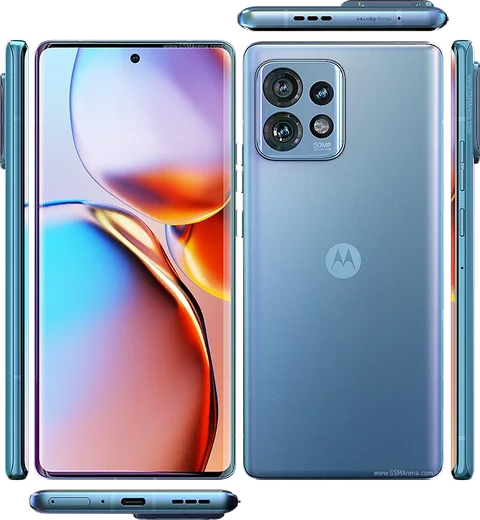
Snapdragon 695 5G, 6.55-inch pOLED, 50MP OIS

WhatsApp Messenger 4.7 · 64.2M reviews Free · Android · ~40 MB · by WhatsApp LLC
Download WhatsApp

Ask a question / report a problem

You can ask any question about WhatsApp support on the Motorola Moto G84 5G — leave it below and we'll help.

Ask a question

Can the Motorola Moto G84 5G run WhatsApp?

Fully supported
  • Operating systemAndroid
  • ProcessorSnapdragon 695 5G
  • WhatsApp versionLatest supported

Latest known WhatsApp problems on Motorola Moto G84 5G

1

Why are my WhatsApp calls and messages delayed on the Moto G84 5G?

This is almost always caused by Motorola's battery optimization killing WhatsApp in the background. Go to Settings > Apps > WhatsApp > App battery usage and set it to Unrestricted. Then open Settings > Battery and turn off any battery saver profile, and disable Adaptive Battery (Settings > Battery > Adaptive Battery) so the system stops throttling WhatsApp. After this, messages and calls should sync in real time instead of arriving in a batch when you reopen the app. See how others solved this on Reddit
2

WhatsApp notifications arrive late on my Motorola G84 5G until I open the app — how do I fix it?

Motorola's power management is putting WhatsApp to sleep, so queued notifications only flush when you reopen it. Set WhatsApp to Unrestricted under Settings > Apps > WhatsApp > App battery usage, and turn off Adaptive Battery in Settings > Battery. Then confirm notifications are fully enabled in Settings > Apps > WhatsApp > Notifications and that WhatsApp is allowed to send notifications at all. Keeping WhatsApp excluded from background restrictions is what stops the delay. See how others solved this on Reddit
3

What actually fixes delayed notifications on the Moto G84?

The most reliable fix reported by owners is to remove every background restriction Motorola puts on the app. Set WhatsApp battery usage to Unrestricted (Settings > Apps > WhatsApp > App battery usage), disable Adaptive Battery in Settings > Battery, and make sure WhatsApp is not listed under any battery-saving or 'optimized' app list. Some users also found that reinstalling WhatsApp and reconfiguring it without battery optimization permanently resolved the lag after a reboot. See how others solved this on Reddit
4

My Moto G84 5G misses WhatsApp notifications and calls when the screen is off — any solution?

With the screen off the phone enters Doze and suspends background apps. Exempt WhatsApp by setting it to Unrestricted in Settings > Apps > WhatsApp > App battery usage, and turn off Adaptive Battery in Settings > Battery. Also check that WhatsApp has not been auto-disabled under Settings > Apps > Unused apps / 'Pause app activity if unused', which can stop it from waking the screen for calls. See how others solved this on Reddit
5

WhatsApp video calls freeze or fail on my Moto G84 5G — is this a known bug?

Several Moto G84 owners report video calls dropping or freezing across multiple apps, which points to a software/firmware issue rather than your network. First make sure WhatsApp and your system software are fully updated (Settings > System > System updates), clear WhatsApp's cache under Settings > Apps > WhatsApp > Storage and cache, and confirm Camera and Microphone permissions are granted in Settings > Apps > WhatsApp > Permissions. If it still happens across every app, report it to Motorola support, as a system update is needed to patch it. See how others solved this on Reddit
6

I get no WhatsApp notifications on the lock screen since the Android 14 update on my Motorola — how do I restore them?

The Android 14 update can reset notification visibility settings. Go to Settings > Notifications > Notifications on lock screen and choose 'Show all notification content', then open Settings > Apps > WhatsApp > Notifications and re-enable the message categories. Toggling WhatsApp notifications fully off and back on after the update usually re-registers them so they appear on the lock screen again. See how others solved this on Reddit

Ask a question / report a problem

You can ask any question about WhatsApp support on the Motorola Moto G84 5G — leave it below and we'll help.

Ask a question

Watch: setting up WhatsApp

Prefer to watch? This short walkthrough shows the whole installation and number-verification flow.

How to install WhatsApp on Motorola Moto G84 5G — video walkthrough

How to install WhatsApp on Motorola Moto G84 5G

1

Choose how to download

On your Motorola Moto G84 5G you can get the official app two ways: from the Google Play Store — the easiest option, since it keeps WhatsApp updated automatically — or directly from the official website. You can download an APK file, by clicking a link “Download WhatsApp directly”.

2

Open WhatsApp

Launch WhatsApp from your home screen or app drawer and accept the Terms of Service to start setup.

3

Verify your phone number

Enter your phone number. If your Motorola Moto G84 5G uses dual SIM, pick the line you want WhatsApp tied to, then enter the 6-digit code it sends by SMS — it usually fills in automatically.

4

Restore chats and finish setup

Restore your chat history from Google Drive (use the same Google account), add your name and photo, and tap Allow for notifications so messages and calls arrive reliably.

Stay safe: only ever install WhatsApp from the official Android source. The Download button above already points there — modified copies (GB/Plus/Aero WhatsApp) can get your number banned.

Comments (11)

No registration needed. No email required.
M
mr_ashMay 11, 2026

pls help no contacts appear in the app ?

AppWhatsOfficialMay 13, 2026

No worries, add the contact in your phone with the full country code, then open WhatsApp and refresh. They should appear. Hope that helps!

M
marc_proApr 24, 2026

Man this worked great on my moto g84 5g

V
val92Feb 14, 2026

guys the video helped me understand cheers

I
ivan_xDec 17, 2025

ugh whyyy is this so hard pls help me get whatsapp 😭😭

AppWhatsOfficialDec 19, 2025

Relax, it is simpler than it looks. Press Download, install, then verify with the SMS code. You got this! You will be set up on your phone in no time.

T
tan_proDec 16, 2025

set up whatsapp on my dads Moto G84 5G no problem

T
tina_leoSep 18, 2025

The Motorola Moto G84 5G guide was spot on

I
im_valAug 31, 2025

well had whatsapp on my g84 5g in no time cheers

Z
zoe_ytAug 9, 2025

Por fin todo bien, mil gracias

M
marc_solMay 7, 2025

Ey súper sencillo, mi moto g84 5G ya está listo

N
noobmasterJan 17, 2025

Couldnt be easier ✌️

AppWhatsOfficialJan 20, 2025

Perfect, enjoy chatting!

D
deni2000Jul 16, 2024

quick and painless 🔥