Motorola Android

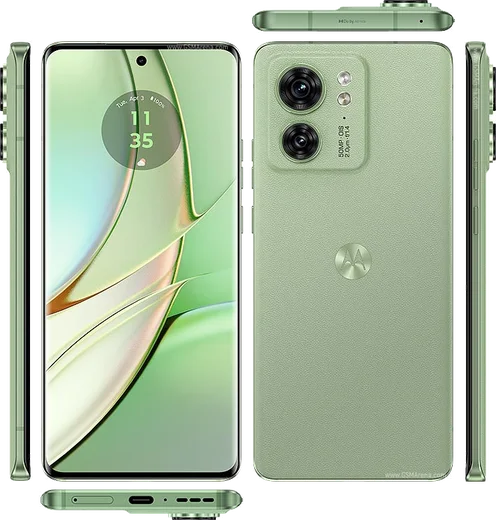
WhatsApp for Motorola Edge 40 Neo

Dimensity 7030, 6.55-inch pOLED 144Hz

WhatsApp Messenger 4.7 · 64.2M reviews Free · Android · ~40 MB · by WhatsApp LLC
Download WhatsApp

Ask a question / report a problem

You can ask any question about WhatsApp support on the Motorola Edge 40 Neo — leave it below and we'll help.

Ask a question

Can the Motorola Edge 40 Neo run WhatsApp?

Fully supported
  • Operating systemAndroid
  • ProcessorDimensity 7030
  • WhatsApp versionLatest supported

Latest known WhatsApp problems on Motorola Edge 40 Neo

1

Why are my WhatsApp messages and notifications delayed on the Motorola Edge 40 Neo?

This is almost always Motorola's aggressive battery optimization killing WhatsApp in the background. Go to Settings > Apps > WhatsApp > Battery and set it to Unrestricted (or Optimized off), then open Settings > Battery > Battery saver and make sure it isn't forcing background limits. Also disable any 'Sleeping apps' / Auto-launch restriction so the app can sync the moment a message arrives. See how others solved this on Reddit
2

My Moto Edge 40 Neo notifications only arrive when I unlock the phone or open the app. How do I fix it?

The phone is putting apps to deep sleep, so they only refresh when you wake the screen. Open Settings > Battery > Background usage limits (or 'Sleeping apps' in some software versions) and remove the affected apps from the list, then set each app's battery usage to Unrestricted under Settings > Apps. Finally, confirm Settings > Apps > Special app access > Notifications and the per-app toggles are all enabled. See how others solved this on Reddit
3

Notifications on my Moto Edge 40 Neo come in late even after checking the usual settings. What else can I try?

After whitelisting the app from battery optimization, also turn off Adaptive Battery in Settings > Battery, since it learns and throttles apps you use less often. Make sure Data Saver (Settings > Network and internet > Data Saver) allows unrestricted background data for the app, and that Wi-Fi isn't set to disconnect during sleep under Wi-Fi > advanced settings. A restart after these changes helps them take effect. See how others solved this on Reddit
4

Where does WhatsApp store photos and media on the Motorola Edge 40 Neo, and how do I find them?

WhatsApp media lives in internal storage under Android/media/com.whatsapp/WhatsApp/Media, which you can browse with the built-in Files app by enabling 'Show internal storage' in its menu. Saved images and videos also appear in your Gallery if 'Media visibility' is on in WhatsApp Settings > Chats. To move them, copy the Media folder via a file manager or back up to Google Drive through WhatsApp Settings > Chats > Chat backup. See how others solved this on Reddit
5

My Motorola Edge 40 Neo gets very hot during WhatsApp video calls. Is this normal and can I reduce it?

Some warmth during video calls is expected, but excessive heat usually points to a background load or a buggy app build, so first update WhatsApp from the Play Store and reboot. Remove any case during long calls, lower screen brightness, and avoid charging while calling since that compounds the heat. If it throttles or feels unsafe, clear WhatsApp's cache under Settings > Apps > WhatsApp > Storage and test a call on Wi-Fi versus mobile data. See how others solved this on Reddit
6

WhatsApp keeps misbehaving on my Motorola Edge 40 Neo even when other apps work fine. What should I do?

Start by clearing WhatsApp's cache (not data) via Settings > Apps > WhatsApp > Storage > Clear cache, then update the app in the Play Store, as outdated builds cause sync and notification glitches on Motorola devices. If problems persist, set WhatsApp's battery usage to Unrestricted and re-grant Notification, Microphone, and Storage permissions under Settings > Apps > WhatsApp > Permissions. A clean reinstall (after a chat backup to Google Drive) resolves most lingering issues. See how others solved this on Reddit

Ask a question / report a problem

You can ask any question about WhatsApp support on the Motorola Edge 40 Neo — leave it below and we'll help.

Ask a question

Watch: setting up WhatsApp

Prefer to watch? This short walkthrough shows the whole installation and number-verification flow.

How to install WhatsApp on Motorola Edge 40 Neo — video walkthrough

How to install WhatsApp on Motorola Edge 40 Neo

1

Choose how to download

On your Motorola Edge 40 Neo you can get the official app two ways: from the Google Play Store — the easiest option, since it keeps WhatsApp updated automatically — or directly from the official website. You can download an APK file, by clicking a link “Download WhatsApp directly”.

2

Open WhatsApp

Launch WhatsApp from your home screen or app drawer and accept the Terms of Service to start setup.

3

Verify your phone number

Enter your phone number. If your Motorola Edge 40 Neo uses dual SIM, pick the line you want WhatsApp tied to, then enter the 6-digit code it sends by SMS — it usually fills in automatically.

4

Restore chats and finish setup

Restore your chat history from Google Drive (use the same Google account), add your name and photo, and tap Allow for notifications so messages and calls arrive reliably.

Stay safe: only ever install WhatsApp from the official Android source. The Download button above already points there — modified copies (GB/Plus/Aero WhatsApp) can get your number banned.

Comments (13)

No registration needed. No email required.
J
joe_chrApr 2, 2026

wow semplicissimo, il mio edge 40 Neo è pronto

M
mr_tanFeb 21, 2026

honestly did it on my Motorola Edge 40 Neo in like 2 minutes 🙏

B
big_louFeb 17, 2026

man clear and to the point 🎉

R
raj_kFeb 5, 2026

Omg took me 5 min total 🙏

I
im_jayDec 22, 2025

Pls help how do i hide my last seen anyone

AppWhatsOfficialDec 24, 2025

Hey there, open Settings, then Privacy, and adjust Last Seen and Online there to keep your activity hidden.

S
sam46Sep 9, 2025

auf dem Edge 40 Neo meiner mutter problemlos installiert

P
pablo_joeAug 13, 2025

tbh installed in 2 min thx

AppWhatsOfficialAug 14, 2025

Awesome, glad it worked!

R
raj.bApr 30, 2025

pls help how do i use whatsapp on a second phone anyone

AppWhatsOfficialMay 2, 2025

Hey there, yes, use Linked Devices in Settings to add a second phone with the same account. Let us know if you need anything else.

S
sooo_confusedApr 22, 2025

guys stuck and so stressed how do i get whatsapp on Motorola Edge 40 Neo pls

AppWhatsOfficialApr 26, 2025

You are almost there! Tap Download, allow the install, open WhatsApp and confirm your number. Reply here if you get stuck.

Y
yasinDec 24, 2024

اشتغل تمام على Motorola Edge 40 Neo شكراً

G
guest_userNov 5, 2024

guys the code never arrives, what do i do anyone

AppWhatsOfficialNov 6, 2024

If the SMS will not arrive, you can choose the call option to hear the code, just make sure your number is entered correctly.

L
lina_xXAug 11, 2024

thank u so much

M
ms_leoJul 24, 2024

hi why is it downloading so slowly

AppWhatsOfficialJul 30, 2024

A slow download is usually the network. A stable wifi connection will speed it up a lot. Happy chatting!