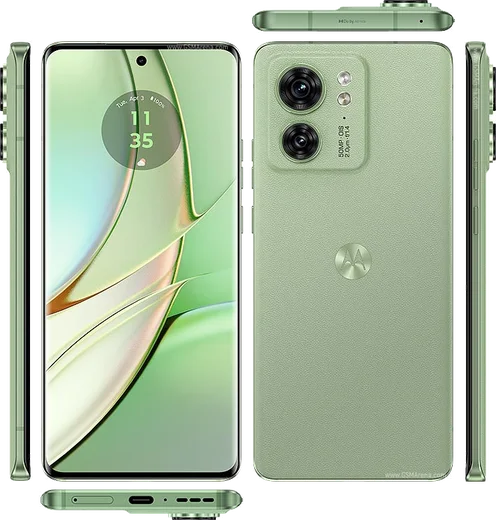
WhatsApp on Motorola Edge 40
Motorola Android

WhatsApp for Motorola Edge 40

Dimensity 8020, 6.55-inch pOLED 144Hz

WhatsApp Messenger 4.7 · 64.2M reviews Free · Android · ~40 MB · by WhatsApp LLC
Download WhatsApp

Ask a question / report a problem

You can ask any question about WhatsApp support on the Motorola Edge 40 — leave it below and we'll help.

Ask a question

Can the Motorola Edge 40 run WhatsApp?

Fully supported
  • Operating systemAndroid
  • ProcessorDimensity 8020
  • WhatsApp versionLatest supported

Latest known WhatsApp problems on Motorola Edge 40

1

Why are my WhatsApp notifications delayed or not showing on my Motorola Edge 40?

This is almost always Motorola's aggressive battery optimization killing WhatsApp in the background. Go to Settings > Apps > WhatsApp > Battery and set it to Unrestricted (or Don't optimize), then open Settings > Battery > and disable any adaptive/auto battery saver that may freeze idle apps. Also confirm WhatsApp notifications are fully enabled under Settings > Apps > WhatsApp > Notifications. See how others solved this on Reddit
2

WhatsApp messages only arrive on my Motorola Edge 40 when I open the app, what's wrong?

When messages only sync after you manually open WhatsApp, the OS is suspending the app to save power. Set Settings > Apps > WhatsApp > Battery to Unrestricted, then go to Settings > Apps > See all apps > tap the three-dot menu > Special app access > Battery optimization and mark WhatsApp as not optimized. Keeping data restrictions off under Settings > Apps > WhatsApp > Mobile data & Wi-Fi (allow background data) ensures real-time delivery. See how others solved this on Reddit
3

My Motorola Edge 40 gets extremely hot during WhatsApp video calls, how do I fix it?

Some heating during video calls is normal, but excessive heat usually comes from the camera plus radios running at full power, often worsened by a thick case. Make sure WhatsApp is updated via the Play Store, lower screen brightness during calls, and remove any case to let the frame dissipate heat. If it persists, clear the WhatsApp cache under Settings > Apps > WhatsApp > Storage & cache > Clear cache and test on Wi-Fi rather than mobile data. See how others solved this on Reddit
4

WhatsApp and Instagram notifications stopped appearing together on my Motorola Edge 40, what should I check?

When multiple apps go silent at once, the cause is a system-wide power or notification setting rather than the individual apps. Open Settings > Battery and turn off battery saver, then in Settings > Apps for each app set Battery to Unrestricted and verify Notifications are on. Also check Settings > Notifications > Do Not Disturb is off and that no Bedtime/Focus schedule is muting them. See how others solved this on Reddit
5

People say my voice is unclear or muffled on WhatsApp video calls from my Motorola Edge 40, how can I improve it?

Muffled audio usually means the bottom microphone is blocked or WhatsApp lacks proper mic priority. Make sure nothing (case, finger, screen protector lip) covers the mic port near the charging connector, and grant the mic permission cleanly under Settings > Apps > WhatsApp > Permissions > Microphone. Clearing the WhatsApp cache and closing other apps that may be holding the mic (voice recorder, assistant) often restores clarity. See how others solved this on Reddit
6

Where does WhatsApp store its media and chats on my Motorola Edge 40 and how do I free up space?

WhatsApp data lives in internal storage under Android/media/com.whatsapp/WhatsApp, which you can browse with the Files app, while chat backups go to your linked Google Drive. To reclaim space, open WhatsApp > Settings > Storage and data > Manage storage to delete large files and forwarded media, and remember Google Drive backups do not count against your phone's storage. See how others solved this on Reddit

Ask a question / report a problem

You can ask any question about WhatsApp support on the Motorola Edge 40 — leave it below and we'll help.

Ask a question

Watch: setting up WhatsApp

Prefer to watch? This short walkthrough shows the whole installation and number-verification flow.

How to install WhatsApp on Motorola Edge 40 — video walkthrough

How to install WhatsApp on Motorola Edge 40

1

Choose how to download

On your Motorola Edge 40 you can get the official app two ways: from the Google Play Store — the easiest option, since it keeps WhatsApp updated automatically — or directly from the official website. You can download an APK file, by clicking a link “Download WhatsApp directly”.

2

Open WhatsApp

Launch WhatsApp from your home screen or app drawer and accept the Terms of Service to start setup.

3

Verify your phone number

Enter your phone number. If your Motorola Edge 40 uses dual SIM, pick the line you want WhatsApp tied to, then enter the 6-digit code it sends by SMS — it usually fills in automatically.

4

Restore chats and finish setup

Restore your chat history from Google Drive (use the same Google account), add your name and photo, and tap Allow for notifications so messages and calls arrive reliably.

Stay safe: only ever install WhatsApp from the official Android source. The Download button above already points there — modified copies (GB/Plus/Aero WhatsApp) can get your number banned.

Comments (11)

No registration needed. No email required.
A
andy_nicFeb 15, 2026

honestly my edge40 has whatsapp now thanks to this 🎉

AppWhatsOfficialFeb 19, 2026

Thanks for the feedback!

N
noah44Nov 25, 2025

Ngl best guide for the motorola edge 40 by far 👍

L
lina_xNov 17, 2025

finalmente ha funzionato benissimo, grazie 💯

S
saaaaamSep 17, 2025

hi verification keeps failing for me

AppWhatsOfficialSep 20, 2025

Hey there, double check the country code and that you have signal, then request a fresh SMS code. If it still fails, wait a few minutes before trying again.

H
heeeelpAug 11, 2025

Works like a charm on the Motorola Edge 40

R
rosa07Jun 21, 2025

hi can i recover my chats thanks

AppWhatsOfficialJun 26, 2025

Good question, yes, as long as you had a backup. Use the same number and choose Restore during setup to bring your messages back.

J
joe21Mar 15, 2025

so all good on my edge40 now

J
justmeJan 17, 2025

Well even my grandma could do this lol

G
gabe_tanNov 24, 2024

finalmente whatsapp installato sul mio motorola edge 40

M
mike99Oct 9, 2024

hey help meee i pressed everything and nothing :(

AppWhatsOfficialOct 13, 2024

You are almost there! Tap Download, allow the install, open WhatsApp and confirm your number. You will be set up on your phone in no time.

K
kai.kAug 1, 2024

sorry but download takes forever for me pls

AppWhatsOfficialAug 3, 2024

Happy to help, it depends on your connection. Try switching to wifi if you can, and the download should finish in under a minute on most networks. Reach out anytime.