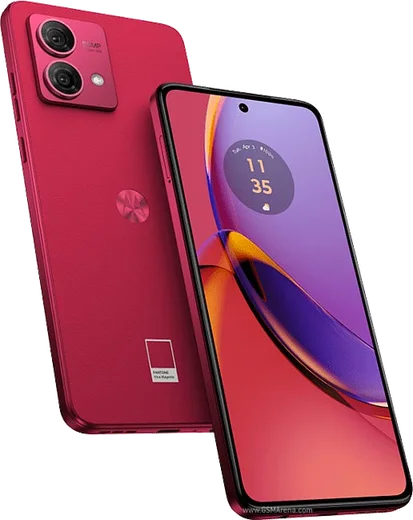
WhatsApp on Motorola Moto G84
Motorola Android

WhatsApp for Motorola Moto G84

Snapdragon 695, 6.55-inch pOLED 120Hz, 5G

WhatsApp Messenger 4.7 · 64.2M reviews Free · Android · ~40 MB · by WhatsApp LLC
Download WhatsApp

Ask a question / report a problem

You can ask any question about WhatsApp support on the Motorola Moto G84 — leave it below and we'll help.

Ask a question

Can the Motorola Moto G84 run WhatsApp?

Fully supported
  • Operating systemAndroid
  • ProcessorSnapdragon 695
  • WhatsApp versionLatest supported

Latest known WhatsApp problems on Motorola Moto G84

1

Why are my WhatsApp messages delayed on the Moto G84 until I open the app?

This is the well-known Moto G84 delayed-notification issue caused by Motorola's aggressive background app management. Go to Settings > Apps > WhatsApp > App battery usage and set it to 'Unrestricted'. Then open Settings > Battery and make sure Battery Saver is off. It also helps to lock WhatsApp in the Recents screen: open Recents, tap WhatsApp's icon at the top of its card, and choose Lock (or pin) so the system is less likely to close it in the background. Note there is no separate 'Adaptive Battery' toggle on Motorola's stock build, so the App battery usage setting is the key one. See how others solved this on Reddit
2

My WhatsApp calls ring late or not at all on the Moto G84 - how do I fix it?

Delayed call ringing happens because background activity is throttled while the phone is in standby. In Settings > Apps > WhatsApp > App battery usage, choose 'Unrestricted'. Then go to Settings > Apps > WhatsApp > Notifications and confirm the Calls notification category is enabled with sound and 'Pop on screen' turned on. Also check Settings > Network & internet > Data Saver - either turn it off or add WhatsApp to 'Unrestricted data' so its connection stays live in the background. See how others solved this on Reddit
3

What is the trick to stop delayed Moto G84 notifications people keep recommending?

The commonly shared fix is to stop the system from putting WhatsApp into deep sleep. Open Settings > Apps > WhatsApp > App battery usage and set it to 'Unrestricted'. Then in Settings > Apps > WhatsApp, scroll down and turn off 'Pause app activity if unused' so Android never auto-revokes its permissions or background access. Finally confirm Battery Saver is off under Settings > Battery. See how others solved this on Reddit
4

Why does WhatsApp call audio cut out when I play a video on my Moto G84?

This is a known audio-routing/firmware conflict on the G84 where starting media playback disrupts the call's audio stream. There is no reliable Settings toggle to fix it; as a workaround keep WhatsApp calls on speakerphone or a Bluetooth headset while watching video, and make sure you are on the latest software via Settings > System > System update. Motorola has been slow to acknowledge it, so installing pending updates is currently the main path toward a real fix. See how others solved this on Reddit
5

Is the delayed WhatsApp notification problem specific to the Moto G84 or other Motorola phones too?

It affects several Motorola models from that generation, including the Moto G84 and the Edge 40 Neo, and it is tied to Motorola's notification and battery handling rather than to WhatsApp itself. Beyond setting WhatsApp to 'Unrestricted' under Settings > Apps > WhatsApp > App battery usage, keep the device updated through Settings > System > System update, since Motorola has shipped firmware patches that improve background delivery. If delays persist, reinstalling WhatsApp from the Play Store and re-granting Unrestricted battery access often clears lingering throttling. See how others solved this on Reddit
6

WhatsApp notifications on my Moto G84 5G are delayed by minutes - any working setting?

Make sure WhatsApp is fully exempt from power management: set Settings > Apps > WhatsApp > App battery usage to 'Unrestricted', and under Settings > Apps > WhatsApp > Mobile data & Wi-Fi enable both 'Background data' and 'Unrestricted data usage'. Then confirm notifications are allowed under Settings > Apps > WhatsApp > Notifications, and inside WhatsApp open Settings > Notifications to verify each category is on. Keeping the phone on the newest build via Settings > System > System update also helps, as later updates reduce this lag. See how others solved this on Reddit

Ask a question / report a problem

You can ask any question about WhatsApp support on the Motorola Moto G84 — leave it below and we'll help.

Ask a question

Watch: setting up WhatsApp

Prefer to watch? This short walkthrough shows the whole installation and number-verification flow.

How to install WhatsApp on Motorola Moto G84 — video walkthrough

How to install WhatsApp on Motorola Moto G84

1

Choose how to download

On your Motorola Moto G84 you can get the official app two ways: from the Google Play Store — the easiest option, since it keeps WhatsApp updated automatically — or directly from the official website. You can download an APK file, by clicking a link “Download WhatsApp directly”.

2

Open WhatsApp

Launch WhatsApp from your home screen or app drawer and accept the Terms of Service to start setup.

3

Verify your phone number

Enter your phone number. If your Motorola Moto G84 uses dual SIM, pick the line you want WhatsApp tied to, then enter the 6-digit code it sends by SMS — it usually fills in automatically.

4

Restore chats and finish setup

Restore your chat history from Google Drive (use the same Google account), add your name and photo, and tap Allow for notifications so messages and calls arrive reliably.

Stay safe: only ever install WhatsApp from the official Android source. The Download button above already points there — modified copies (GB/Plus/Aero WhatsApp) can get your number banned.

Comments (10)

No registration needed. No email required.
T
the_real_kateJun 21, 2026

guys worked perfect on my Motorola Moto G84 🙏

H
helpmeMay 29, 2026

ok so no problems installing on my g84 🎉

R
rosa21May 24, 2026

Wasnt expecting it to be this easy

R
randomuserNov 20, 2025

sehr einfach, in 2 minuten erledigt danke

T
techguyAug 23, 2025

yo wasnt expecting it to be this easy

J
just_finnMar 24, 2025

Set up whatsapp on my dads moto g84 no problem

C
confuuusedFeb 5, 2025

wow alles läuft, vielen dank 🙏

N
nick_zoeFeb 2, 2025

man got it working on my Motorola Moto G84 first try thanks again

T
tina_robNov 8, 2024

Ugh my whole family is waiting pls help me install it pls

AppWhatsOfficialNov 11, 2024

Take a breath, we got you. Press Download above, then Install, then verify your number. That is all it takes. Reply here if you get stuck.

N
nina_finNov 3, 2024

tbh no problems installing on my g84

AppWhatsOfficialNov 6, 2024

Thanks for the feedback!