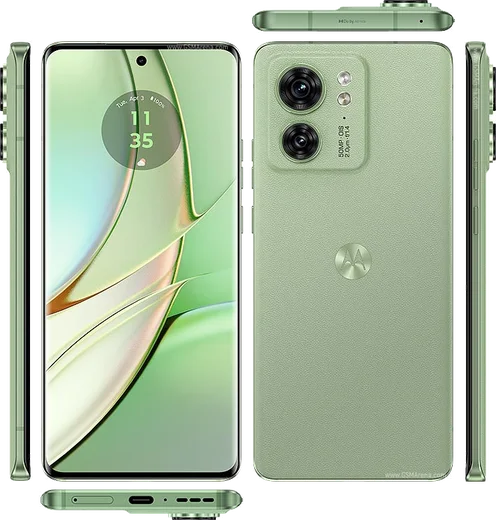
Motorola Android

WhatsApp for Motorola Moto G53

Snapdragon 480+, 6.5-inch 120Hz, 5G

WhatsApp Messenger 4.7 · 64.2M reviews Free · Android · ~40 MB · by WhatsApp LLC
Download WhatsApp

Ask a question / report a problem

You can ask any question about WhatsApp support on the Motorola Moto G53 — leave it below and we'll help.

Ask a question

Can the Motorola Moto G53 run WhatsApp?

Fully supported
  • Operating systemAndroid
  • ProcessorSnapdragon 480+
  • WhatsApp versionLatest supported

Latest known WhatsApp problems on Motorola Moto G53

1

Why do my apps keep restarting and the Moto G53 forgets what I was doing?

The G53's 4GB RAM (some variants) plus Motorola's aggressive memory management closes background apps quickly, so WhatsApp and other apps reload from scratch when you switch back. Go to Settings > Battery > and set WhatsApp to 'Unrestricted' (or Settings > Apps > WhatsApp > Battery > Unrestricted), and turn off any 'Adaptive Battery' / battery saver mode. Restricting the number of background processes in Developer Options to the default 'Standard limit' rather than a lower cap also helps the phone hold sessions in memory. See how others solved this on Reddit
2

WhatsApp and other notifications arrive late on my Moto G53 - how do I fix delayed notifications?

Delayed notifications on the G53 are almost always caused by battery optimization killing WhatsApp in the background. Open Settings > Apps > WhatsApp > Battery and set it to 'Unrestricted', then go to Settings > Battery and disable battery saver and any 'Optimized charging' that throttles apps. Also confirm WhatsApp is allowed to run by checking Settings > Apps > Special app access > and keep the phone off Doze by setting it to Unrestricted background activity. See how others solved this on Reddit
3

People can't hear me on WhatsApp and regular calls on my Moto G53, but I can hear them - what's wrong?

If callers can't hear you but your audio works fine, first check Settings > Apps > WhatsApp > Permissions and make sure the Microphone permission is allowed, then clean the bottom mic hole near the USB-C port since lint or a case often blocks it. Test the hardware by recording a voice memo or video; if the recording is also silent it's a mic fault, but if only calls fail, toggle Bluetooth off (a connected device may be grabbing the mic) and restart the phone. See how others solved this on Reddit
4

Why does audio sound poor and muffled on videos I record with my Moto G53 camera?

The G53's video mic processing tends to compress and muffle audio, especially in noisy or windy conditions. In the Camera app open Settings (gear icon) and look for any 'Audio zoom' or noise-reduction toggle and turn it off, and make sure no app or case is covering the secondary mic. For important clips, recording with a dedicated app or an external/Bluetooth mic produces noticeably cleaner sound than the built-in capture. See how others solved this on Reddit
5

Does the Moto G53 screen flicker (PWM) and cause eye strain during long WhatsApp use?

The G53 uses an LCD panel that dims via PWM, which some sensitive users find tiring during long messaging sessions. There's no built-in DC dimming toggle, but you can reduce flicker perception by keeping brightness higher and enabling Settings > Display > Dark theme plus the Reading/Comfort color filter to lower blue light. Turning off auto-brightness so the panel doesn't constantly modulate also makes extended WhatsApp use easier on the eyes. See how others solved this on Reddit
6

Is the Moto G53 a reliable budget phone for everyday WhatsApp and messaging?

The G53 is a solid sub-150 euro pick for messaging and calls, with the main trade-offs being limited RAM and Motorola's background app handling rather than any deal-breaking fault. To get the smoothest WhatsApp experience, keep the system updated via Settings > System > System update, set WhatsApp to Unrestricted battery, and avoid loading many heavy apps at once. For its price it handles chat, photos and video calls well once those battery and memory settings are tuned. See how others solved this on Reddit

Ask a question / report a problem

You can ask any question about WhatsApp support on the Motorola Moto G53 — leave it below and we'll help.

Ask a question

Watch: setting up WhatsApp

Prefer to watch? This short walkthrough shows the whole installation and number-verification flow.

How to install WhatsApp on Motorola Moto G53 — video walkthrough

How to install WhatsApp on Motorola Moto G53

1

Choose how to download

On your Motorola Moto G53 you can get the official app two ways: from the Google Play Store — the easiest option, since it keeps WhatsApp updated automatically — or directly from the official website. You can download an APK file, by clicking a link “Download WhatsApp directly”.

2

Open WhatsApp

Launch WhatsApp from your home screen or app drawer and accept the Terms of Service to start setup.

3

Verify your phone number

Enter your phone number. If your Motorola Moto G53 uses dual SIM, pick the line you want WhatsApp tied to, then enter the 6-digit code it sends by SMS — it usually fills in automatically.

4

Restore chats and finish setup

Restore your chat history from Google Drive (use the same Google account), add your name and photo, and tap Allow for notifications so messages and calls arrive reliably.

Stay safe: only ever install WhatsApp from the official Android source. The Download button above already points there — modified copies (GB/Plus/Aero WhatsApp) can get your number banned.

Comments (11)

No registration needed. No email required.
P
priya_jayFeb 22, 2026

Wow installato senza problemi 😍

M
mmmaaaxxxFeb 5, 2026

wow facilissimo, fatto in 2 minuti

A
anonNov 18, 2025

Tbh this fixed whatsapp on my Motorola Moto G53 🔥

F
finn54Aug 16, 2025

update whatsapp finally on my g53 🎉

N
nina_kJul 6, 2025

so my new motorola moto g53 is all set up now

W
whatsappfanApr 22, 2025

anyone? official app or a mod pls

AppWhatsOfficialApr 23, 2025

Hi! It is the official WhatsApp from the real app store. We do not recommend modded versions like GB or Plus, they can get your number banned. Enjoy WhatsApp on your your phone!

R
rosa.gMar 15, 2025

Omg anyone pls i cant download it heeeelp me :(

AppWhatsOfficialMar 19, 2025

You are almost there! Tap Download, allow the install, open WhatsApp and confirm your number. You will be set up on your phone in no time.

B
bea46Feb 7, 2025

tbh my new g53 is all set up now

X
xX_omarNov 19, 2024

Update i was scared it was a virus but its the real app

AppWhatsOfficialNov 23, 2024

Awesome, glad it worked!

B
big_finnOct 27, 2024

so im not techy and i still managed cheers

Y
yuki_danOct 27, 2024

whatsapp works fine on my Motorola Moto G53