Honor Android

WhatsApp for Honor X6a

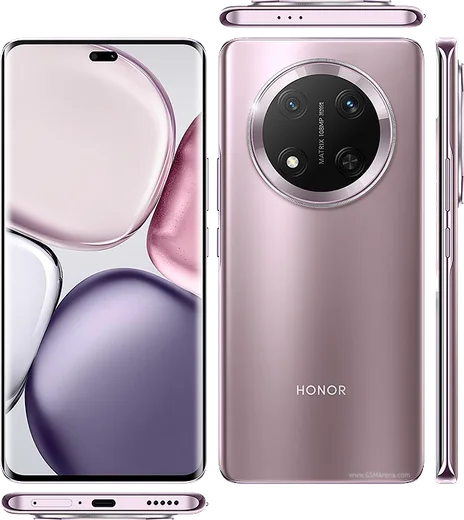
Helio G36, 6.56-inch LCD, 5200mAh battery, 108MP camera

WhatsApp Messenger 4.7 · 64.2M reviews Free · Android · ~40 MB · by WhatsApp LLC
Download WhatsApp

Ask a question / report a problem

You can ask any question about WhatsApp support on the Honor X6a — leave it below and we'll help.

Ask a question

Can the Honor X6a run WhatsApp?

Fully supported
  • Operating systemAndroid
  • ProcessorHelio G36
  • WhatsApp versionLatest supported

Latest known WhatsApp problems on Honor X6a

1

Why don't I get WhatsApp notifications on my Honor X6a unless I open the app?

This is almost always Honor's aggressive battery management (MagicOS) closing WhatsApp in the background. Go to Settings > Apps > Apps > WhatsApp > Battery and set it to "No restrictions". Then open Settings > Battery > Launch, find WhatsApp, switch it from "Manage automatically" to "Manage manually", and turn on all three toggles: Auto-launch, Secondary launch and Run in background. Finally, open Recents (swipe up and hold), find WhatsApp and tap the padlock icon to lock it so MagicOS stops killing it. After this, notifications arrive in real time. See how others solved this on Reddit
2

Why do my WhatsApp calls go on hold or fail to connect right away on the Honor X6a?

Calls that immediately drop or jump to "on hold" are usually caused by WhatsApp being denied microphone access or having its background activity killed by MagicOS. First, open Settings > Apps > Apps > WhatsApp > Permissions and confirm Microphone and Phone (and Camera for video calls) are allowed. Then under WhatsApp > Battery choose "No restrictions" so calls aren't cut when the screen locks. Check your connection too: WhatsApp calls need a stable internet connection, so test on both Wi-Fi and mobile data, since a weak or restricted network can also force calls to keep going on hold. See how others solved this on Reddit
3

I get an error that WhatsApp needs the official app downloaded on my Honor X6a, what does that mean?

This appears when WhatsApp detects an unofficial or modified build (like GB WhatsApp or an APK from a third-party site) and blocks it. Back up your chats first (in the modified app, if it still opens, or it may have already synced to Google Drive), then uninstall the current version and reinstall WhatsApp only from the Google Play Store. The Honor X6a ships with Google services, so the Play Store is available. Verify your number in the official app and your chats restore from your Google Drive backup. See how others solved this on Reddit
4

How do I switch the GIF search in WhatsApp from Giphy to Tenor on my Honor X6a?

WhatsApp does not expose any setting to choose the GIF provider; it uses Giphy or Tenor automatically depending on your region and app version, so there is no toggle to flip on the X6a or any other Android phone. Make sure WhatsApp is updated to the latest version from the Play Store for the best results. If a specific GIF source matters to you, save the clip from the Tenor or Giphy app to your gallery and send it through WhatsApp as a regular media file instead. See how others solved this on Reddit
5

Why do photos taken inside WhatsApp look worse than my Honor X6a camera app?

WhatsApp's in-app camera captures at a lower resolution and then compresses the image, so it never matches the native Honor Camera app, which uses the full sensor and image processing. For better results, take the photo with the Honor Camera app first, then in WhatsApp tap the attach (paperclip) icon, choose Gallery, select your photo, and tap the "HD" button before sending so it compresses less. To preserve the original quality completely, send the picture as a Document (attach > Document) instead of a photo, which bypasses WhatsApp's compression. See how others solved this on Reddit

Ask a question / report a problem

You can ask any question about WhatsApp support on the Honor X6a — leave it below and we'll help.

Ask a question

Watch: setting up WhatsApp

Prefer to watch? This short walkthrough shows the whole installation and number-verification flow.

How to install WhatsApp on Honor X6a — video walkthrough

How to install WhatsApp on Honor X6a

1

Choose how to download

On your Honor X6a you can get the official app two ways: from the Google Play Store — the easiest option, since it keeps WhatsApp updated automatically — or directly from the official website. You can download an APK file, by clicking a link “Download WhatsApp directly”.

2

Open WhatsApp

Launch WhatsApp from your home screen or app drawer and accept the Terms of Service to start setup.

3

Verify your phone number

Enter your phone number. If your Honor X6a uses dual SIM, pick the line you want WhatsApp tied to, then enter the 6-digit code it sends by SMS — it usually fills in automatically.

4

Restore chats and finish setup

Restore your chat history from Google Drive (use the same Google account), add your name and photo, and tap Allow for notifications so messages and calls arrive reliably.

Stay safe: only ever install WhatsApp from the official Android source. The Download button above already points there — modified copies (GB/Plus/Aero WhatsApp) can get your number banned.

Comments (13)

No registration needed. No email required.
D
droiduserJun 19, 2026

hey im so confused someone help meeee 😭😭

AppWhatsOfficialJun 22, 2026

We are here to help. Hit Download, follow the steps on this page, and if the code is slow just request it again.

M
mia.fJun 12, 2026

Honestly much better then the other sites

A
amy.nApr 15, 2026

gracias, mi x6a ya tiene whatsapp

O
omar.lMar 22, 2026

running whatsapp on my honor x6a like new

K
kev_ytMar 4, 2026

anyone? how do i restore my old messages thanks

AppWhatsOfficialMar 8, 2026

Good question, yes, as long as you had a backup. Use the same number and choose Restore during setup to bring your messages back. Glad to help.

D
deni62Jan 17, 2026

So no problems installing on my X6a 🙏

Z
zoe.gSep 12, 2025

ngl did it without any help, very simple :)

P
priya.cMay 8, 2025

Sorry but my whatsapp keeps crashing after install

AppWhatsOfficialMay 11, 2025

Of course, try clearing the cache and updating your phone software, then install the latest version again. That usually stops the crashing.

O
omar_9969May 7, 2025

أخيراً ثبّت واتساب على Honor X6a

H
helpmeeeOct 28, 2024

hey i dont want people to see im online anyone

AppWhatsOfficialNov 2, 2024

Good question, in Privacy settings you can set Last Seen and Online to Nobody, so no one sees when you are active. Reach out anytime.

L
lou73Oct 28, 2024

Sorry but is old android supported thanks

AppWhatsOfficialOct 30, 2024

Sure, if the store lets you install it, you are supported. Very old systems may eventually lose support though. Let us know if you need anything else.

R
ray.eOct 25, 2024

passaggi chiarissimi per il X6a 🙏

C
coolcatOct 7, 2024

finally finally a guide that makes sense