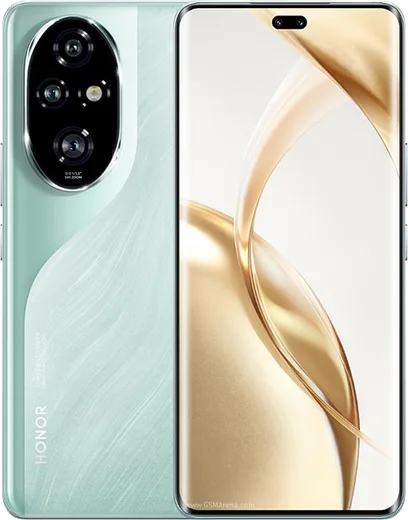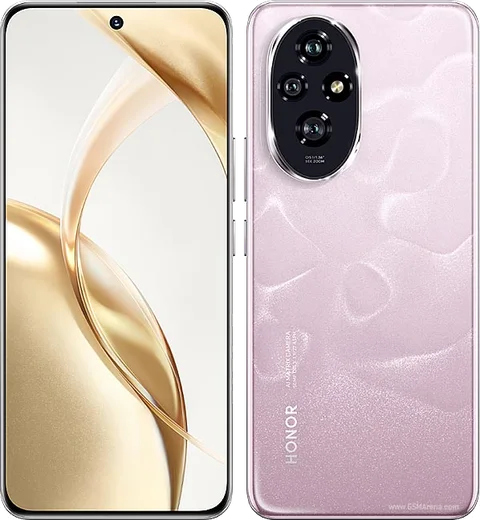
WhatsApp on Honor 200 Pro
Honor Android

WhatsApp for Honor 200 Pro

Snapdragon 8s Gen 3, 6.78-inch OLED, 50MP Harcourt portrait

WhatsApp Messenger 4.7 · 64.2M reviews Free · Android · ~40 MB · by WhatsApp LLC
Download WhatsApp

Ask a question / report a problem

You can ask any question about WhatsApp support on the Honor 200 Pro — leave it below and we'll help.

Ask a question

Can the Honor 200 Pro run WhatsApp?

Fully supported
  • Operating systemAndroid
  • ProcessorSnapdragon 8s Gen 3
  • WhatsApp versionLatest supported

Latest known WhatsApp problems on Honor 200 Pro

1

Why doesn't my Honor 200 Pro show WhatsApp notifications until I open the app?

MagicOS aggressively sleeps background apps, which delays or kills WhatsApp pushes. Go to Settings > Apps > App launch, find WhatsApp, switch it from Auto to Manage manually, then enable Auto-launch, Secondary launch, and Run in background. Also exclude WhatsApp from battery optimization: Settings > Battery > More battery settings > App launch, or Settings > Apps > WhatsApp > Battery usage > set to Don't optimize. This lets the app wake and post notifications instantly. See how others solved this on Reddit
2

My Honor 200 Pro doesn't ring for WhatsApp calls when the screen is locked, how do I fix it?

Incoming calls fail to wake the device because MagicOS restricts WhatsApp in the background. In WhatsApp tap Settings > Notifications and make sure call notifications are on, then on the phone go to Settings > Apps > WhatsApp > Notifications and enable Allow notifications plus the Calls channel (with banner/pop-up and sound). Finally set WhatsApp to Manage manually under Settings > Apps > App launch so the call ringtone can break through when locked. See how others solved this on Reddit
3

WhatsApp keeps having problems on my Honor 200 Pro after an update, what should I check first?

Most post-update WhatsApp glitches on Honor come from a stale cache or a lost background permission rather than the app itself. First clear the cache via Settings > Apps > WhatsApp > Storage > Clear cache (this is safe and won't delete chats), then update WhatsApp from Google Play. If issues persist, reconfirm WhatsApp is set to Manage manually under Settings > Apps > App launch and is excluded from battery optimization, since updates can reset these. See how others solved this on Reddit
4

The WhatsApp icon badge on my Honor 200 Pro shows unread messages but I get no notification sound, how do I get reliable alerts?

Honor's notification system can suppress the sound while still updating the badge, usually because a notification channel or alert style was reset. Open Settings > Apps > WhatsApp > Notifications, make sure Allow notifications is on, then open the Messages channel and enable Sound and banners/pop-up and pick a tone. Then turn off Do Not Disturb and any Digital Balance schedule so WhatsApp can play its sound at all times. See how others solved this on Reddit
5

My Honor 200 Pro only delivers WhatsApp notifications in bursts when I unlock the phone, is there a fix?

This batching happens because MagicOS holds background activity until you wake the device to save battery. Set WhatsApp to Manage manually under Settings > Apps > App launch and enable Run in background, then turn off the global Power saving mode in Settings > Battery. It also helps to lock WhatsApp in the Recents view (open Recents, hold the app card, tap Lock) so the system stops freezing it. See how others solved this on Reddit
6

WhatsApp notifications are still delayed on my Honor even after enabling auto-launch, what else can I try?

When auto-launch alone isn't enough, the culprit is usually battery optimization silently restarting the app. Go to Settings > Apps > WhatsApp > Battery usage (or Settings > Battery > More battery settings > App launch) and switch WhatsApp to Don't optimize / Manage manually, and turn off any Power saving or Performance mode. As a last resort, toggle WhatsApp's notification permission off and back on in Settings > Apps > WhatsApp > Notifications to force MagicOS to re-register its push channel. See how others solved this on Reddit

Ask a question / report a problem

You can ask any question about WhatsApp support on the Honor 200 Pro — leave it below and we'll help.

Ask a question

Watch: setting up WhatsApp

Prefer to watch? This short walkthrough shows the whole installation and number-verification flow.

How to install WhatsApp on Honor 200 Pro — video walkthrough

How to install WhatsApp on Honor 200 Pro

1

Choose how to download

On your Honor 200 Pro you can get the official app two ways: from the Google Play Store — the easiest option, since it keeps WhatsApp updated automatically — or directly from the official website. You can download an APK file, by clicking a link “Download WhatsApp directly”.

2

Open WhatsApp

Launch WhatsApp from your home screen or app drawer and accept the Terms of Service to start setup.

3

Verify your phone number

Enter your phone number. If your Honor 200 Pro uses dual SIM, pick the line you want WhatsApp tied to, then enter the 6-digit code it sends by SMS — it usually fills in automatically.

4

Restore chats and finish setup

Restore your chat history from Google Drive (use the same Google account), add your name and photo, and tap Allow for notifications so messages and calls arrive reliably.

Stay safe: only ever install WhatsApp from the official Android source. The Download button above already points there — modified copies (GB/Plus/Aero WhatsApp) can get your number banned.

Comments (11)

No registration needed. No email required.
G
gabe75Apr 17, 2026

Pls help is the 200pro compatible with whatsapp

AppWhatsOfficialApr 20, 2026

Good question, the your phone works great with WhatsApp. Keep your system software current and you are good to go. Glad to help.

L
lou21Dec 15, 2025

honestly couldnt install whatsapp on my honor 200 pro until i found this

A
ash_realDec 10, 2025

sorry but no contacts appear in the app

AppWhatsOfficialDec 13, 2025

Hi! Add the contact in your phone with the full country code, then open WhatsApp and refresh. They should appear. Let us know if you need anything else.

A
andy.nOct 19, 2025

Tolle anleitung danke

J
joe_robAug 8, 2025

Pls help i lost my old chats can i get them back thanks

AppWhatsOfficialAug 11, 2025

If you made a backup before, sign in with the same number and tap Restore when asked. WhatsApp pulls your chats from the cloud backup.

G
gamerxJul 6, 2025

cheers for the clear instructions 🙏

M
marc63Jun 28, 2025

Tbh easy install on my honor 200 pro

J
jess_lucMay 21, 2025

omg omggg i cant install it someone heeelp 😭

AppWhatsOfficialMay 24, 2025

Don't worry, you can do this! Use the Download button, install the app, and enter your number to verify. You will be set up on your phone in no time.

T
tan5May 8, 2025

Anyone? do i need to uninstall my old whatsapp first

AppWhatsOfficialMay 11, 2025

Of course, you can keep the old one. Installing the newest build simply updates it and your chats stay put.

N
newbieDec 20, 2024

Tbh best guide for the Honor 200 Pro by far 🎉

B
bea.zDec 18, 2024

davvero ha funzionato benissimo sul mio 200pro