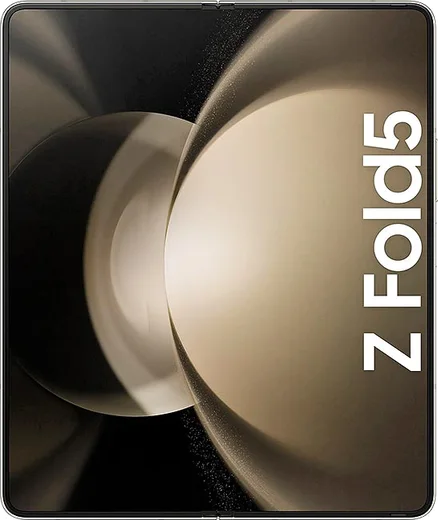
WhatsApp on Samsung Galaxy Z Fold 5
Samsung Android

WhatsApp for Samsung Galaxy Z Fold 5

Snapdragon 8 Gen 2, 7.6-inch 120Hz, flat-fold hinge

WhatsApp Messenger 4.7 · 64.2M reviews Free · Android · ~40 MB · by WhatsApp LLC
Download WhatsApp

Ask a question / report a problem

You can ask any question about WhatsApp support on the Samsung Galaxy Z Fold 5 — leave it below and we'll help.

Ask a question

Can the Samsung Galaxy Z Fold 5 run WhatsApp?

Fully supported
  • Operating systemAndroid
  • ProcessorSnapdragon 8 Gen 2
  • WhatsApp versionLatest supported

Latest known WhatsApp problems on Samsung Galaxy Z Fold 5

1

How do I get WhatsApp to use the full screen on my Galaxy Z Fold 5 instead of a narrow centered strip?

WhatsApp sometimes opens in a phone-shaped column on the wide inner screen instead of filling it. Go to Settings > Display > Full screen apps and make sure WhatsApp is toggled on so it's allowed to use the full aspect ratio, then fully close the app (swipe it away in Recents) and reopen it. Make sure WhatsApp is updated to the latest version from the Play Store, since older builds handled the foldable's wide screen poorly. If it still won't expand, restarting the phone after enabling the toggle forces the app to redraw at the correct size. See how others solved this on Reddit
2

Why does the WhatsApp chat view look wrong or only fill part of the screen when I unfold my Z Fold 5?

WhatsApp doesn't always re-scale cleanly when you switch from the cover screen to the unfolded inner display, leaving a chat stuck in the smaller layout. The quickest fix is to swipe WhatsApp away from Recents and reopen it directly on the screen you want to use. To prevent it long term, enable Settings > Display > Full screen apps for WhatsApp so it's permitted to redraw at the full inner-screen size, and keep the app updated from the Play Store. See how others solved this on Reddit
3

My WhatsApp images are showing up blurry, cropped, or as broken thumbnails on my Galaxy Z Fold 5 — how do I fix it?

This is usually a media-cache rendering glitch rather than a failed download. Open the affected chat and tap the broken image to force a re-download, then clear the cache via Settings > Apps > WhatsApp > Storage > Clear cache (use Clear cache only, never Clear data, which wipes your chats). Updating WhatsApp from the Play Store resolves most of these display bugs, as they're typically fixed in newer app versions. See how others solved this on Reddit
4

WhatsApp notifications stopped appearing on my Galaxy Z Fold 5 — how do I get them back?

On One UI this is almost always battery optimization putting WhatsApp to sleep. Go to Settings > Apps > WhatsApp > Battery and set it to 'Unrestricted', confirm Settings > Apps > WhatsApp > Notifications is turned on, and check that WhatsApp isn't listed under Settings > Battery (or Device care > Battery) > Background usage limits > Sleeping apps / Deep sleeping apps. Turning off Power saving mode also helps, since it can silently delay or suppress alerts. See how others solved this on Reddit
5

WhatsApp voice messages won't play or record properly on my Galaxy Z Fold — how do I fix it?

Voice-message problems on the Fold are usually a permissions or cache issue tied to the app rather than the hardware. First confirm Settings > Apps > WhatsApp > Permissions has Microphone allowed. Then clear the app cache via Settings > Apps > WhatsApp > Storage > Clear cache (not Clear data), and update WhatsApp from the Play Store. If playback cuts out specifically when folding or unfolding, swipe WhatsApp away from Recents and reopen it so the audio session reinitializes. See how others solved this on Reddit
6

How do I move my WhatsApp chats from an iPhone to my Galaxy Z Fold 5?

The official iOS-to-Android WhatsApp transfer must be done during the initial Android setup using a USB-C to Lightning cable. On a freshly set-up or factory-reset Fold, run Samsung Smart Switch during setup, connect the two phones with the cable, and follow the 'Move data from iPhone' / WhatsApp transfer prompt while signed into WhatsApp with the same phone number. If you've already finished setting up the phone, this transfer can't be triggered afterward — you'd need to reset and start over. See how others solved this on Reddit

Ask a question / report a problem

You can ask any question about WhatsApp support on the Samsung Galaxy Z Fold 5 — leave it below and we'll help.

Ask a question

Watch: setting up WhatsApp

Prefer to watch? This short walkthrough shows the whole installation and number-verification flow.

How to install WhatsApp on Samsung Galaxy Z Fold 5 — video walkthrough

How to install WhatsApp on Samsung Galaxy Z Fold 5

1

Choose how to download

On your Samsung Galaxy Z Fold 5 you can get the official app two ways: from the Google Play Store — the easiest option, since it keeps WhatsApp updated automatically — or directly from the official website. You can download an APK file, by clicking a link “Download WhatsApp directly”.

2

Open WhatsApp

Launch WhatsApp from your home screen or app drawer and accept the Terms of Service to start setup.

3

Verify your phone number

Enter your phone number. If your Samsung Galaxy Z Fold 5 uses dual SIM, pick the line you want WhatsApp tied to, then enter the 6-digit code it sends by SMS — it usually fills in automatically.

4

Restore chats and finish setup

Restore your chat history from Google Drive (use the same Google account), add your name and photo, and tap Allow for notifications so messages and calls arrive reliably.

Stay safe: only ever install WhatsApp from the official Android source. The Download button above already points there — modified copies (GB/Plus/Aero WhatsApp) can get your number banned.

Comments (17)

No registration needed. No email required.
G
greg16Jun 15, 2026

wow did it without any help, very simple 👍

B
ben.jMay 23, 2026

Omggg i cant install it someone heeelp 🙏

AppWhatsOfficialMay 24, 2026

We are here to help. Hit Download, follow the steps on this page, and if the code is slow just request it again. You will be set up on your phone in no time.

X
xX_gabeMay 8, 2026

enfin trop facile, tout est prêt 💯

O
omar_99Mar 7, 2026

سهل جداً بدون مشاكل

M
marc20Feb 27, 2026

Honestly whatsapp running great on my galaxy zfold5

M
mike21Jan 22, 2026

tbh installed whatsapp on my samsung galaxy z fold 5 with no issues

AppWhatsOfficialJan 25, 2026

That is great to hear!

G
greg21Sep 7, 2025

man easy install on my galaxy zfold5

S
sol_officialAug 8, 2025

anyone? how to add a profile photo

AppWhatsOfficialAug 10, 2025

Open WhatsApp, go to Settings, tap your name at the top, then tap the camera icon to set a new photo. Happy chatting!

L
lou.vJul 26, 2025

man respect, this helped alot

K
kai_pabJul 8, 2025

Tutto funziona, mille grazie

J
just_miaMay 5, 2025

this fixed whatsapp on my samsung galaxy z fold 5 thanks again

Z
zoe63Jan 26, 2025

installed in 2 min

O
omar07Oct 23, 2024

guys very clear steps

I
im_jessOct 13, 2024

Installed on my samsung galaxy z fold 5, super simple

K
kai.oOct 7, 2024

Guys thank u so much

N
noah6Oct 1, 2024

Wow alles läuft, vielen dank

R
raj2000Aug 26, 2024

Omg everything working now :)