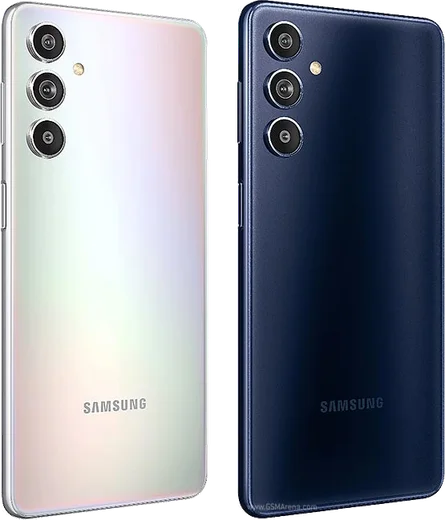
Samsung Android

WhatsApp for Samsung Galaxy A54

Exynos 1380, 6.4-inch FHD+ 120Hz, 50MP OIS

WhatsApp Messenger 4.7 · 64.2M reviews Free · Android · ~40 MB · by WhatsApp LLC
Download WhatsApp

Ask a question / report a problem

You can ask any question about WhatsApp support on the Samsung Galaxy A54 — leave it below and we'll help.

Ask a question

Can the Samsung Galaxy A54 run WhatsApp?

Fully supported
  • Operating systemAndroid
  • ProcessorExynos 1380
  • WhatsApp versionLatest supported

Latest known WhatsApp problems on Samsung Galaxy A54

1

WhatsApp call audio breaks up or crackles on speaker on my Galaxy A54

This is usually a Bluetooth or media-volume conflict, so disconnect any paired earbuds and toggle speaker off and back on mid-call. Then go to Settings > Apps > WhatsApp > Storage and tap Clear cache, and make sure One UI and WhatsApp are both updated, since a glitchy firmware/app combination is a common cause of this loudspeaker distortion. If it persists, test the loudspeaker with a normal phone call to rule out a hardware fault. See how others solved this on Reddit
2

WhatsApp audio keeps cutting out during calls on my A54

First exclude WhatsApp from battery optimisation: Settings > Apps > WhatsApp > Battery and set it to Unrestricted, then check Settings > Battery and device care > Battery > Background usage limits and make sure WhatsApp isn't being put to sleep. Also disconnect any Bluetooth device that may be grabbing the call audio, and clear WhatsApp's cache under Settings > Apps > WhatsApp > Storage. A full uninstall and reinstall from the Play Store often clears this when a glitchy update is the cause. See how others solved this on Reddit
3

WhatsApp voice messages won't record on the first try on my Galaxy A54

This happens when WhatsApp can't grab the microphone fast enough, so go to Settings > Apps > WhatsApp > Permissions > Microphone and set it to Allow (not 'Ask every time'). Then remove WhatsApp from battery restrictions via Settings > Apps > WhatsApp > Battery > Unrestricted, and close other apps that might be holding the mic, like Voice Recorder or the camera. Losing the first second or two on the first recording is a known WhatsApp/One UI quirk that updating both apps usually fixes. See how others solved this on Reddit
4

Why can't the other person hear my WhatsApp voice messages on my A54?

Your bottom microphone is likely the issue, so test it by recording a clip in Samsung's Voice Recorder app while speaking near the bottom edge. If that is also silent, gently clean the bottom mic hole and confirm Settings > Apps > WhatsApp > Permissions > Microphone is allowed; if Voice Recorder works but WhatsApp doesn't, clear WhatsApp's cache and reinstall it. A mic that fails everywhere points to a hardware fault worth a Samsung service visit. See how others solved this on Reddit
5

Received WhatsApp voice messages play with no sound on my Galaxy A54

Check that you aren't holding the phone up near your ear, which switches playback to the quiet earpiece via the proximity sensor; lay it flat or hold it away so it plays through the loudspeaker. Raise the media volume with the volume keys while a message is playing, and confirm Do Not Disturb isn't muting media. If it's still silent, clear the cache under Settings > Apps > WhatsApp > Storage and restart the phone. See how others solved this on Reddit
6

How do I delete WhatsApp images to free up space on my A54?

Open WhatsApp > Settings > Storage and data > Manage storage, where you can sort by largest files or by chat and delete photos and videos in bulk. To remove them from the gallery too, open Samsung's My Files and delete the contents of Internal storage > Android > media > com.whatsapp > WhatsApp > Media (the WhatsApp Images and WhatsApp Video folders). Turning off Media visibility in WhatsApp > Settings > Chats stops new images from auto-saving to your gallery. See how others solved this on Reddit

Ask a question / report a problem

You can ask any question about WhatsApp support on the Samsung Galaxy A54 — leave it below and we'll help.

Ask a question

Watch: setting up WhatsApp

Prefer to watch? This short walkthrough shows the whole installation and number-verification flow.

How to install WhatsApp on Samsung Galaxy A54 — video walkthrough

How to install WhatsApp on Samsung Galaxy A54

1

Choose how to download

On your Samsung Galaxy A54 you can get the official app two ways: from the Google Play Store — the easiest option, since it keeps WhatsApp updated automatically — or directly from the official website. You can download an APK file, by clicking a link “Download WhatsApp directly”.

2

Open WhatsApp

Launch WhatsApp from your home screen or app drawer and accept the Terms of Service to start setup.

3

Verify your phone number

Enter your phone number. If your Samsung Galaxy A54 uses dual SIM, pick the line you want WhatsApp tied to, then enter the 6-digit code it sends by SMS — it usually fills in automatically.

4

Restore chats and finish setup

Restore your chat history from Google Drive (use the same Google account), add your name and photo, and tap Allow for notifications so messages and calls arrive reliably.

Stay safe: only ever install WhatsApp from the official Android source. The Download button above already points there — modified copies (GB/Plus/Aero WhatsApp) can get your number banned.

Comments (14)

No registration needed. No email required.
O
omar_ellApr 28, 2026

Instalado sin problemas 😍

B
budgetkingApr 14, 2026

ok so no problems installing on my galaxy a54 💯

F
finn_xXFeb 4, 2026

help meee i pressed everything and nothing 😭 :(

AppWhatsOfficialFeb 5, 2026

Take a breath, we got you. Press Download above, then Install, then verify your number. That is all it takes. It is easier than it looks, promise.

B
budgetkingDec 26, 2025

Hey my phone has no google services, is it possible

AppWhatsOfficialDec 27, 2025

Thanks for asking, yes you can. Enable 'Install unknown apps' for your browser in Settings, then open the official APK. The steps above cover it.

N
nick_noaDec 19, 2025

Yo respect, this helped alot

A
ahmed92Nov 19, 2025

تم التثبيت بدون مشاكل

M
maxx.nNov 17, 2025

Excelente guía, gracias

F
finn_realOct 2, 2025

Yo set up whatsapp on my dads Samsung Galaxy A54 no problem

L
lil_priyaSep 18, 2025

tbh cheers for the clear instructions

S
saaaaamJun 10, 2025

Did this on my Samsung Galaxy A54 and it just worked

L
luca67Mar 19, 2025

whatsapp works fine on my samsung galaxy a54 lol

AppWhatsOfficialMar 20, 2025

Glad we could help!

T
the_real_pabloFeb 13, 2025

pls help how do i hide my last seen

AppWhatsOfficialFeb 19, 2025

Sure, yes, go to Settings then Privacy and set Last Seen and Online to Nobody or My Contacts. Your activity stays private. Let us know if you need anything else.

I
its_alexDec 19, 2024

quick q my phone is a few years old will it work ?

AppWhatsOfficialDec 22, 2024

It depends. WhatsApp drops support for very old systems over time. If the store still offers you the app, your phone is supported. Feel free to ask if you get stuck.

S
sara.cSep 3, 2024

wow worked perfect on my Samsung Galaxy A54