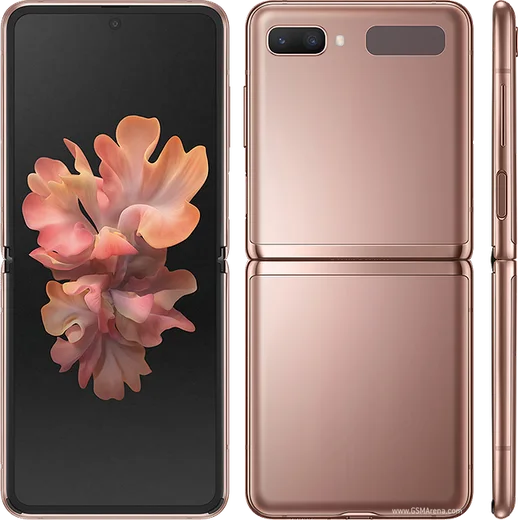
WhatsApp on Samsung Galaxy Z Flip 5
Samsung Android

WhatsApp for Samsung Galaxy Z Flip 5

Snapdragon 8 Gen 2, 3.4-inch cover screen, 6.7-inch

WhatsApp Messenger 4.7 · 64.2M reviews Free · Android · ~40 MB · by WhatsApp LLC
Download WhatsApp

Ask a question / report a problem

You can ask any question about WhatsApp support on the Samsung Galaxy Z Flip 5 — leave it below and we'll help.

Ask a question

Can the Samsung Galaxy Z Flip 5 run WhatsApp?

Fully supported
  • Operating systemAndroid
  • ProcessorSnapdragon 8 Gen 2
  • WhatsApp versionLatest supported

Latest known WhatsApp problems on Samsung Galaxy Z Flip 5

1

How do I open WhatsApp directly on the Z Flip 5 cover screen without unfolding?

By default the Flex Window only runs Samsung's curated widgets, so you need to unlock full app support. Install Good Lock from the Galaxy Store, open the MultiStar module, and turn on 'I ❤ Galaxy Foldable.' That enables the 'Launcher Widget' on the cover screen: swipe to it, add WhatsApp, and you can then tap it to launch WhatsApp straight on the front display while the phone is folded. See how others solved this on Reddit
2

Can I run WhatsApp as a full app on the Flip 5 cover screen without Good Lock?

On newer One UI versions there is a built-in option that avoids Good Lock. Go to Settings > Advanced features > Labs and turn on 'Apps allowed on cover screen' (also labelled 'Use apps on cover screen' on some versions), then add WhatsApp to the list. Note this is an experimental Labs feature, so apps aren't optimized for the small screen and may look cramped; if you don't see Labs, your software version may not include it yet and Good Lock's MultiStar remains the reliable route. See how others solved this on Reddit
3

WhatsApp suddenly stopped working on my Z Flip 5, how do I fix it?

This is usually a cache, background-restriction, or version issue rather than the foldable hardware. First update WhatsApp from the Play Store, then go to Settings > Apps > WhatsApp > Storage and tap 'Clear cache.' Next open Settings > Apps > WhatsApp > Battery and set it to 'Unrestricted' so WhatsApp isn't put to sleep, and confirm background data is allowed under Settings > Apps > WhatsApp > Mobile data. If it still fails, reinstall WhatsApp and restore your chats from the Google Drive backup tied to your account. See how others solved this on Reddit
4

Why don't WhatsApp notifications show or let me reply on the Flip 5 cover screen?

Cover-screen notifications depend on the app's notifications being enabled in the first place. Go to Settings > Notifications > App notifications and make sure WhatsApp is turned on, and check that WhatsApp itself has notifications enabled in its in-app Settings > Notifications. Once enabled, WhatsApp messages appear on the Flex Window and you can use the quick-reply keyboard there. If previews look hidden, check Settings > Notifications > Notification settings on Lock screen, since the cover screen follows your lock-screen privacy setting. See how others solved this on Reddit
5

How do I use both WhatsApp accounts (Dual Messenger) on the Flip 5 cover screen?

First create the second copy: go to Settings > Advanced features > Dual Messenger and toggle on WhatsApp, which installs a separate cloned WhatsApp. Stock One UI only exposes the primary app to the Flex Window, so to put the clone on the cover screen use Good Lock's MultiStar 'Launcher Widget' (after enabling 'I ❤ Galaxy Foldable') and add the second WhatsApp icon there alongside the first. See how others solved this on Reddit

Ask a question / report a problem

You can ask any question about WhatsApp support on the Samsung Galaxy Z Flip 5 — leave it below and we'll help.

Ask a question

Watch: setting up WhatsApp

Prefer to watch? This short walkthrough shows the whole installation and number-verification flow.

How to install WhatsApp on Samsung Galaxy Z Flip 5 — video walkthrough

How to install WhatsApp on Samsung Galaxy Z Flip 5

1

Choose how to download

On your Samsung Galaxy Z Flip 5 you can get the official app two ways: from the Google Play Store — the easiest option, since it keeps WhatsApp updated automatically — or directly from the official website. You can download an APK file, by clicking a link “Download WhatsApp directly”.

2

Open WhatsApp

Launch WhatsApp from your home screen or app drawer and accept the Terms of Service to start setup.

3

Verify your phone number

Enter your phone number. If your Samsung Galaxy Z Flip 5 uses dual SIM, pick the line you want WhatsApp tied to, then enter the 6-digit code it sends by SMS — it usually fills in automatically.

4

Restore chats and finish setup

Restore your chat history from Google Drive (use the same Google account), add your name and photo, and tap Allow for notifications so messages and calls arrive reliably.

Stay safe: only ever install WhatsApp from the official Android source. The Download button above already points there — modified copies (GB/Plus/Aero WhatsApp) can get your number banned.

Comments (15)

No registration needed. No email required.
X
xX_nickJun 14, 2026

a marché parfaitement, merci 💯

X
xX_maxxMar 15, 2026

Honestly it worked first try thanks again

AppWhatsOfficialMar 17, 2026

Great to hear it worked out!

C
chris_rajJan 24, 2026

you guys are life savers

R
ray_kDec 13, 2025

Hey omggg i cant install it someone heeelp 😭

AppWhatsOfficialDec 17, 2025

You are almost there! Tap Download, allow the install, open WhatsApp and confirm your number. Reply here if you get stuck.

B
big_kateOct 12, 2025

omg super easy to follow

P
pablo_xOct 2, 2025

the zflip5 guide was spot on ✌️

G
greg79Sep 24, 2025

whatsapp finally on my galaxy z flip 5

N
nightowlAug 18, 2025

So couldnt install whatsapp on my Samsung Galaxy Z Flip 5 until i found this thx

N
nourJul 8, 2025

أخيراً سهل جداً بدون مشاكل

T
tan33Jun 8, 2025

wow trop facile, tout est prêt

W
whatsappfanMar 4, 2025

So you guys are life savers

H
heeeelpJan 18, 2025

finally got it working on my zflip5 first try

P
pete00Nov 16, 2024

installed in 2 min cheers

A
alex_xAug 27, 2024

ok so verified my number on the z flip 5 with no trouble

F
finn07Aug 7, 2024

it worked first try