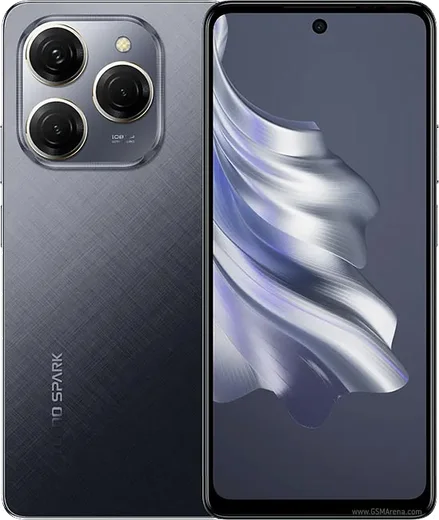
WhatsApp on Tecno Spark 20 Pro
Tecno Android

WhatsApp for Tecno Spark 20 Pro

Helio G99 Ultimate, 6.78-inch 120Hz display

WhatsApp Messenger 4.7 · 64.2M reviews Free · Android · ~40 MB · by WhatsApp LLC
Download WhatsApp

Ask a question / report a problem

You can ask any question about WhatsApp support on the Tecno Spark 20 Pro — leave it below and we'll help.

Ask a question

Can the Tecno Spark 20 Pro run WhatsApp?

Fully supported
  • Operating systemAndroid
  • ProcessorHelio G99 Ultimate
  • WhatsApp versionLatest supported

Latest known WhatsApp problems on Tecno Spark 20 Pro

1

Why are my WhatsApp notifications silent on the Tecno Spark 20 Pro?

Open WhatsApp > Settings > Notifications and confirm the message tone and vibration are set, then go to Android Settings > Apps > WhatsApp > Notifications and open the 'Messages' channel. Set its importance to 'High' and make sure a sound is selected. On HiOS the per-channel sound controls this, so if the channel was switched to 'Silent' you will get banners with no tone until you set a sound and high importance again. See how others solved this on Reddit
2

WhatsApp calls won't ring or connect on my Tecno Spark 20 Pro, how do I fix it?

Go to Settings > Apps > WhatsApp > Permissions and enable Microphone and Phone, then enable 'Display over other apps' so the incoming-call screen can show. Next open Settings > Battery > App battery management (Power Manager), find WhatsApp and set it to 'No restrictions' (Unrestricted). The Spark's aggressive HiOS power saving often kills the background connection before a call can ring, so removing the restriction is usually what fixes it. See how others solved this on Reddit
3

WhatsApp changed how my notifications look on the Tecno Spark 20 Pro and now I can't see message previews

The grouped notification layout is controlled by WhatsApp's app, but you can restore the look you want under WhatsApp > Settings > Notifications by toggling 'Use high priority notifications'. To show full message text on the lock screen, go to Android Settings > Notifications > Notifications on lock screen and choose 'Show all notification content' so previews are no longer hidden. See how others solved this on Reddit
4

I only get WhatsApp notifications when I open the app on my Tecno Spark 20 Pro, what's wrong?

This is almost always battery management closing WhatsApp in the background. Go to Settings > Battery > App battery management (or Power Manager), find WhatsApp and set it to 'No restrictions'. Then open Settings > Apps > WhatsApp > Battery and choose 'Unrestricted', and lock WhatsApp in the recent-apps screen (tap the lock icon or pull the card down) so HiOS stops clearing it from memory. See how others solved this on Reddit
5

WhatsApp notifications only arrive sometimes or are very delayed on my Tecno Spark 20 Pro

Delayed and inconsistent alerts usually come from Doze and Data Saver cutting WhatsApp's connection. Open Settings > Network & internet > Data Saver > Unrestricted data and turn WhatsApp on, then set Settings > Apps > WhatsApp > Mobile data to allow background data. Finally set WhatsApp to 'Unrestricted' under Settings > Apps > WhatsApp > Battery so the app keeps a live connection even when the screen is off. See how others solved this on Reddit
6

I get no WhatsApp notifications at all on my Tecno Spark 20 Pro running Android 13

First confirm notifications are allowed at the system level under Settings > Apps > WhatsApp > Notifications and turn the master switch on. Then check that 'Pause app activity if unused' is turned off under Settings > Apps > WhatsApp so Android doesn't auto-revoke its permissions. If alerts still don't appear, clear WhatsApp's cache via Settings > Apps > WhatsApp > Storage > Clear cache and reboot, which re-registers the push connection. See how others solved this on Reddit

Ask a question / report a problem

You can ask any question about WhatsApp support on the Tecno Spark 20 Pro — leave it below and we'll help.

Ask a question

Watch: setting up WhatsApp

Prefer to watch? This short walkthrough shows the whole installation and number-verification flow.

How to install WhatsApp on Tecno Spark 20 Pro — video walkthrough

How to install WhatsApp on Tecno Spark 20 Pro

1

Choose how to download

On your Tecno Spark 20 Pro you can get the official app two ways: from the Google Play Store — the easiest option, since it keeps WhatsApp updated automatically — or directly from the official website. You can download an APK file, by clicking a link “Download WhatsApp directly”.

2

Open WhatsApp

Launch WhatsApp from your home screen or app drawer and accept the Terms of Service to start setup.

3

Verify your phone number

Enter your phone number. If your Tecno Spark 20 Pro uses dual SIM, pick the line you want WhatsApp tied to, then enter the 6-digit code it sends by SMS — it usually fills in automatically.

4

Restore chats and finish setup

Restore your chat history from Google Drive (use the same Google account), add your name and photo, and tap Allow for notifications so messages and calls arrive reliably.

Stay safe: only ever install WhatsApp from the official Android source. The Download button above already points there — modified copies (GB/Plus/Aero WhatsApp) can get your number banned.

Comments (11)

No registration needed. No email required.
P
pete66Jun 8, 2026

hi same account on two devices possible pls

AppWhatsOfficialJun 13, 2026

Thanks for asking, yes, use Linked Devices in Settings to add a second phone with the same account. Glad to help.

L
lurkerMay 28, 2026

Finally even my grandma could do this

Y
yuki1990Feb 28, 2026

tolle anleitung danke

C
chris.rFeb 25, 2026

finally wasnt expecting it to be this easy lol

K
kate.bMay 9, 2025

This fixed whatsapp on my Spark 20 Pro 👍

S
sara.eFeb 16, 2025

pasos clarísimos para el 20 pro

J
jess_realFeb 5, 2025

Quick q is whatsapp free or do i have to pay thanks

AppWhatsOfficialFeb 11, 2025

Hey there, it is completely free. There is no fee for the app, only your usual data or wifi is used.

C
confuuusedJan 4, 2025

Guys cant do this alone HELP how do i download 😭

AppWhatsOfficialJan 6, 2025

Breathe! Follow the steps above one by one, tap Download first, and you will be chatting in no time. You got this!

H
halppDec 6, 2024

update whatsapp running great on my 20 pro cheers

L
lou2000Nov 22, 2024

couldnt install whatsapp on my tecno spark 20 pro until i found this

A
ash_xXSep 28, 2024

thank u, whatsapp installed on my spark 20 pro 🔥

AppWhatsOfficialSep 30, 2024

Thanks for the feedback!