WhatsApp on Xperia Pro
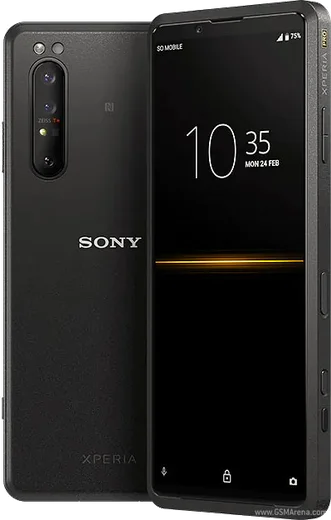
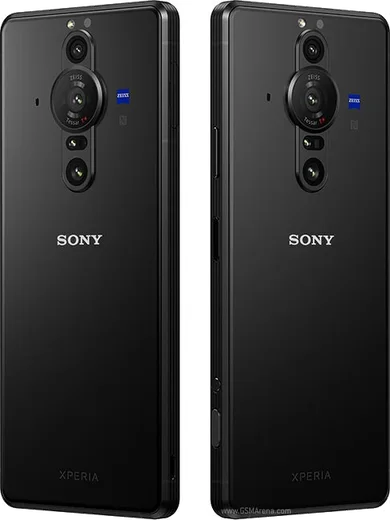
Sony Xperia Android

WhatsApp for Xperia Pro

Snapdragon 865, mmWave 5G, HDMI input for cameras

WhatsApp Messenger 4.7 · 64.2M reviews Free · Android · ~40 MB · by WhatsApp LLC
Download WhatsApp

Ask a question / report a problem

You can ask any question about WhatsApp support on the Xperia Pro — leave it below and we'll help.

Ask a question

Can the Xperia Pro run WhatsApp?

Fully supported
  • Operating systemAndroid
  • ProcessorSnapdragon 865
  • WhatsApp versionLatest supported

Latest known WhatsApp problems on Xperia Pro

1

Why are photos taken inside WhatsApp on my Xperia Pro so low quality and grainy?

WhatsApp uses its own basic in-app camera that bypasses Sony's camera processing, so shots look soft and noisy compared to the stock app. For good results, shoot with Sony's Camera (Photo Pro) app first, then in WhatsApp tap the attach (paperclip) icon, choose Gallery, and send the photo from there. Also reduce compression by going to WhatsApp Settings > Storage and data > Media upload quality and selecting HD. See how others solved this on Reddit
2

WhatsApp won't open Sony's real camera app on my Xperia Pro. Can I change that?

No. WhatsApp deliberately uses its own embedded camera for in-chat capture and there's no setting to swap in Sony's Camera/Photo Pro app. The only workaround is to open Sony's camera separately, take the shot, then attach it through WhatsApp's Gallery picker (paperclip icon > Gallery). That gives you the full sensor quality and Sony's processing that the in-app camera skips. See how others solved this on Reddit
3

WhatsApp notification sounds don't play properly on my Xperia Pro. How do I fix it?

This is usually Sony's battery management putting WhatsApp to sleep, which delays or mutes alert sounds. Go to Settings > Apps > WhatsApp > App battery usage (or Battery) and set it to Unrestricted; also disable STAMINA mode under Settings > Battery. Then in WhatsApp, open Settings > Notifications, re-select your notification tone, and confirm that the system's Do Not Disturb and the chat's own mute setting aren't active. See how others solved this on Reddit
4

How do I run two WhatsApp accounts on my Xperia Pro?

Newer WhatsApp versions support a second account natively: open WhatsApp, go to Settings, tap the dropdown arrow next to your name at the top, choose Add account, and register a second number (handy if your Xperia Pro has dual SIM). If you'd rather keep two separate apps, install WhatsApp Business from the Play Store and use a different number there, since it runs independently alongside the standard app. See how others solved this on Reddit
5

How do I transfer my WhatsApp chats to a new Xperia Pro without losing history?

Since both phones are Android, back up first on your old phone via WhatsApp Settings > Chats > Chat backup, then tap Back up to save to Google Drive (use the same Google account on both devices). On the Xperia Pro, install WhatsApp, verify the same phone number, and when prompted tap Restore to pull the chats and media back from Drive. Make sure Google Play services is up to date on the Xperia, or the restore prompt may not appear. See how others solved this on Reddit
6

WhatsApp messages arrive late on my Xperia Pro because it keeps getting killed in the background. How do I stop it?

Sony's aggressive power management is the cause, so exempt WhatsApp from it. Go to Settings > Apps > WhatsApp > App battery usage and choose Unrestricted, then under Settings > Battery turn off STAMINA mode. Also open Settings > Apps > WhatsApp > Mobile data and confirm Background data and Unrestricted data usage are enabled so it keeps its connection alive for instant delivery. See how others solved this on Reddit

Ask a question / report a problem

You can ask any question about WhatsApp support on the Xperia Pro — leave it below and we'll help.

Ask a question

Watch: setting up WhatsApp

Prefer to watch? This short walkthrough shows the whole installation and number-verification flow.

How to install WhatsApp on Xperia Pro — video walkthrough

How to install WhatsApp on Xperia Pro

1

Choose how to download

On your Xperia Pro you can get the official app two ways: from the Google Play Store — the easiest option, since it keeps WhatsApp updated automatically — or directly from the official website. You can download an APK file, by clicking a link “Download WhatsApp directly”.

2

Open WhatsApp

Launch WhatsApp from your home screen or app drawer and accept the Terms of Service to start setup.

3

Verify your phone number

Enter your phone number. If your Xperia Pro uses dual SIM, pick the line you want WhatsApp tied to, then enter the 6-digit code it sends by SMS — it usually fills in automatically.

4

Restore chats and finish setup

Restore your chat history from Google Drive (use the same Google account), add your name and photo, and tap Allow for notifications so messages and calls arrive reliably.

Stay safe: only ever install WhatsApp from the official Android source. The Download button above already points there — modified copies (GB/Plus/Aero WhatsApp) can get your number banned.

Comments (11)

No registration needed. No email required.
M
maxx.xApr 9, 2026

wow alles läuft auf meinem pro, vielen dank danke

G
gabe52Jan 19, 2026

Quick q stuck on a black screen after install pls

AppWhatsOfficialJan 21, 2026

Good question, try restarting your phone first. If it still wont open, clear the cache or reinstall the latest version from the official source. Reach out anytime.

S
sooo_confusedOct 27, 2025

anyone? how do i hide my last seen anyone

AppWhatsOfficialOct 30, 2025

Happy to help, in Privacy settings you can set Last Seen and Online to Nobody, so no one sees when you are active. Reach out anytime.

N
nightowlSep 19, 2025

hé tout fonctionne sur mon xperia pro, merci beaucoup 🙏

T
theuserSep 16, 2025

tbh installed on my Xperia Pro, super simple lol

N
noah99Sep 5, 2025

pls help wont this give me a virus ?

AppWhatsOfficialSep 9, 2025

Sure, yes, this is safe. Stick to the official download we link to and avoid modified copies and you will be fine. Enjoy WhatsApp on your your phone!

T
the_real_linaSep 3, 2025

Man even my grandma could do this lol

L
luca.jAug 10, 2025

Anyone pls i cant download it heeeelp me 😩

AppWhatsOfficialAug 11, 2025

Relax, it is simpler than it looks. Press Download, install, then verify with the SMS code. You got this!

W
whyyyyyJul 21, 2025

Wow downloaded and installed on my Xperia Pro :)

G
gabe65Jun 14, 2025

omg i tried 3 other guides before this one 👍

P
priya79Apr 11, 2025

man installed whatsapp on my pro with no issues :)