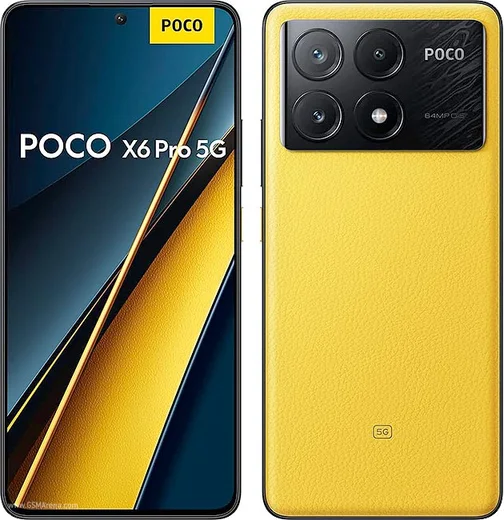
WhatsApp on Poco X6 Pro
Poco Android

WhatsApp for Poco X6 Pro

Dimensity 8300-Ultra, 6.67-inch 1.5K AMOLED, 67W

WhatsApp Messenger 4.7 · 64.2M reviews Free · Android · ~40 MB · by WhatsApp LLC
Download WhatsApp

Ask a question / report a problem

You can ask any question about WhatsApp support on the Poco X6 Pro — leave it below and we'll help.

Ask a question

Can the Poco X6 Pro run WhatsApp?

Fully supported
  • Operating systemAndroid
  • ProcessorDimensity 8300-Ultra
  • WhatsApp versionLatest supported

Latest known WhatsApp problems on Poco X6 Pro

1

Why are WhatsApp notifications not showing on the lock screen of my Poco X6 Pro?

HyperOS aggressively manages background apps, so first open Settings > Apps > Manage apps > WhatsApp, set Battery saver to No restrictions, and turn on Autostart. Then go to Settings > Notifications & Control center > App notifications > WhatsApp and enable Lock screen notifications plus Show notification content. Finally confirm notifications are enabled inside WhatsApp's own Settings > Notifications. This keeps the connection alive while the phone is idle so alerts reach the lock screen. See how others solved this on Reddit
2

My Poco X6 Pro doesn't give me instant WhatsApp notifications and they arrive late

Delayed notifications almost always come from HyperOS battery optimization throttling WhatsApp in the background. Go to Settings > Apps > Manage apps > WhatsApp, set Battery saver to No restrictions, and enable Autostart. Then in Settings > Battery turn off any battery-saver or scheduled power-saving modes. You can also open the Recents screen, hold or swipe down on WhatsApp's card, and tap the lock icon so the system stops clearing it from memory. See how others solved this on Reddit
3

WhatsApp keeps ignoring Do Not Disturb and still rings on my Poco X6 Pro

Do Not Disturb only silences apps that aren't marked as priority, so an exception is letting WhatsApp through. Open Settings > Sound & vibration > Do Not Disturb and check the Apps / Priority notifications (Exceptions) list, then remove WhatsApp so it is no longer allowed to break through. Also review WhatsApp's in-app Settings > Notifications and clear any custom call/message override. After that DND will mute WhatsApp calls and messages as expected. See how others solved this on Reddit
4

The screen doesn't turn off during WhatsApp calls on my Poco X6 Pro (proximity sensor issue)

If the display stays on when you hold the phone to your ear, first make sure no case, screen protector, or dirt is covering the top of the screen near the earpiece where the sensor sits. You can test the sensor with the hardware test menu via the dialer code *#*#64663#*#* (CIT test) and run the proximity check. If it still misbehaves, clear WhatsApp's cache in Settings > Apps > Manage apps > WhatsApp > Clear data > Clear cache and reboot, since a stuck sensor reading is often a software glitch after a HyperOS update rather than a hardware fault. See how others solved this on Reddit
5

WhatsApp voice messages and call audio not working properly on my Poco X6 Pro

First confirm WhatsApp has microphone access in Settings > Apps > Manage apps > WhatsApp > Permissions > Microphone (set to Allow), and disable any audio enhancers like Dolby Atmos in Settings > Sound & vibration that can distort playback. If voice notes still fail or sound broken, clear WhatsApp's cache under Settings > Apps > Manage apps > WhatsApp > Clear data > Clear cache and update the app from the Play Store, as audio glitches are common after a HyperOS upgrade. See how others solved this on Reddit
6

After updating to HyperOS 2.0 my Poco X6 Pro WhatsApp notifications and chats broke

HyperOS updates can reset app permissions and re-enable battery restrictions, so after updating re-apply them in Settings > Apps > Manage apps > WhatsApp: set Battery saver to No restrictions, enable Autostart, and re-confirm Notifications and Storage permissions. If chats fail to load or sync, clear the cache (not data) on that same WhatsApp app page and reboot, then update WhatsApp from the Play Store, which usually resolves display issues introduced by the new firmware. See how others solved this on Reddit

Ask a question / report a problem

You can ask any question about WhatsApp support on the Poco X6 Pro — leave it below and we'll help.

Ask a question

Watch: setting up WhatsApp

Prefer to watch? This short walkthrough shows the whole installation and number-verification flow.

How to install WhatsApp on Poco X6 Pro — video walkthrough

How to install WhatsApp on Poco X6 Pro

1

Choose how to download

On your Poco X6 Pro you can get the official app two ways: from the Google Play Store — the easiest option, since it keeps WhatsApp updated automatically — or directly from the official website. You can download an APK file, by clicking a link “Download WhatsApp directly”.

2

Open WhatsApp

Launch WhatsApp from your home screen or app drawer and accept the Terms of Service to start setup.

3

Verify your phone number

Enter your phone number. If your Poco X6 Pro uses dual SIM, pick the line you want WhatsApp tied to, then enter the 6-digit code it sends by SMS — it usually fills in automatically.

4

Restore chats and finish setup

Restore your chat history from Google Drive (use the same Google account), add your name and photo, and tap Allow for notifications so messages and calls arrive reliably.

Stay safe: only ever install WhatsApp from the official Android source. The Download button above already points there — modified copies (GB/Plus/Aero WhatsApp) can get your number banned.

Comments (13)

No registration needed. No email required.
N
needwhatsappApr 7, 2026

this is the only one that worked for me

L
lina.kMar 22, 2026

Omg help meee i pressed everything and nothing 😭 :(

AppWhatsOfficialMar 23, 2026

Don't worry, you can do this! Use the Download button, install the app, and enter your number to verify. Reply here if you get stuck.

M
mmmaaaxxxMar 13, 2026

finally best site for this honestly 🔥

M
mr_kateDec 28, 2025

beste seite, sofort geklappt 👍

P
priya.uDec 26, 2025

wow easy install on my Poco X6 Pro

N
nour25Jun 9, 2025

أخيراً ثبّت واتساب

P
phonefanMay 10, 2025

Finally clear steps for the x6pro, cheers

T
tom07Apr 25, 2025

update saved me so much time

Y
yuki92Mar 10, 2025

Finally had whatsapp on my X6 Pro in no time

L
luca_joeFeb 24, 2025

finally got whatsapp running on my poco x6 pro

D
dan27Jan 28, 2025

pls help official app or a mod

AppWhatsOfficialJan 31, 2025

Sure, only the official app here. Modified versions can get your account banned, so we never link to them. Enjoy WhatsApp on your your phone!

O
omar.cJan 1, 2025

Wow installé sans souci

M
mr_jessJul 15, 2024

did it on my Poco X6 Pro in like 2 minutes