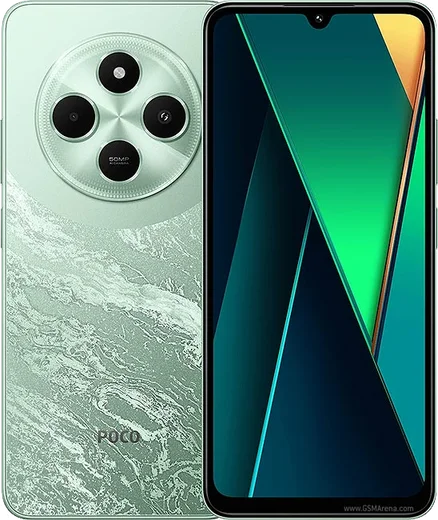
WhatsApp on Poco X7
Poco Android

WhatsApp for Poco X7

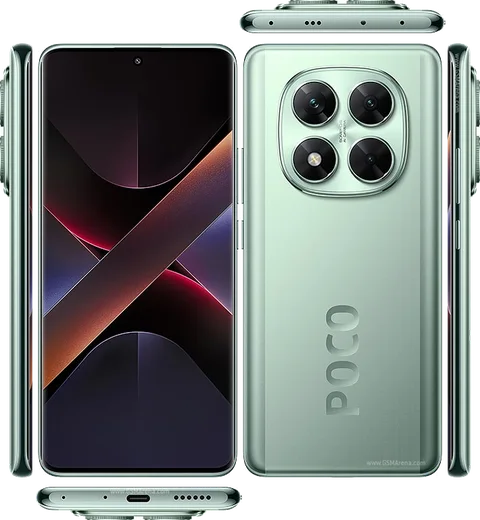
Dimensity 7300-Ultra, 6.67-inch curved AMOLED, 45W

WhatsApp Messenger 4.7 · 64.2M reviews Free · Android · ~40 MB · by WhatsApp LLC
Download WhatsApp

Ask a question / report a problem

You can ask any question about WhatsApp support on the Poco X7 — leave it below and we'll help.

Ask a question

Can the Poco X7 run WhatsApp?

Fully supported
  • Operating systemAndroid
  • ProcessorDimensity 7300-Ultra
  • WhatsApp versionLatest supported

Latest known WhatsApp problems on Poco X7

1

Why aren't WhatsApp photos showing in my gallery on the Poco X7?

This happens when WhatsApp's media folder isn't picked up by the HyperOS Gallery scanner, usually because Media Visibility is off or storage permission is missing. Open WhatsApp, go to Settings > Chats and turn on 'Media visibility', then check that storage access is granted under Settings > Apps > Manage apps > WhatsApp > Permissions > Files and media. Reboot the phone so the Gallery re-indexes the WhatsApp Images folder. See how others solved this on Reddit
2

WhatsApp images suddenly disappeared from my MIUI/HyperOS Gallery after an update, how do I fix it?

An update can move WhatsApp's media to scoped storage, so new photos land in Android/media/com.whatsapp instead of the old top-level WhatsApp folder. Open the built-in Files app and browse to Android/media/com.whatsapp/WhatsApp/Media to confirm the pictures are still there, then in WhatsApp Settings > Chats enable 'Media visibility'. Clearing the Gallery app's cache via Settings > Apps > Manage apps > Gallery > Clear data > Clear cache forces a fresh re-scan. See how others solved this on Reddit
3

I can't see received WhatsApp images in my gallery on Poco X7 even though they download fine, what's wrong?

The images download but the Gallery skips the folder, typically a permissions or media-visibility issue on HyperOS. Make sure WhatsApp has Files and media access under Settings > Apps > Manage apps > WhatsApp > Permissions, and turn on 'Media visibility' in WhatsApp Settings > Chats. You can also check a specific chat: open it, tap the contact/group name at the top, and confirm 'Media visibility' is set to On or Default, then restart the phone. See how others solved this on Reddit
4

WhatsApp notifications are delayed or don't arrive instantly on my Poco X7, how do I get them in real time?

HyperOS aggressively kills background apps to save battery, which delays WhatsApp's push notifications. Go to Settings > Apps > Manage apps > WhatsApp > Battery saver and set it to 'No restrictions', then enable Autostart for WhatsApp under Settings > Apps > Permissions > Autostart. Also lock WhatsApp in the Recents screen (pull down on its card and tap the lock icon) so the system can't clear it from memory. See how others solved this on Reddit
5

WhatsApp notifications don't show on my Poco X7 lock screen, how do I enable them?

This is usually a HyperOS notification or lock-screen restriction rather than a WhatsApp bug. Go to Settings > Notifications & Control center > App notifications > WhatsApp and make sure notifications, 'Show on lock screen', and the Messages channel are all enabled. Then set WhatsApp's battery mode to 'No restrictions' and enable Autostart so the app can deliver notifications while the screen is off. See how others solved this on Reddit
6

WhatsApp keeps crashing on my Poco X7 Pro, how can I stop it?

Repeated crashes usually come from a corrupted cache or an outdated build conflicting with HyperOS. Update WhatsApp to the latest version in the Play Store, then clear its cache via Settings > Apps > Manage apps > WhatsApp > Clear data > Clear cache (this keeps your chats). If it still crashes, back up your chats in WhatsApp Settings > Chats > Chat backup to Google Drive, then uninstall and reinstall the app fresh. See how others solved this on Reddit

Ask a question / report a problem

You can ask any question about WhatsApp support on the Poco X7 — leave it below and we'll help.

Ask a question

Watch: setting up WhatsApp

Prefer to watch? This short walkthrough shows the whole installation and number-verification flow.

How to install WhatsApp on Poco X7 — video walkthrough

How to install WhatsApp on Poco X7

1

Choose how to download

On your Poco X7 you can get the official app two ways: from the Google Play Store — the easiest option, since it keeps WhatsApp updated automatically — or directly from the official website. You can download an APK file, by clicking a link “Download WhatsApp directly”.

2

Open WhatsApp

Launch WhatsApp from your home screen or app drawer and accept the Terms of Service to start setup.

3

Verify your phone number

Enter your phone number. If your Poco X7 uses dual SIM, pick the line you want WhatsApp tied to, then enter the 6-digit code it sends by SMS — it usually fills in automatically.

4

Restore chats and finish setup

Restore your chat history from Google Drive (use the same Google account), add your name and photo, and tap Allow for notifications so messages and calls arrive reliably.

Stay safe: only ever install WhatsApp from the official Android source. The Download button above already points there — modified copies (GB/Plus/Aero WhatsApp) can get your number banned.

Comments (10)

No registration needed. No email required.
M
ms_nickMay 13, 2026

Ugh anyone pls i cant download it heeeelp me

AppWhatsOfficialMay 17, 2026

Relax, it is simpler than it looks. Press Download, install, then verify with the SMS code. You got this! You got this!

M
ms_rajDec 29, 2025

Todo bien, mil gracias 💯

S
sooo_confusedDec 22, 2025

Finally good job whoever made this thx

U
ugh_helpJul 25, 2025

Got it working on my x7 first try ✌️

B
budgetkingJul 1, 2025

Honestly 10 out of 10

O
omar_benFeb 23, 2025

honestly downloaded and installed on my X7 cheers

R
rob89Feb 1, 2025

hi does whatsapp support the poco x7

AppWhatsOfficialFeb 7, 2025

Hi! Absolutely, the your phone is supported. Follow the steps above and you will be chatting in minutes. Enjoy WhatsApp on your your phone!

L
luca.bJan 19, 2025

tbh got my x7 sorted thanks to you

L
lina_proDec 27, 2024

finalmente semplicissimo, tutto pronto 🙏

G
gabe.bSep 16, 2024

Well smooth install on the poco x7