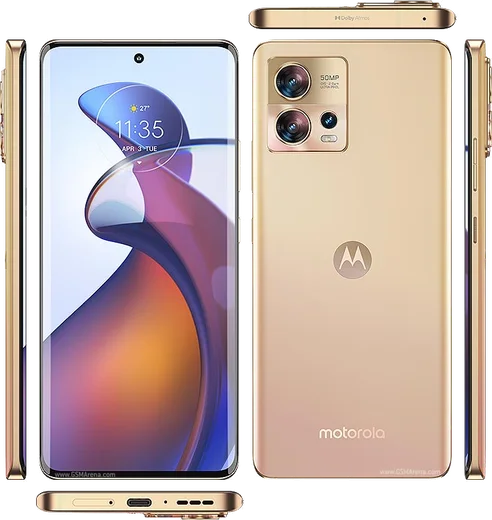
Motorola Android

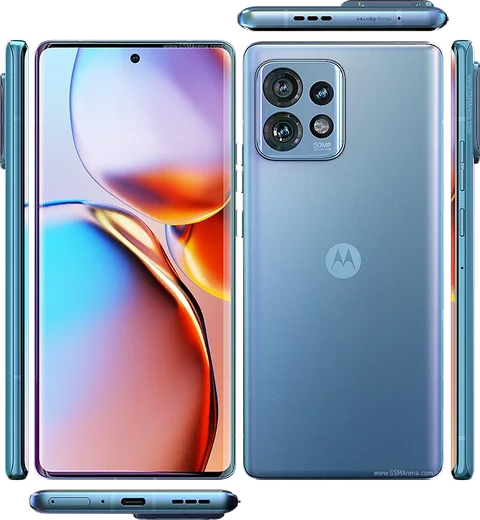
WhatsApp for Motorola Edge 30 Pro

Snapdragon 8 Gen 1, 6.7-inch pOLED 144Hz

WhatsApp Messenger 4.7 · 64.2M reviews Free · Android · ~40 MB · by WhatsApp LLC
Download WhatsApp

Ask a question / report a problem

You can ask any question about WhatsApp support on the Motorola Edge 30 Pro — leave it below and we'll help.

Ask a question

Can the Motorola Edge 30 Pro run WhatsApp?

Fully supported
  • Operating systemAndroid
  • ProcessorSnapdragon 8 Gen 1
  • WhatsApp versionLatest supported

Latest known WhatsApp problems on Motorola Edge 30 Pro

1

Why do I hear a buzzing or crackling sound during WhatsApp calls on my Motorola Edge 30 Pro?

This buzzing is usually WhatsApp's audio routing fighting with the phone's noise-suppression, so first force-close and update WhatsApp, then go to Settings > Apps > WhatsApp > Permissions and confirm Microphone is allowed. If it persists, toggle Bluetooth off during calls and disable any 'Advanced calling/VoLTE' under Settings > Network & internet > SIMs (or Mobile network), since the codec switch often introduces the buzz on Edge devices. See how others solved this on Reddit
2

The other person says my voice sounds robotic or has weird noise on WhatsApp video calls from my Edge 30 Pro. How do I fix it?

This is typically the bottom (primary) microphone or its noise-cancelling processing misbehaving, so first test all mics with a voice recorder app to find a dead one. Reboot to clear the audio service, then clear WhatsApp's cache under Settings > Apps > WhatsApp > Storage & cache > Clear cache; if only WhatsApp is affected, reinstalling it from the Play Store usually resolves the distorted or noisy audio. See how others solved this on Reddit
3

My Motorola Edge 30 Pro microphone stops working during normal calls but works in speaker mode. What's wrong?

When the mic works on speaker but not when held to your ear, it's almost always the bottom mic being blocked, dirty, or faulty, so gently clean the bottom mic port and remove any case or screen protector covering it. Test in Safe Mode to rule out a third-party app hijacking the mic, and if the lower mic is genuinely dead it's a hardware repair, though clearing the Phone app's cache fixes the software cases. See how others solved this on Reddit
4

My Edge 30 Pro gets very hot and the battery drains fast during WhatsApp video calls. Is this normal?

Heavy heat and drain on video calls usually come from the modem and camera processing running flat-out, often made worse by a weak signal forcing the radio to max power. Lower the in-app video quality, remove thick cases that trap heat, and check Settings > Apps > WhatsApp > Mobile data & Wi-Fi to ensure background activity isn't compounding it; updating both WhatsApp and the phone's software also patches known overheating regressions. See how others solved this on Reddit
5

My Motorola Edge 30 Pro wakes up warm with the battery drained overnight. How do I stop the drain?

Overnight warmth means an app or sync is keeping the phone awake, so check Settings > Battery > Battery usage to find the culprit, then restrict it via Settings > Apps > (app) > Battery (or App battery usage) and set it to Restricted. Turn off any 'Always-on display' and enable Adaptive battery under Settings > Battery; if a specific app like WhatsApp is shown holding the phone awake, clearing its cache and limiting its background data usually ends the drain. See how others solved this on Reddit
6

I'm not getting WhatsApp message notifications on time on my Edge 30 Pro unless I open the app. How do I fix delayed notifications?

This is Motorola's aggressive battery optimization killing WhatsApp in the background, so go to Settings > Apps > WhatsApp > Battery (or App battery usage) and set it to Unrestricted, then confirm notifications are enabled under Settings > Apps > WhatsApp > Notifications. Also turn off any Battery saver and Data saver, which stops the delayed delivery and missing notification banners. See how others solved this on Reddit

Ask a question / report a problem

You can ask any question about WhatsApp support on the Motorola Edge 30 Pro — leave it below and we'll help.

Ask a question

Watch: setting up WhatsApp

Prefer to watch? This short walkthrough shows the whole installation and number-verification flow.

How to install WhatsApp on Motorola Edge 30 Pro — video walkthrough

How to install WhatsApp on Motorola Edge 30 Pro

1

Choose how to download

On your Motorola Edge 30 Pro you can get the official app two ways: from the Google Play Store — the easiest option, since it keeps WhatsApp updated automatically — or directly from the official website. You can download an APK file, by clicking a link “Download WhatsApp directly”.

2

Open WhatsApp

Launch WhatsApp from your home screen or app drawer and accept the Terms of Service to start setup.

3

Verify your phone number

Enter your phone number. If your Motorola Edge 30 Pro uses dual SIM, pick the line you want WhatsApp tied to, then enter the 6-digit code it sends by SMS — it usually fills in automatically.

4

Restore chats and finish setup

Restore your chat history from Google Drive (use the same Google account), add your name and photo, and tap Allow for notifications so messages and calls arrive reliably.

Stay safe: only ever install WhatsApp from the official Android source. The Download button above already points there — modified copies (GB/Plus/Aero WhatsApp) can get your number banned.

Comments (11)

No registration needed. No email required.
D
dan.tFeb 12, 2026

Hey pleeeease i really need whatsapp on my Motorola Edge 30 Pro today 😭😭

AppWhatsOfficialFeb 16, 2026

Breathe! Follow the steps above one by one, tap Download first, and you will be chatting in no time. You will be set up on your phone in no time.

W
whatsappfanJan 13, 2026

It worked first try 👍

T
tan.gDec 12, 2025

Yo thank u, whatsapp installed on my edge 30 pro 🔥

O
oldschoolNov 6, 2025

yo didnt work at first but second time was fine

R
ray.aAug 3, 2025

me funcionó al instante en mi edge30pro

I
its_alexDec 28, 2024

clear and to the point thx

S
sara.gNov 18, 2024

Finally clear and to the point

N
nick93Nov 3, 2024

did it without any help, very simple

L
luca_kaiOct 17, 2024

Update easy install on my Motorola Edge 30 Pro lol

D
deni2000Sep 6, 2024

Guys the download is very slow is that normal

AppWhatsOfficialSep 9, 2024

Happy to help, a slow download is usually the network. A stable wifi connection will speed it up a lot.

N
not_benJul 21, 2024

a marché parfaitement sur mon Edge 30 Pro merci