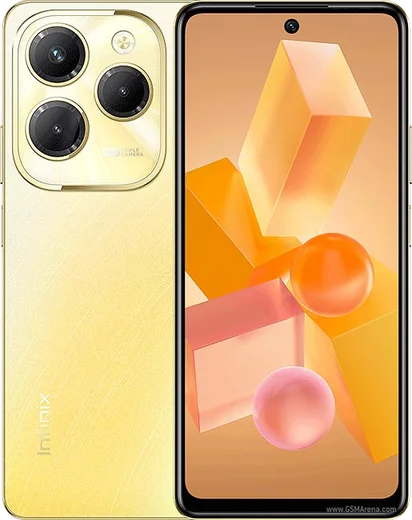
WhatsApp on Infinix Zero Ultra
Infinix Android

WhatsApp for Infinix Zero Ultra

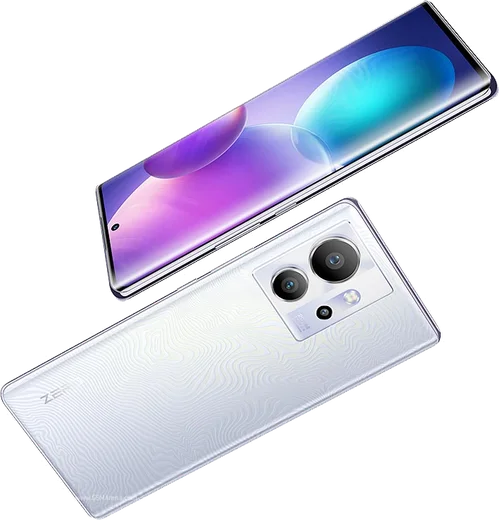
Dimensity 920, 6.8-inch curved AMOLED, 180W charging

WhatsApp Messenger 4.7 · 64.2M reviews Free · Android · ~40 MB · by WhatsApp LLC
Download WhatsApp

Ask a question / report a problem

You can ask any question about WhatsApp support on the Infinix Zero Ultra — leave it below and we'll help.

Ask a question

Can the Infinix Zero Ultra run WhatsApp?

Fully supported
  • Operating systemAndroid
  • ProcessorDimensity 920
  • WhatsApp versionLatest supported

Latest known WhatsApp problems on Infinix Zero Ultra

1

Why are my WhatsApp notifications on the Infinix Zero Ultra silent or delayed until I open the app?

XOS aggressively closes background apps to save battery, which prevents WhatsApp from receiving pushes in real time. Go to Settings > Apps > App management > WhatsApp > Battery usage and set it to "No restrictions" (allow background activity). Then open Settings > Battery > and add WhatsApp to the protected apps / unrestricted list so XOS stops killing it. Finally, long-press a WhatsApp notification, open its notification settings, and make sure the Messages and Group channels are set to "Make sound and pop on screen" rather than Silent. See how others solved this on Reddit
2

After the XOS 15 update my Infinix Zero Ultra has missing features and apps like WhatsApp act buggy, what can I do?

Large XOS version jumps can leave cached app data in an inconsistent state, causing missing toggles and unstable behavior in apps such as WhatsApp. Clear the app cache via Settings > Apps > App management > WhatsApp > Storage > Clear cache (do NOT tap Clear data, as that removes chats and local settings), then restart the phone. If features are still missing, check Settings > System > System update, since Infinix usually ships a follow-up patch build shortly after a major release. See how others solved this on Reddit
3

WhatsApp keeps automatically adding random contacts on my Infinix Zero Ultra, how do I stop it?

WhatsApp syncs your entire address book, so any number saved on the phone or in your Google account appears in the WhatsApp contacts list. To block syncing entirely, go to Settings > Apps > App management > WhatsApp > Permissions and turn off the Contacts permission. To instead clean it up, remove the unwanted numbers in the Contacts app and at contacts.google.com, then reopen WhatsApp and pull down on the chats list to force a refresh. See how others solved this on Reddit
4

Is the Infinix Zero Ultra reliable enough as a main phone for messaging, or should I keep it as a backup?

Owners generally find Infinix hardware (fast charging and the display) solid, but the software has more preinstalled apps and more aggressive background management than Samsung or Pixel, which can affect always-on apps like WhatsApp. To make it dependable as a daily driver, set WhatsApp to "No restrictions" under Settings > Apps > App management > WhatsApp > Battery usage, add it to the protected apps list under Settings > Battery, and keep XOS updated. With those tweaks it handles full-time messaging fine. See how others solved this on Reddit
5

My Infinix Zero Ultra has too much bloatware and ad notifications cluttering daily use, how do I clean it up?

XOS preloads promotional apps and shows recommendation notifications from system apps like Palm Store and Phone Master. Long-press each unwanted app to uninstall or disable it. For the ad notifications, go to Settings > Notifications & status bar > App notifications, find the offending app (e.g. Palm Store, Phone Master), and turn its notifications off. Some system apps also have an in-app "recommendations" or "content" toggle in their own settings that you can disable to stop the banners. See how others solved this on Reddit
6

Does the Infinix Zero Ultra's 180W fast charging hurt the battery, and how should I charge it for long-term health?

180W charging is designed to be safe for daily use because the phone manages current and heat automatically, but sustained ultra-fast charging combined with heat does age any lithium battery faster over time. To reduce wear, open Settings > Battery and enable any smart/optimized charging option (which avoids holding the phone at 100% overnight), avoid charging in hot environments, and unplug once it is full. If your unit offers a bypass-charging toggle, enabling it during long sessions like video calls lets the phone draw power directly instead of cycling the battery. See how others solved this on Reddit

Ask a question / report a problem

You can ask any question about WhatsApp support on the Infinix Zero Ultra — leave it below and we'll help.

Ask a question

Watch: setting up WhatsApp

Prefer to watch? This short walkthrough shows the whole installation and number-verification flow.

How to install WhatsApp on Infinix Zero Ultra — video walkthrough

How to install WhatsApp on Infinix Zero Ultra

1

Choose how to download

On your Infinix Zero Ultra you can get the official app two ways: from the Google Play Store — the easiest option, since it keeps WhatsApp updated automatically — or directly from the official website. You can download an APK file, by clicking a link “Download WhatsApp directly”.

2

Open WhatsApp

Launch WhatsApp from your home screen or app drawer and accept the Terms of Service to start setup.

3

Verify your phone number

Enter your phone number. If your Infinix Zero Ultra uses dual SIM, pick the line you want WhatsApp tied to, then enter the 6-digit code it sends by SMS — it usually fills in automatically.

4

Restore chats and finish setup

Restore your chat history from Google Drive (use the same Google account), add your name and photo, and tap Allow for notifications so messages and calls arrive reliably.

Stay safe: only ever install WhatsApp from the official Android source. The Download button above already points there — modified copies (GB/Plus/Aero WhatsApp) can get your number banned.

Comments (11)

No registration needed. No email required.
J
jess99Jun 4, 2026

Sorry but download takes forever for me thanks

AppWhatsOfficialJun 8, 2026

No worries, speed comes down to your data or wifi. On a good connection it only takes a few seconds. Hope that helps!

T
the_real_beaMar 19, 2026

Très simple, fait en 2 minutes 👍

P
pete.mMar 2, 2026

Hey im so confused someone help meeee 😭

AppWhatsOfficialMar 5, 2026

Take a breath, we got you. Press Download above, then Install, then verify your number. That is all it takes.

M
mobilegeekFeb 5, 2026

súper sencillo, ya está listo 👍

D
droiduserJan 1, 2026

Yo the zeroultra steps actually work unlike other sites

E
ella.jAug 23, 2025

Everything working now thanks again

R
rosa58May 27, 2025

omg best site for this honestly

L
lucy_officialFeb 7, 2025

downloaded and installed on my zero Ultra

N
noobmasterDec 1, 2024

The infinix zero ultra steps actually work unlike other sites

AppWhatsOfficialDec 2, 2024

That is great to hear!

P
pablo76Oct 6, 2024

Finally works like a charm on the zero ultra thanks again

I
its_kateAug 15, 2024

Tbh did this on my Zero Ultra and it just worked