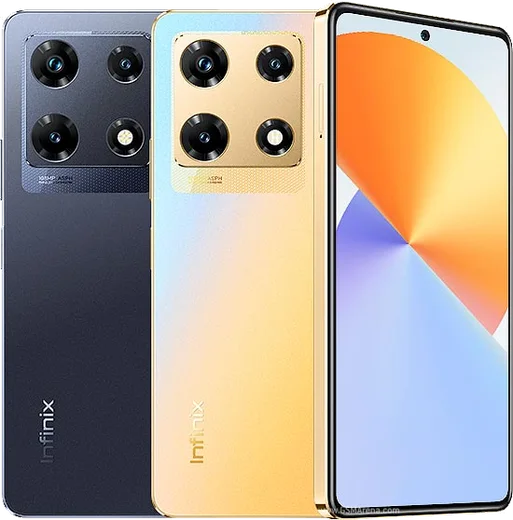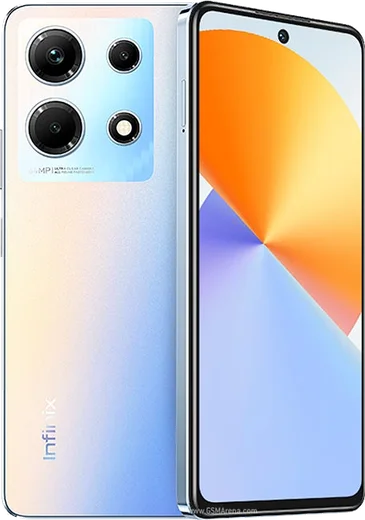
WhatsApp on Infinix Note 30 Pro
Infinix Android

WhatsApp for Infinix Note 30 Pro

Helio G99, 6.67-inch 120Hz AMOLED, 68W charging

WhatsApp Messenger 4.7 · 64.2M reviews Free · Android · ~40 MB · by WhatsApp LLC
Download WhatsApp

Ask a question / report a problem

You can ask any question about WhatsApp support on the Infinix Note 30 Pro — leave it below and we'll help.

Ask a question

Can the Infinix Note 30 Pro run WhatsApp?

Fully supported
  • Operating systemAndroid
  • ProcessorHelio G99
  • WhatsApp versionLatest supported

Latest known WhatsApp problems on Infinix Note 30 Pro

1

WhatsApp keeps showing a 'too many notifications' message and then stops notifying me on my Infinix Note 30 Pro

XOS is throttling the app in the background. Go to Settings > Apps > WhatsApp > Battery and set it to 'No restrictions' (or 'Unrestricted'). Then open the Phone Master / Security app, find App freezer (Power Marathon) and exclude WhatsApp from being put to sleep. Finally, in Settings > Notifications & status bar > WhatsApp, make sure the notification categories you care about (Messages, Group notifications, Calls) are all turned on. This combination stops XOS from silencing or batching WhatsApp alerts. See how others solved this on Reddit
2

WhatsApp messages on my Infinix Note 30 Pro only arrive when I open the app, not in real time

XOS battery optimization is killing WhatsApp's background connection. Open Settings > Apps > WhatsApp > Battery and set it to 'No restrictions'. Then go to Settings > Apps > App management (or the App launch / Manage manually screen), turn off automatic management for WhatsApp and enable Auto-launch and Run in background. If delays continue, open Settings > Battery and turn off Adaptive battery / any Power saving / Ultra power saving mode. After this WhatsApp can hold its push connection while idle. See how others solved this on Reddit
3

WhatsApp video calls lag and stutter badly on my Infinix Note 30 Pro

This is usually XOS trimming WhatsApp's resources mid-call plus an unstable network. Set WhatsApp to 'No restrictions' under Settings > Apps > WhatsApp > Battery, turn off battery saver before calling, and lock WhatsApp in the recent-apps switcher so it can't be cleared from RAM. If you're on Wi-Fi, open Settings > Wi-Fi (or Mobile network) and turn off 'Switch to mobile data' / 'Adaptive Wi-Fi', since handoffs between Wi-Fi and data are a common cause of mid-call stutter. See how others solved this on Reddit
4

After a system update my Infinix Note 30 Pro got new bugs and WhatsApp started acting up

XOS updates often re-enable aggressive power management and reset app permissions. After any update, recheck Settings > Apps > WhatsApp > Battery ('No restrictions'), re-enable Auto-launch and Run in background, and confirm notification permissions are still on. If WhatsApp itself is glitching, clear its cache via Settings > Apps > WhatsApp > Storage > Clear cache (this is safe and won't delete your chats). Avoid 'Clear data', which logs you out and wipes local data. See how others solved this on Reddit
5

Is the Infinix Note 30 Pro reliable enough for daily WhatsApp use, or should I avoid the brand?

The hardware runs WhatsApp fine; most messaging complaints trace back to XOS background management rather than a hardware fault. For reliable messaging do the one-time setup: WhatsApp on 'No restrictions' battery, Auto-launch and Run in background enabled, locked in recents, and notifications fully on. Keep WhatsApp updated from the Play Store and back up chats to Google Drive (WhatsApp > Settings > Chats > Chat backup) so a reset or warranty repair never costs you your messages. See how others solved this on Reddit
6

Coming from an Infinix Hot 40 Pro / Note 30 4G, how do I keep WhatsApp running smoothly on the Note 30 Pro?

The fix is the same across XOS Infinix phones: exclude WhatsApp from App freezer in Phone Master, set its battery profile to 'No restrictions', and enable Auto-launch under Settings > Apps. When migrating, transfer chats via Google Drive backup (restore during WhatsApp setup using the same phone number and Google account) rather than copying local files. Reapply these battery and auto-launch settings on the new phone, since they don't carry over from the old device. See how others solved this on Reddit

Ask a question / report a problem

You can ask any question about WhatsApp support on the Infinix Note 30 Pro — leave it below and we'll help.

Ask a question

Watch: setting up WhatsApp

Prefer to watch? This short walkthrough shows the whole installation and number-verification flow.

How to install WhatsApp on Infinix Note 30 Pro — video walkthrough

How to install WhatsApp on Infinix Note 30 Pro

1

Choose how to download

On your Infinix Note 30 Pro you can get the official app two ways: from the Google Play Store — the easiest option, since it keeps WhatsApp updated automatically — or directly from the official website. You can download an APK file, by clicking a link “Download WhatsApp directly”.

2

Open WhatsApp

Launch WhatsApp from your home screen or app drawer and accept the Terms of Service to start setup.

3

Verify your phone number

Enter your phone number. If your Infinix Note 30 Pro uses dual SIM, pick the line you want WhatsApp tied to, then enter the 6-digit code it sends by SMS — it usually fills in automatically.

4

Restore chats and finish setup

Restore your chat history from Google Drive (use the same Google account), add your name and photo, and tap Allow for notifications so messages and calls arrive reliably.

Stay safe: only ever install WhatsApp from the official Android source. The Download button above already points there — modified copies (GB/Plus/Aero WhatsApp) can get your number banned.

Comments (15)

No registration needed. No email required.
P
phonefanApr 26, 2026

update my whatsapp had stopped working but this fixed it 👌

S
sol.lApr 19, 2026

Honestly easy install on my infinix note 30 pro 🎉

T
techguyApr 18, 2026

someone omggg i cant install it someone heeelp 🙏

AppWhatsOfficialApr 19, 2026

You are almost there! Tap Download, allow the install, open WhatsApp and confirm your number. You got this!

M
mia.wJan 21, 2026

Update this actually works unlike others

L
luca72Nov 26, 2025

Wow very clear steps

P
pete1990Oct 15, 2025

Pls help is this legit and safe

AppWhatsOfficialOct 21, 2025

Happy to help, totally safe. We only link to the genuine WhatsApp, so there is no risk of malware as long as you use the button above. Hope that helps!

A
alex_officialSep 13, 2025

Wow très simple, fait en 2 minutes

S
sara_k24Jul 30, 2025

والله أفضل شرح

I
its_rosaJul 9, 2025

man easy install on my Note 30 Pro

I
its_miaApr 29, 2025

Had whatsapp on my note30pro in no time

M
marc_proMar 20, 2025

Man i tried 3 other guides before this one

L
lina_kMar 17, 2025

Pls help why cant i see my contacts in the app

AppWhatsOfficialMar 22, 2025

Sure, add the contact in your phone with the full country code, then open WhatsApp and refresh. They should appear. Glad to help.

S
sol00Mar 15, 2025

super easy, alles startklar

J
just_rayMar 8, 2025

works like a charm on the note 30 pro

P
plz help meeAug 22, 2024

so my note30pro was being difficult but this sorted it