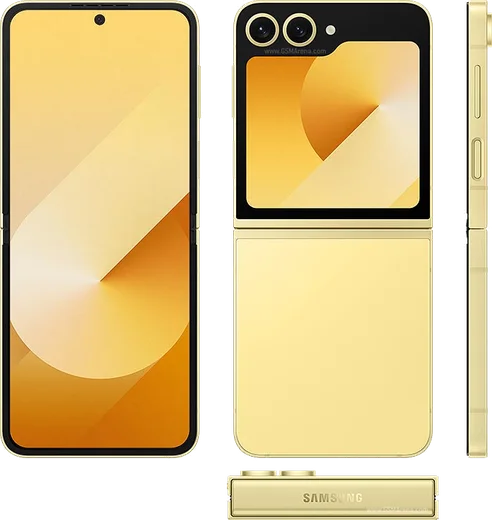
WhatsApp on Samsung Galaxy Z Flip 6
Samsung Android

WhatsApp for Samsung Galaxy Z Flip 6

Snapdragon 8 Gen 3, 6.7-inch 120Hz, Galaxy AI

WhatsApp Messenger 4.7 · 64.2M reviews Free · Android · ~40 MB · by WhatsApp LLC
Download WhatsApp

Ask a question / report a problem

You can ask any question about WhatsApp support on the Samsung Galaxy Z Flip 6 — leave it below and we'll help.

Ask a question

Can the Samsung Galaxy Z Flip 6 run WhatsApp?

Fully supported
  • Operating systemAndroid
  • ProcessorSnapdragon 8 Gen 3
  • WhatsApp versionLatest supported

Latest known WhatsApp problems on Samsung Galaxy Z Flip 6

1

How do I open WhatsApp directly on the Z Flip 6 cover screen without unfolding?

One UI doesn't let arbitrary apps run on the cover (FlexWindow) screen by default, so install Samsung's free 'Good Lock' app from the Galaxy Store, open its 'MultiStar' module, and turn on the cover-screen apps feature (often shown as 'I love Galaxy Foldable' / 'Launch widget'). Then add WhatsApp to the cover screen's Apps widget: long-press the cover screen, add the Apps widget, edit it, and tick WhatsApp. After that a tap on the cover launches the full app on the outer display. Without Good Lock there is no stock toggle to allow WhatsApp on the cover screen. See how others solved this on Reddit
2

How do I add a WhatsApp shortcut or widget to the Z Flip 6 cover screen?

WhatsApp has no dedicated native cover-screen widget, so you use the built-in Apps widget instead. Long-press an empty area of the cover screen, swipe to the widgets panel and add the 'Apps' widget, then tap Edit and select WhatsApp so it appears as a launchable tile. To run the full app from that tile rather than just see notifications, you'll need Good Lock's MultiStar cover-screen apps feature enabled first. See how others solved this on Reddit
3

WhatsApp is draining my Z Flip 6 battery fast — how do I fix it?

Open Settings > Apps > WhatsApp > Battery and set it to 'Restricted' or 'Optimized' so it can't run unchecked in the background. Inside WhatsApp, go to Settings > Storage and data > Media auto-download and turn off auto-download for mobile data and Wi-Fi to cut constant downloading. Also check Settings > Battery > Background usage limits to confirm WhatsApp isn't kept awake, and disable any cover-screen tile for it if you don't use it. See how others solved this on Reddit
4

WhatsApp keeps crashing or won't load properly on my Z Flip 6 — what should I do?

First clear the cache via Settings > Apps > WhatsApp > Storage > Clear cache (this won't delete your chats), then update both WhatsApp from the Play Store and One UI under Settings > Software update. If it still misbehaves, restart the phone, and as a last step uninstall and reinstall WhatsApp, restoring your chats from the Google Drive backup prompt during setup. See how others solved this on Reddit
5

Can I keep a WhatsApp video call going on the Z Flip 6 cover screen when I close the phone?

Out of the box, closing the phone ends or pauses the call rather than moving it to the cover screen, since WhatsApp isn't an allowed cover-screen app by default. The supported approach is Flex Mode: partially fold the phone during the inner-screen call to prop it up hands-free. To actually continue the call on the closed cover screen you must first enable WhatsApp as a cover-screen app using Good Lock's MultiStar module; there is no native Samsung setting for this. See how others solved this on Reddit
6

Can I reply to WhatsApp messages directly from the Z Flip 6 cover screen?

Yes, for quick replies. When a WhatsApp notification appears on the closed cover screen, tap it and use the inline 'Reply' field with the small cover keyboard or voice-to-text to respond without opening the phone. For full back-and-forth conversations on the cover screen you'll need to enable WhatsApp as a cover-screen app via Good Lock's MultiStar module, since the stock cover screen only shows the quick-reply popup. See how others solved this on Reddit

Ask a question / report a problem

You can ask any question about WhatsApp support on the Samsung Galaxy Z Flip 6 — leave it below and we'll help.

Ask a question

Watch: setting up WhatsApp

Prefer to watch? This short walkthrough shows the whole installation and number-verification flow.

How to install WhatsApp on Samsung Galaxy Z Flip 6 — video walkthrough

How to install WhatsApp on Samsung Galaxy Z Flip 6

1

Choose how to download

On your Samsung Galaxy Z Flip 6 you can get the official app two ways: from the Google Play Store — the easiest option, since it keeps WhatsApp updated automatically — or directly from the official website. You can download an APK file, by clicking a link “Download WhatsApp directly”.

2

Open WhatsApp

Launch WhatsApp from your home screen or app drawer and accept the Terms of Service to start setup.

3

Verify your phone number

Enter your phone number. If your Samsung Galaxy Z Flip 6 uses dual SIM, pick the line you want WhatsApp tied to, then enter the 6-digit code it sends by SMS — it usually fills in automatically.

4

Restore chats and finish setup

Restore your chat history from Google Drive (use the same Google account), add your name and photo, and tap Allow for notifications so messages and calls arrive reliably.

Stay safe: only ever install WhatsApp from the official Android source. The Download button above already points there — modified copies (GB/Plus/Aero WhatsApp) can get your number banned.

Comments (17)

No registration needed. No email required.
L
lil_mikeApr 21, 2026

finally a guide that makes sense 👍

M
ms_ninaMar 12, 2026

il miglior sito, al primo colpo 🙏

S
sara_kMar 4, 2026

أخيراً ثبّت واتساب

H
halppFeb 10, 2026

installed in 2 min ✌️

L
lil_chrisFeb 2, 2026

franchement installé sans souci

S
speedyJan 18, 2026

Man i tried 3 other guides before this one thx

L
leo_xJan 10, 2026

did it on my galaxy zflip6 in like 2 minutes

M
maxx_katJan 8, 2026

wow finally got whatsapp running on my galaxy z flip 6

R
raj_rayNov 14, 2025

Man the video helped me understand

M
maxx42Sep 27, 2025

man i had to enable unknown sources but then it was fine

A
amy10Jul 10, 2025

Help meee i pressed everything and nothing

AppWhatsOfficialJul 12, 2025

Breathe! Follow the steps above one by one, tap Download first, and you will be chatting in no time.

S
sol.mJun 26, 2025

tbh the samsung galaxy z flip 6 guide was spot on

N
noobmasterJan 18, 2025

Finally installed in 2 min lol

P
plz help meeDec 16, 2024

tbh installed on my Samsung Galaxy Z Flip 6, super simple

N
noah_noaDec 13, 2024

Man worked perfect on my zflip6 thanks again

N
not_leoSep 25, 2024

ngl smooth and simple, no issues

O
omar.xJul 14, 2024

Por fin pude instalar whatsapp gracias