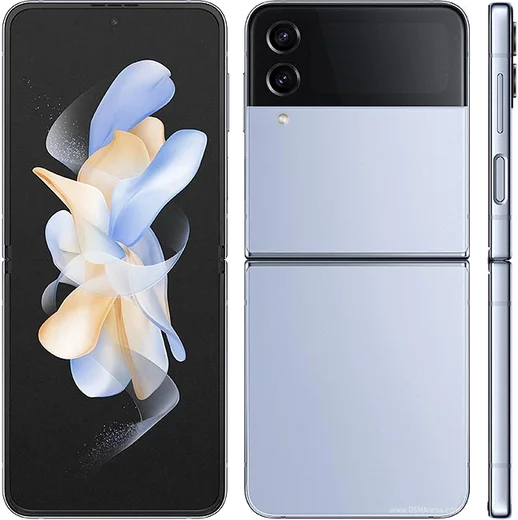
WhatsApp on Samsung Galaxy Z Flip 4
Samsung Android

WhatsApp for Samsung Galaxy Z Flip 4

Snapdragon 8+ Gen 1, 6.7-inch 120Hz foldable

WhatsApp Messenger 4.7 · 64.2M reviews Free · Android · ~40 MB · by WhatsApp LLC
Download WhatsApp

Ask a question / report a problem

You can ask any question about WhatsApp support on the Samsung Galaxy Z Flip 4 — leave it below and we'll help.

Ask a question

Can the Samsung Galaxy Z Flip 4 run WhatsApp?

Fully supported
  • Operating systemAndroid
  • ProcessorSnapdragon 8+ Gen 1
  • WhatsApp versionLatest supported

Latest known WhatsApp problems on Samsung Galaxy Z Flip 4

1

How do I read and reply to WhatsApp messages on the Galaxy Z Flip 4 cover screen?

The Flip 4's cover screen only runs a limited set of apps by default, so you need Samsung's Good Lock to add WhatsApp. Install Good Lock from the Galaxy Store, open the MultiStar module, and turn on the "I love Galaxy Foldable" toggle. After enabling it, go to the cover screen widget/apps area, edit the app list, and add WhatsApp so it runs on the outer display. You can then open chats and type short replies using the small keyboard or voice-to-text without unfolding the phone. See how others solved this on Reddit
2

How do I transfer my WhatsApp chats to a new Galaxy Z Flip 4?

On your old phone open WhatsApp, go to Settings > Chats > Chat backup and back up to Google Drive, making sure both phones use the same Google account. On the Flip 4, install WhatsApp from the Play Store, verify the same phone number, and choose Restore when prompted to pull the backup down. If the Google Drive restore fails, use Samsung Smart Switch during initial setup to copy WhatsApp data directly from the old phone over cable or Wi-Fi. See how others solved this on Reddit
3

Why are my custom conversation notification settings not working in WhatsApp on the Flip 4?

One UI's per-conversation notification handling can override WhatsApp's in-app custom notifications. First set the tone inside WhatsApp: open the chat, tap the contact name > Custom notifications, enable it and pick your sound. Then go to phone Settings > Apps > WhatsApp > Notifications and confirm the relevant notification categories are turned on. If a specific chat still uses the wrong sound, look under Settings > Notifications > Advanced settings for any saved conversation entry, reset it, and re-apply the custom notification in WhatsApp. See how others solved this on Reddit
4

How do I stop WhatsApp video calls from always opening in flex mode on the Galaxy Z Flip 4?

Flex mode automatically engages when the hinge is partly folded, which pushes the WhatsApp video feed to the top half and the controls to the bottom. To keep the call full-screen, open the phone fully flat so it leaves flex mode. If it still splits while flat, open Settings > Advanced features > Labs, find the Flex mode panel option, and adjust or disable the panel for WhatsApp so the call uses the whole screen. See how others solved this on Reddit

Ask a question / report a problem

You can ask any question about WhatsApp support on the Samsung Galaxy Z Flip 4 — leave it below and we'll help.

Ask a question

Watch: setting up WhatsApp

Prefer to watch? This short walkthrough shows the whole installation and number-verification flow.

How to install WhatsApp on Samsung Galaxy Z Flip 4 — video walkthrough

How to install WhatsApp on Samsung Galaxy Z Flip 4

1

Choose how to download

On your Samsung Galaxy Z Flip 4 you can get the official app two ways: from the Google Play Store — the easiest option, since it keeps WhatsApp updated automatically — or directly from the official website. You can download an APK file, by clicking a link “Download WhatsApp directly”.

2

Open WhatsApp

Launch WhatsApp from your home screen or app drawer and accept the Terms of Service to start setup.

3

Verify your phone number

Enter your phone number. If your Samsung Galaxy Z Flip 4 uses dual SIM, pick the line you want WhatsApp tied to, then enter the 6-digit code it sends by SMS — it usually fills in automatically.

4

Restore chats and finish setup

Restore your chat history from Google Drive (use the same Google account), add your name and photo, and tap Allow for notifications so messages and calls arrive reliably.

Stay safe: only ever install WhatsApp from the official Android source. The Download button above already points there — modified copies (GB/Plus/Aero WhatsApp) can get your number banned.

Comments (10)

No registration needed. No email required.
J
jay_leoJun 17, 2026

Ugh SOS i cant figure out how to install whatsapp heeelp :(

AppWhatsOfficialJun 20, 2026

Take a breath, we got you. Press Download above, then Install, then verify your number. That is all it takes. You will be set up on your phone in no time.

X
xX_lucaJun 10, 2026

Wow tutto funziona sul mio zflip4, mille grazie 💯

A
alex0May 6, 2026

so the z flip 4 steps actually work unlike other sites 👌

Y
yuki14Nov 14, 2025

wow set up whatsapp on my dads Galaxy Z Flip 4 no problem thx

L
lucy_jaySep 10, 2025

two thumbs up

AppWhatsOfficialSep 11, 2025

Perfect, enjoy chatting!

A
anonJul 28, 2025

guys best site for this honestly ✌️

L
lil_danFeb 22, 2025

Danke, mein galaxy z flip 4 hat jetzt whatsapp

N
not_pabloFeb 3, 2025

Man the Galaxy Z Flip 4 guide was spot on thx

A
anonOct 16, 2024

How do i restore my old messages anyone

AppWhatsOfficialOct 17, 2024

Sure, yes, as long as you had a backup. Use the same number and choose Restore during setup to bring your messages back. Glad to help.

K
kate56Aug 5, 2024

I lost my old chats can i get them back ?

AppWhatsOfficialAug 7, 2024

Happy to help, yes, as long as you had a backup. Use the same number and choose Restore during setup to bring your messages back.